

Opal
Stop losing ideas and time searching Opal organizes all your projects and notes visually so you can find anything instantly.
tool Details
Explore More
Alternatives
About Opal
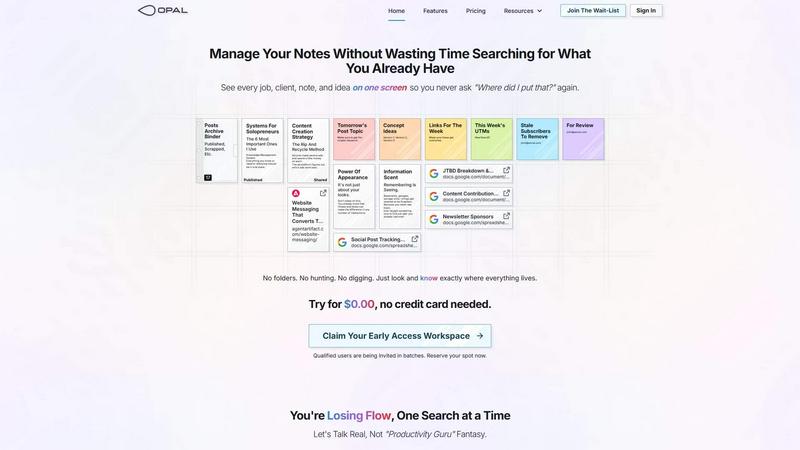
Tired of losing your best ideas in a maze of folders and tabs? Opal is your visual command center, built for people who think spatially! It's a revolutionary knowledge and project management workspace that replaces clunky, nested systems with an infinite digital canvas. Imagine your entire workflow laid out on a giant, smart desk where you can drag and drop notes, documents, links, and files exactly where they make sense to you. This taps into your brain's powerful spatial memory—you remember where things are, not just what they're called. The result? Instant retrieval, zero hunting, and no more frustrating searches that break your creative flow. Opal is specifically designed for solopreneurs, consultants, agency owners, writers, and any professional whose business thrives on conversations, client details, and creative promises. It keeps every active project, client note, and brilliant idea visible and top-of-mind, transforming scattered information into a clear, actionable landscape. Stop letting your tools hide your work! With Opal, you see your whole world at a glance and finally get to focus on doing your best work.
Features
The Infinite Visual Canvas
Ditch restrictive folders and linear lists! Opal gives you a boundless digital workspace where you can freely arrange everything. Place client notes next to their project brief, stack related ideas, or create zones for different areas of your business. This spatial freedom allows you to organize visually, just like you would on a physical desk, making the location of information as important as the information itself for effortless recall.
Spatial Memory & Instant Retrieval
Your brain is wired to remember locations. Opal leverages this by letting you place information, not just file it. When you arrange notes and projects spatially, you build a mental map of your workspace. Need that client quote or content idea? You'll know exactly where to look without typing a single keyword into a search bar. This eliminates the "Where did I put that?" panic for good!
Drag, Drop, and Visual Grouping
Organization is intuitive and fluid. Simply drag any note, document, web link, or file onto your canvas. Group related items together, create visual stacks for different stages of a project, or use the space to map out processes and strategies. This hands-on approach makes managing complex information feel natural and keeps all the context for a task or client visibly connected.
Side-by-Side Context Viewing
Stop the tab-switching madness! Opal lets you open multiple notes, documents, and links side-by-side, limited only by your screen size. Compare versions of a script, reference a client brief while writing an email, or review research links while drafting a post—all without losing your place. This maintains crucial context and keeps your flow state intact.
Use Cases
Content Creator & Social Media Manager
Map out your entire content calendar on one canvas! Visually organize post topics, drafts, published links, UTMs, and tracking sheets. Keep your "ideas bank" visible so nothing gets forgotten. Group content by campaign, platform, or client, and open drafts next to your strategy docs to create cohesive, on-brand content without constant app-switching.
Solo Consultant or Agency Owner
Keep every client and project in clear view! Create a dedicated zone for each client, placing their notes, contracts, project briefs, and communication logs together. See all active projects at a glance to prioritize effectively. Store and visibly access your pitches, proposals, and SOPs so your best work is always reusable and never lost.
Writer and Researcher
Break free from chaotic document folders! Use the canvas to visually plot article outlines, cluster research links and quotes around a central topic, and keep draft versions side-by-side for easy comparison. Maintain a visible "swipe file" of inspiration and a running list of future topics so your pipeline is always full and organized.
Solopreneur Business Operations
Centralize your entire business brain! Visually manage your knowledge base, operational systems, financial tracking sheets, and task lists in one interconnected space. Group tools for marketing, sales, and admin so your most important processes are always visible and top-of-mind, turning scattered operations into a streamlined, visual dashboard.
Frequently Asked Questions
How is Opal different from tools like Notion or Google Docs?
While those are excellent for deep document creation, they often hide information behind pages, dashboards, and folders—you have to remember to search. Opal is built on spatial memory. It gives you a single, infinite surface where you see everything you're working on. You organize by placement, not just filing, which aligns with how your brain naturally remembers. It's about visibility and instant spatial recall, not just storage.
Is there a learning curve to using a visual canvas?
It's the opposite! If you've ever organized papers on a physical desk, you already know how to use Opal. The drag-and-drop interface is incredibly intuitive. There are no complex databases or hierarchies to learn. You simply start placing your notes and projects where they make sense to you. Most users find it liberating and more natural than traditional, nested systems from day one.
Can I collaborate with my team in Opal?
Opal is currently optimized for the individual professional or solopreneur to master their own workflow and information. The focus is on giving you a personal, visual command center to eliminate your own friction and search time. This deep focus on the individual's spatial thinking makes it uniquely powerful for personal knowledge management and project clarity.
What happens if I have a lot of information? Will it get cluttered?
The canvas is infinite, so you have all the space you need! The power is in how you choose to organize it. You can create distinct zones or "rooms" for different areas of your life and business (e.g., Client Work, Content, Personal). You can also stack related notes or minimize groups you're not currently focused on, keeping your active workspace clean while preserving instant access to everything.
Similar to Opal
Novastart
Apps and files on an infinite canvas where people and AI agents work together.
Nijia
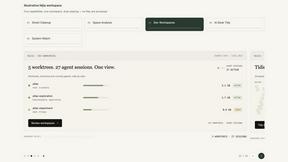
Understand your Mac's storage, review cleanup candidates, and organize files with control.

Panzoe
Panzoe is an all-in-one AI platform for personal productivity, business automation, AI assistants, content creation, and custom AI solutions.
AI Email Filter
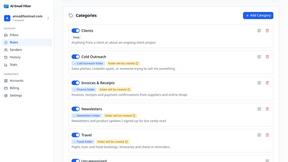
AI Email Filter sorts incoming mail into folders using plain-language prompts you write. Works with any IMAP mailbox; bring your own LLM if you want.
Egmatic
No-code 2D game editor: visual node logic, drag-and-drop scenes, live preview. Exports to Windows, macOS, Linux, Android, iOS, Web.
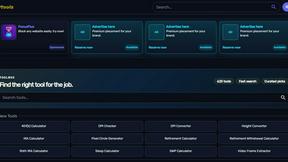
Kody Tools
Free collection of online developer utilities, code formatters, and digital converters designed to streamline your daily workflow.
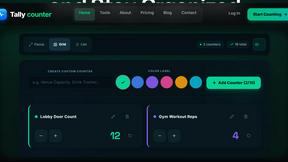
tallycounterweb.com
Online tally counter for tracking attendance, workouts, inventory, sports scores, visitors, habits, and everyday counting tasks.
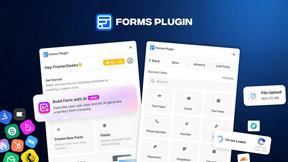
Forms Plugin
The #1 Native Form Builder Plugin for Framer - No Code, No Embeds, No External Platforms.