

Yume Comic
Turn your ideas into stunning manga pages instantly with AI, no drawing skills needed.
tool Details
Explore More
Alternatives
About Yume Comic
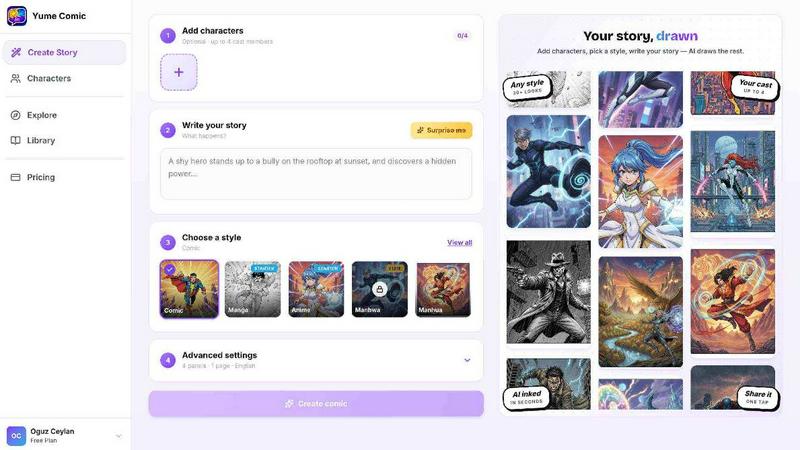
Yume Comic is an AI-powered comic creation tool designed for anyone who wants to create comic-style images, scenes, and visual stories without needing any drawing skills. Just describe your idea, character, or story concept, and Yume Comic transforms it into creative comic visuals instantly. This tool is built for storytellers, creators, social media users, manga fans, and anyone exploring visual storytelling with AI. The core magic is that you can turn your one-line idea into a full multi-panel layout in seconds. Your characters stay looking like themselves across the entire story, which solves one of the biggest headaches in comic creation. You can pick your vibe from classic shonen, moody manhwa, or bright webtoon styles. Yume Comic works right in your browser, so you can start creating on your phone or laptop immediately. Forget about expensive tablets or complicated software that takes years to learn. This is about seeing your imagination finally come to life exactly how you pictured it, without the frustration of a blank canvas staring back at you. You become the director and writer all at once, producing professional-looking pages you will be proud to share with friends and followers. Whether you are dreaming of a classic black-and-white shonen manga or a vibrant, vertical-scroll manhwa, you can switch between dozens of styles with a single click. It is like having a whole studio of artists ready to work on your script. Yume Comic empowers you to stop dreaming about your comic and start reading it today.
Features
Prompt to Page in Seconds
Turn your one-line story idea into a full comic layout in seconds. Just type a few lines about your character and what happens next. Our AI comic maker reads your prompt and builds a multi-panel page with dialogue bubbles and cinematic angles. You do not need to worry about sketching or perspective. Simply drop in your idea, hit the button, and watch your first draft come to life. This feature makes the creative process incredibly fast and accessible for everyone.
Consistent Character Design
Your characters stay looking like themselves across the whole story, panel after panel. Once you define your protagonist, they stay consistent throughout your entire webtoon or manga. This means you can focus on the plot and the dialogue while we make sure your hero's hair, outfit, and face stay perfectly on model every single time. This solves one of the hardest parts of making a series and handles the heavy lifting for you.
Multiple Style Selection
Pick your vibe from dozens of professional styles with a single click. Choose from classic shonen manga, moody manhwa, bright webtoon styles, high-energy action panels, smooth scroll romance, epic fantasy adventure, soft emotional scenes, bold vintage vibes, or neon sci-fi worlds. You can experiment with different aesthetics until you find the perfect vibe for your world. It is like having a whole studio of artists ready to work on your script instantly.
Browser-Based Creation
No drawing skills needed for this free AI comic maker. Forget about expensive tablets or complicated software that takes years to learn. This free AI comic maker works right in your browser, so you can start creating on your phone or laptop immediately. You do not need to master perspective or anatomy just to share a great idea with the world. It is a space where your creativity is the only limit, allowing you to produce professional-looking pages instantly.
Use Cases
Social Media Content Creation
Social media users can create eye-catching comic panels and strips to share on platforms like Instagram, Twitter, and TikTok. You can turn a funny moment, a dramatic story, or a quick joke into a shareable comic in seconds. This helps you stand out from the crowd with unique visual content that engages your audience. No drawing skills required, just your imagination and a prompt. Your followers will love seeing your stories come to life in vibrant comic form.
Manga and Webtoon Prototyping
Manga fans and aspiring creators can prototype their comic ideas quickly without spending months learning to draw. You can test different story concepts, character designs, and visual styles before committing to a full series. This is perfect for writers who have great stories but lack the artistic skills to bring them to life. You can see how your hero looks in a gritty action scene or a soft romance setting instantly and iterate on your ideas rapidly.
Storytelling for Writers and Authors
Writers and authors can use Yume Comic to visualize scenes from their novels or scripts. You can create visual references for characters, settings, and key moments in your story. This helps you communicate your vision to editors, publishers, or collaborators more effectively. You can also create promotional comic pages to market your book or project on social media. This tool bridges the gap between written storytelling and visual art.
Educational and Instructional Comics
Teachers, educators, and trainers can create educational comics to explain complex concepts in a fun and engaging way. You can turn a lesson on history, science, or literature into a visual narrative that students will remember. This is also great for creating step-by-step instructions, safety guides, or training materials. The comic format makes information more digestible and entertaining for learners of all ages.
Frequently Asked Questions
Do I need any drawing skills to use Yume Comic?
No drawing skills are needed at all. Yume Comic is built for anyone who wants to create comic-style images and stories without any artistic background. Just describe your idea, character, or story concept using text prompts, and the AI transforms it into creative comic visuals. You do not need to master perspective, anatomy, or any art techniques. Your imagination and a prompt are all you need to get started.
How does Yume Comic keep my characters consistent?
Once you define your protagonist using a text description, Yume Comic ensures they stay looking like themselves across the entire story. The AI remembers your character's hair, outfit, face, and other defining features from panel to panel. This means you can focus on the plot and dialogue while the tool handles the heavy lifting of character consistency. It is one of the hardest parts of making a series, and we solved it for you.
What styles are available in Yume Comic?
You can choose from dozens of professional styles with a single click. Options include classic shonen manga, moody manhwa, bright webtoon styles, high-energy action panels, smooth scroll romance, epic fantasy adventure, soft emotional scenes, bold vintage vibes, and neon sci-fi worlds. You can experiment with different aesthetics until you find the perfect vibe for your story. It is like having a whole studio of artists ready to work on your script.
Can I use Yume Comic on my phone or tablet?
Yes, Yume Comic works right in your browser, so you can start creating on your phone, tablet, or laptop immediately. There is no need to download any software or purchase expensive tablets. The tool is fully web-based and optimized for mobile devices. This makes it incredibly convenient to create comics anywhere, anytime, whether you are at home, on the bus, or waiting in line.
Similar to Yume Comic
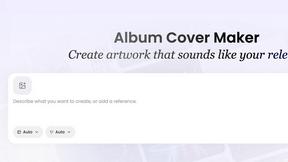
AI Album Cover Maker
Create release-ready album covers from a prompt or photo. Generate, refine, and export art for singles, EPs, mixtapes, and playlists.
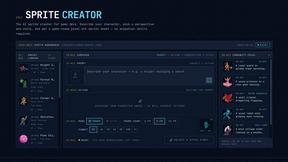
Sprite Sheet Maker
Create pixel-art sprite sheets from text with AI, preview animations, and export PNG assets for game prototypes.

AIEnhancer
AI enhancer for photos, images, videos, and creative effects.

Ideogram Studio
Ideogram 4 AI workflows for text-perfect logos, posters, ads, packaging, and ecommerce visuals with prompts and image references.
Seedream 5.0
Seedream 5.0 Pro and Lite generate and edit production-ready images for ecommerce, marketing, social, and branded content.

Vynzo
AI image and video studio. Generate from a prompt, animate stills, swap faces, restyle clips and edit — one credit pool, no subscription.

ProfileLoom
ProfileLoom turns one photo into platform-ready AI portraits for professional, social, and creator profiles, with presets and built-in editing.