

Browser Notes
Supercharge your browser with local notes, sticky boards, and mind maps instantly no signup or cloud needed.
tool Details
Explore More
Alternatives
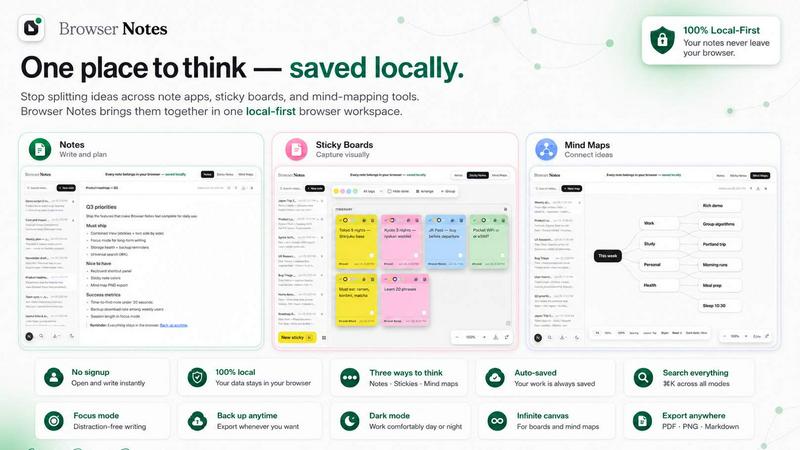
About Browser Notes
Tired of your brilliant ideas being scattered across a dozen different apps, sticky boards, and mind-mapping tools? Frustrated with your private thoughts being pushed to some distant cloud server you don't control? It's time to bring everything home with Browser Notes! This is the ultimate local-first workspace that lives right inside your Chrome browser, giving you three powerful ways to think, plan, and create. No account required, no tracking ever, and absolutely no forced sync to the cloud. Browser Notes is built for privacy-conscious creators, students, professionals, and anyone who values their data staying exactly where it belongs on their own machine. It works completely offline, stores every note, sticky, and mind map in your browser's local storage, and lets you back up your entire workspace with a single click. Whether you're a writer drafting in markdown, a visual thinker brainstorming on a free canvas, or a strategist branching ideas from a central node, Browser Notes adapts to your flow. It's your personal, private, and permanent thinking space that never phones home. Ready to take control of your notes? Let's dive in!
Features
Three Powerful Thinking Modes
Browser Notes gives you the freedom to choose the perfect tool for every task. Write and format detailed notes using full markdown support for clean, structured documents. Need to brainstorm? Open a free-form sticky notes board where you can scatter ideas across an infinite canvas. Want to connect complex concepts? Create dynamic mind maps that branch out from a central idea. Each mode is purpose-built for a different type of thinking, and you can switch between them instantly without ever leaving your browser. It's like having three productivity apps in one, with zero bloat and zero distractions.
100% Local and Offline Storage
Your data never leaves your device. Period. Browser Notes stores everything using your browser's built-in local storage, meaning all your notes, sticky boards, and mind maps are saved directly on your computer. There are no servers, no cloud accounts, and no third-party data handlers. This means you can work offline anywhere on a plane, in a coffee shop with no Wi-Fi, or deep in the mountains. Your entire workspace is always available, always private, and always under your control. Plus, you can export a complete backup anytime you want for extra peace of mind.
No Account, No Tracking, No Nonsense
Forget about signing up, verifying emails, or agreeing to lengthy privacy policies. Browser Notes requires absolutely zero personal information to use. There is no account creation, no user tracking, and no data collection whatsoever. Every keystroke and every idea stays between you and your browser. This is a radical departure from the surveillance-heavy note-taking apps that mine your data for profit. With Browser Notes, you get pure, unfiltered productivity without the creepy feeling that someone is watching your every thought.
Instant Backup and Restore
Your notes are precious, and Browser Notes makes sure you never lose them. With one click, you can export a complete backup of all your notes, sticky boards, and mind maps as a single file. Store it on your hard drive, a USB stick, or your preferred cloud storage (on your terms). Already have a backup from a previous session? The Import Backup feature lets you restore your entire workspace instantly. This gives you total control over your data lifecycle, and it's perfect for migrating between devices or simply keeping a snapshot of your work.
Use Cases
Rapid Project Planning and Brainstorming
Jumpstart your next big project by opening a sticky notes board and scattering every raw idea that pops into your head. Use colorful stickies for different categories, move them around freely, and watch your chaotic thoughts organize themselves into a coherent plan. Once you have a solid foundation, switch to a mind map to connect those ideas visually, showing the relationships between tasks, deadlines, and deliverables. Finally, write up your polished project plan in a markdown note, complete with checklists and headers. All of this happens in one tool, with zero context switching.
Private Journaling and Personal Knowledge Management
Keep a daily journal, track your habits, or build a personal wiki of everything you learn, all without worrying about a company reading your most private entries. Use markdown notes to write long-form reflections, create sticky notes for quick reminders like "buy milk" or "call mom," and build mind maps to explore your personal goals and life plans. Since everything stays local, you can be completely honest and unfiltered in your writing. Your Browser Notes workspace becomes your secure digital sanctuary for your thoughts.
Student Note-Taking and Study Organization
Ace your classes by organizing all your study materials in one place. Take detailed lecture notes using markdown with bullet points, code blocks, and tables. Create mind maps to visualize complex topics like historical timelines, scientific processes, or philosophical arguments. Use sticky notes to jot down quick definitions, formulas, or exam reminders that you can glance at instantly. When exam season hits, export a backup of your entire semester's work and study offline without needing an internet connection. It's the ultimate study companion.
Creative Writing and Content Planning
Whether you're a novelist, blogger, or marketer, Browser Notes is your creative command center. Start with a mind map to outline your story's plot points, character arcs, or article structure. Then, expand each branch into a detailed sticky note with specific scenes, quotes, or research snippets. Finally, draft your actual content in a markdown note with full formatting control. The local-first nature means you can write for hours without distractions from notifications or sync delays. Your creative flow stays uninterrupted.
Frequently Asked Questions
Is Browser Notes really free to use?
Yes, absolutely! Browser Notes is completely free to use with no hidden costs, premium tiers, or subscription fees. There are no ads, no data selling, and no feature limitations. You get the full power of notes, sticky notes, and mind maps all in one local-first workspace without paying a single cent. The developers believe that private, local productivity tools should be accessible to everyone.
How do I back up my data in Browser Notes?
Backing up your data is incredibly simple. Just look for the backup option in the interface, click it, and your entire workspace will be downloaded as a single backup file to your computer. You can save this file anywhere on your hard drive, an external drive, or even your own cloud storage service. To restore, simply use the "Import backup" feature and select your backup file. Everything including your notes, sticky boards, and mind maps will be restored exactly as you left them.
Can I use Browser Notes on multiple computers?
Since Browser Notes stores data locally in your browser, your notes do not automatically sync between devices. However, you can easily transfer your workspace by exporting a backup from one computer, transferring the file (via email, USB drive, or your own cloud storage), and importing it on another computer. This manual process ensures your data never touches a third-party server, giving you total control over your privacy.
What happens if I clear my browser data or cookies?
If you clear your browser's local storage, cookies, or site data, your Browser Notes workspace will be deleted from that browser. This is why we strongly recommend using the backup feature regularly! Simply export a backup file before clearing your browser data, and then import that backup afterward to restore everything. For maximum safety, keep multiple backup files in different locations. This is a small price to pay for the incredible privacy and offline capabilities you gain.
Similar to Browser Notes

Panzoe
Panzoe is an all-in-one AI platform for personal productivity, business automation, AI assistants, content creation, and custom AI solutions.
AI Email Filter
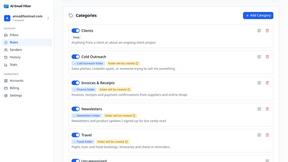
AI Email Filter sorts incoming mail into folders using plain-language prompts you write. Works with any IMAP mailbox; bring your own LLM if you want.
Egmatic
No-code 2D game editor: visual node logic, drag-and-drop scenes, live preview. Exports to Windows, macOS, Linux, Android, iOS, Web.
Kody Tools
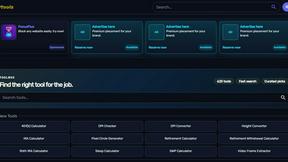
Free collection of online developer utilities, code formatters, and digital converters designed to streamline your daily workflow.
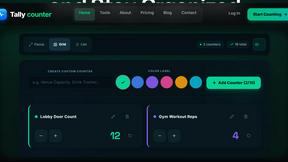
tallycounterweb.com
Online tally counter for tracking attendance, workouts, inventory, sports scores, visitors, habits, and everyday counting tasks.
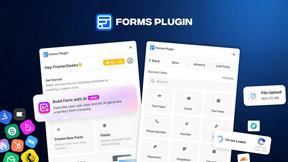
Forms Plugin
The #1 Native Form Builder Plugin for Framer - No Code, No Embeds, No External Platforms.
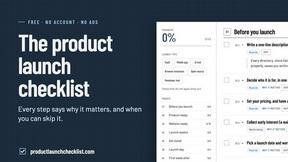
Product Launch Checklist
A free launch checklist for SaaS, apps, AI tools and more. Every step says why it matters and when you can skip it.

HomeAnswerBook
Practical, independent guides to home repairs, maintenance, costs, troubleshooting, and everyday fixes.