
SparkPix vs TinyFast
Side-by-side comparison to help you choose the right tool.

SparkPix
Edit any photo instantly with AI by simply typing what you want to change, from removing backgrounds to creating stunning art styles!.
Last updated: March 11, 2026

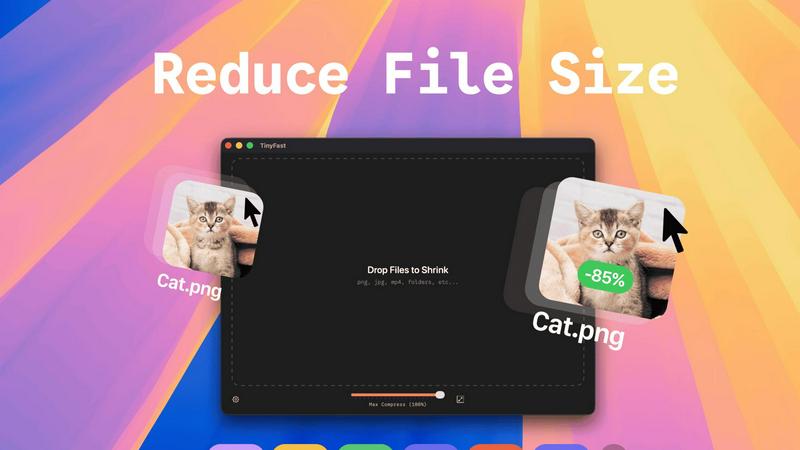
Shrink images, videos, and PDFs instantly on your Mac with TinyFast for fast, private, and hassle-free file.
Last updated: February 28, 2026
Visual Comparison
SparkPix

TinyFast
Feature Comparison
SparkPix
AI Photo Editor (Edit by Text)
This is the heart of SparkPix's magic! Instead of searching for the right slider or brush, you describe your edit in plain English. Just upload your photo, type a command like "make the sky more dramatic at sunset" or "add a cozy sweater to the person," and watch as the AI interprets your request and applies the changes automatically. It's like having a professional photo editor on standby, ready to execute your creative vision in seconds, with no technical skills needed from you!
Background Remover & Changer
Get flawless, transparent backgrounds with a single click or command! This powerful feature is perfect for creating clean portraits, eye-catching product photos for your online store, or fun social media content. It handles complex scenes with ease, precisely isolating subjects from even the busiest backgrounds. Go beyond removal and instantly transport your subject to a new environment by typing, for example, "change the background to a beach at dusk."
Photo Restoration & Enhancement
Breathe new life into your precious memories! SparkPix's AI can meticulously repair old, faded, scratched, or physically damaged photographs, restoring details and clarity you thought were lost forever. Coupled with its enhancement suite, it can also sharpen blurry images, reduce digital noise, upscale resolution to HD, and boost colors—all in one seamless step. Turn blurry, low-quality snaps into portfolio-worthy images instantly!
AI Image Generator & Style Transfer
Unleash your inner artist! Generate completely original, high-quality images from your imagination by typing a descriptive text prompt, available at resolutions up to stunning 4K. Furthermore, transform any existing photo into a masterpiece by applying over 15+ artistic styles. Convert your portrait into an anime character, a landscape into a vibrant oil painting, or a pet photo into a elegant pencil sketch with a single click!
TinyFast
Batch & Drag-Drop Shrink
TinyFast allows you to drop entire folders into the app, providing optimized output in seconds! No more tedious one-by-one file compression; just drag and drop, and let TinyFast handle the rest. This feature is perfect for users who have multiple files to compress and want to save time.
Blazing-Fast Compression
Experience lightning-fast compression with TinyFast's optimized native engines! Unlike online tools that require uploads and downloads, TinyFast compresses files instantly on your device, eliminating wait times. You can shrink large files in seconds, streamlining your workflow and enhancing productivity.
Resize Resolution
With TinyFast, you can automatically resize the resolution of your images and videos! This feature is especially useful for those who need to adapt file sizes for different platforms or applications. Customize your output to suit your needs without compromising on quality.
100% Local & Private
TinyFast guarantees that your files remain completely private. No uploads, no cloud servers—your files never leave your machine! This design ensures total confidentiality, making it the perfect solution for anyone concerned about data security, such as developers and designers working with sensitive materials.
Use Cases
SparkPix
E-commerce & Small Business Owners
Create stunning, professional product photography without a studio or expensive equipment! Use SparkPix to remove backgrounds for clean white-background shots, generate realistic product mockups, enhance image quality, and create consistent, eye-catching visuals for your Shopify, Amazon, or Etsy storefront. It's the ultimate, cost-effective tool for building a powerful brand image and boosting sales!
Family History & Photo Restoration
Preserve your heritage for generations to come! SparkPix is the perfect companion for anyone digitizing family albums. You can expertly colorize black and white photos, repair tears and scratches, restore faded colors, and sharpen details on old portraits. It's an invaluable resource for genealogists and anyone looking to honor and revitalize their family's visual history with ease and impressive results.
Social Media Content Creators
Stand out on Instagram, TikTok, and YouTube with unique, high-quality visuals! Quickly remove unwanted photobombers or objects, generate custom thumbnails, apply trendy artistic filters, and enhance all your photos for a polished feed. The speed and versatility of SparkPix allow you to maintain a consistent and professional online aesthetic, saving you hours of editing time.
Personal Creativity & Fun
Explore the joy of digital art and photo manipulation without a steep learning curve! Whether you want to see yourself as a cartoon character, create a fantasy scene from a text description, design a custom passport photo, or simply make your vacation pictures pop with enhanced colors, SparkPix makes it an accessible and entertaining experience for hobbyists and creative minds of all levels.
TinyFast
Creator's Toolkit
Whether you're a graphic designer, video editor, or web developer, TinyFast is an essential tool in your creative arsenal. Compress images and videos quickly to optimize your projects and improve loading times on websites, ensuring a smooth user experience.
Efficient File Management
For professionals who handle numerous files daily, TinyFast transforms the way you manage your assets. The ability to batch compress entire folders means you spend less time on file management and more time on what truly matters—your work!
Secure Document Handling
TinyFast is the go-to solution for anyone dealing with confidential documents. With the assurance that your files remain local and private, you can compress sensitive PDFs and other documents without the fear of them being stored on external servers.
Streamlined Workflow for Developers
Developers can greatly benefit from TinyFast by compressing images, audio files, and code assets efficiently. This ensures that applications run faster and consume less storage, all while maintaining high-quality visuals and sound.
Overview
About SparkPix
Welcome to the future of photo editing, where your words are the most powerful tool in the box! SparkPix is a revolutionary, web-based AI photo editor that transforms your creative vision into reality with just a simple text prompt. Forget about complex software like Photoshop and tedious manual tools. With SparkPix, you simply type what you want to change—like "remove the background" or "restore this old photo"—and our advanced artificial intelligence works its magic in under 30 seconds! It's designed for absolutely everyone: from social media enthusiasts and small business owners looking to create stunning product shots, to genealogists restoring precious family archives and digital artists exploring new styles. The core value proposition is breathtakingly simple: professional-grade photo editing made instantly accessible, incredibly fast, and fun to use. Best of all, you can start transforming your images for free right now, with no download required. Unleash your creativity without limits!
About TinyFast
TinyFast is the ultimate local file compressor designed specifically for macOS users who crave speed, efficiency, and privacy! Say goodbye to the days of waiting for slow online tools and worrying about file security. With TinyFast, you can effortlessly compress a wide array of file types, including PNG, JPEG, MP4, MOV, PDF, SVG, WebP, MP3, and GIF, all from the comfort of your Mac. This powerful application allows you to simply drag and drop your files, and within seconds, you receive perfectly compressed versions without ever leaving your device. It's the ideal solution for developers, designers, and creators who frequently handle large or sensitive files. Why risk uploading confidential assets to unknown servers when you can maintain total control? TinyFast prioritizes your privacy, ensuring your files stay on your machine. Experience the blazing-fast compression with optimized native engines, batch processing capabilities for entire folders, and seamless integration into your workflow. Transform your file management process today with TinyFast, the fast, safe, and incredibly efficient way to reduce file sizes!
Frequently Asked Questions
SparkPix FAQ
Is SparkPix really free to use?
Yes! You can start using SparkPix absolutely free, with no credit card required. We offer 5 free credits upon sign-up to test all the powerful features. Additionally, free users receive 1 credit daily, allowing for ongoing experimentation and light use without any cost.
What platforms does SparkPix work on?
SparkPix is entirely web-based, meaning it works directly in your browser! There's no software to download or install. You can access and use all its features seamlessly on any desktop computer (Windows, Mac, Linux), as well as on your mobile devices like iPhones and Android smartphones.
How accurate is the AI background remover?
Our AI background remover is highly accurate and designed to handle complex scenes, including fine details like hair, fur, and transparent objects. For the best results, we recommend using high-contrast photos where the subject stands out clearly from the background. You can always use the text editor to refine the result further!
What can I do with the AI Image Generator?
The possibilities are endless! You can generate original artwork, concept images for projects, social media graphics, book illustrations, product mockup scenes, and much more. Just describe the scene, style, and elements you envision in the text prompt, and the AI will create a unique image for you at resolutions up to 4K.
TinyFast FAQ
How does TinyFast ensure file privacy?
TinyFast compresses files locally on your device without any uploads to cloud servers. This means your files never leave your machine, providing complete privacy and security for sensitive data.
What file types does TinyFast support?
TinyFast supports a wide range of file types, including images (PNG, JPG, TIFF, HEIC, WEBP, GIF, BMP, SVG), videos (MP4, MOV, M4V), documents (PDF, DOCX), code files (JS, CSS, JSON), and audio files (MP3).
Is there a limit to how many files I can compress?
With the free plan, you can compress up to 5 files per day. For those needing unlimited local compressions, TinyFast offers a lifetime plan or a monthly subscription option.
How do I get started with TinyFast?
Getting started is simple! Download TinyFast for Mac, drag your files into the app, and watch as they are compressed instantly. Enjoy the ease and efficiency of managing your file sizes locally!
Alternatives
SparkPix Alternatives
SparkPix is an exciting AI-powered photo editor that lets you transform images simply by typing commands! It falls into the category of online, AI-driven image editing tools, making professional-grade edits accessible to everyone without needing complex software like Photoshop. Users often explore alternatives for various reasons. Some might need a different pricing structure or more free credits, while others could be looking for specific niche features, a downloadable desktop application, or a tool that integrates directly with their existing workflow. It's a vibrant market with options for every need! When choosing your ideal AI photo editor, consider what matters most to you. Compare core capabilities like background removal and photo restoration, evaluate the cost against your expected usage, and check if the platform works seamlessly on your preferred devices. The best choice is the one that makes your creative process faster and more fun!
TinyFast Alternatives
TinyFast is an innovative local file compressor designed specifically for macOS users, enabling them to quickly shrink images, videos, and PDFs right on their devices. This powerful tool is perfect for developers, designers, and creators who prioritize speed and privacy when managing large or sensitive files. As users navigate their options, they often seek alternatives due to various factors such as pricing, specific feature sets, or compatibility with different platforms. When searching for an alternative, it is essential to consider aspects like the speed of compression, privacy measures, ease of use, and support for multiple file formats. Users should also evaluate whether the software offers batch processing capabilities and whether it operates locally or requires an internet connection to function. Making informed choices ensures that users find a solution that fits their unique workflow and requirements.