

QUVIAI
QUVIAI turns your ideas into photorealistic renders, 3D scenes, videos, and music instantly with AI-powered creation!.
tool Details
Explore More
Alternatives
About QUVIAI
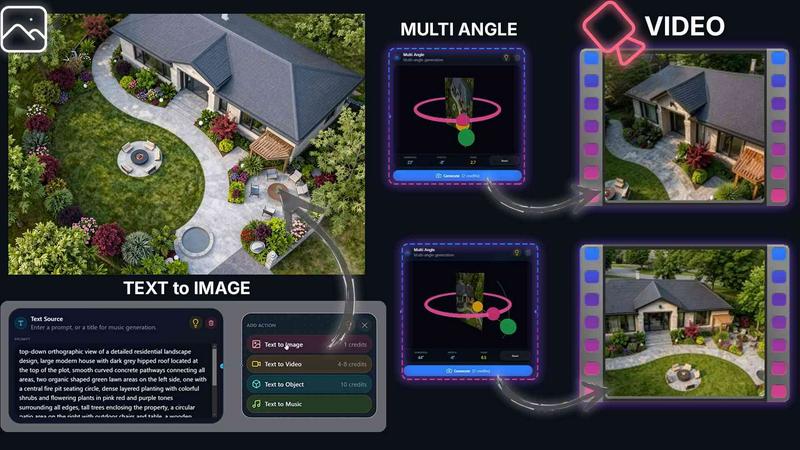
QUVIAI is the ultimate all-in-one AI-powered creative platform built specifically for architects, designers, and visionary creators who refuse to be limited by traditional tools. Imagine a single workspace where you can upload a simple sketch, a reference image, or a full 3D model and instantly transform it into photorealistic renders, cinematic videos, multiple camera angles, detailed floor plan renders, custom 3D objects, and even original music. That is exactly what QUVIAI delivers, and it does it all without forcing you to jump between different software programs.
The core value proposition here is seamless integration and massive time savings. Instead of piecing together a workflow with separate modeling, rendering, and video editing applications, QUVIAI brings everything together in one fluid experience. The platform features a built-in 3D workspace that lets you model, render, and iterate as fast as your imagination can move. You can edit entire scenes using simple text prompts, generate furniture and decorative objects from scratch, and stage them exactly where you want within your scene. Need a cinematic walkthrough? Just define your start and end frames, and QUVIAI generates the entire video sequence for you. This is not just another AI tool. It is a complete creative studio that empowers you to go from concept to polished presentation in record time. Available on web, iOS, and Android, QUVIAI makes professional-grade AI creation accessible anywhere. Try it free at quvi.ai and experience the future of architectural creativity today.
Features
AI Image Generation
Turn any text prompt or reference image into stunningly photorealistic architectural renders in just seconds. This feature is your ultimate idea accelerator. Simply describe the scene you envision, or upload a sketch or photo, and the AI instantly generates a high-quality, production-ready render complete with accurate lighting, materials, and spatial composition. It is perfect for iterating on concepts rapidly and presenting polished visuals to clients without any rendering delays.
AI Video Creation
Animate your still images, generate smooth walkthroughs, or create cinematic sequences from a single text prompt. This feature breathes life into your architectural projects. You can define a start and end frame for a walkthrough, and the AI intelligently interpolates the movement to produce a professional-quality video. Whether you need a dramatic flythrough of a building exterior or a gentle pan through an interior space, QUVIAI makes video creation as simple as typing a sentence.
Multi Angle Camera Suite
Generate multiple architectural viewpoints from one single source image to create richer, presentation-ready perspective sets. This is a game-changer for client presentations and design reviews. Instead of manually setting up multiple camera angles in a 3D program, you can let QUVIAI automatically produce a variety of compelling views from your original render. Show your design from every important angle with consistent lighting and style, making your portfolio and proposals look incredibly comprehensive.
Object Staging
Stage generated 3D objects seamlessly into your scene backgrounds and produce polished compositions with consistent lighting and perspective. This feature eliminates the tedious work of sourcing and placing furniture or decorative items. You can generate custom 3D objects directly within the platform and then position them exactly where you want in your scene. The AI ensures that the lighting and shadows of the staged objects match the environment perfectly, resulting in a cohesive and realistic final image every time.
Use Cases
Rapid Concept Exploration for Architects
Architects can use QUVIAI to explore dozens of design variations in a single session. Start with a basic massing model or a hand-drawn sketch, then use text prompts to instantly generate different material palettes, lighting conditions, and architectural styles. This rapid iteration loop allows you to test ideas like facade treatments, interior layouts, or landscaping options before committing to a final direction. It saves hours of manual modeling and rendering time and opens up creative possibilities you might not have considered.
Creating Cinematic Client Presentations
Designers and real estate developers can use the AI Video Creation and Multi Angle features to build compelling, cinematic presentations for clients. Instead of showing static 2D drawings, you can produce a full walkthrough video that guides the viewer through the space. Generate multiple camera angles to highlight key design features, and add original music created within QUVIAI to set the perfect mood. This transforms a standard project review into an immersive experience that helps clients truly visualize and connect with the design.
Interior Design and Furniture Staging
Interior designers can leverage the Object Staging and AI Image Generation tools to furnish and decorate spaces virtually. Upload a photo of an empty room, then generate furniture, rugs, lighting fixtures, and decorative objects directly into the scene. The AI ensures that every item looks natural and properly lit within the space. This is perfect for presenting different furnishing options to clients, testing color schemes, or creating inspirational mood boards for a project. It turns conceptual interior ideas into photorealistic visualizations instantly.
Generating Marketing and Portfolio Content
Creators and marketing professionals can use QUVIAI to quickly produce a wide variety of high-quality visual content for websites, social media, and print materials. Generate stunning exterior and interior renders, create short video clips for Instagram or LinkedIn, and produce multiple camera angles for a comprehensive project showcase. The platform's speed and consistency mean you can create a full suite of marketing assets from a single project file, ensuring a cohesive brand look across all your promotional channels.
Pricing
QUVIAI offers a free tier to get you started. You can sign up in seconds and receive free credits to generate your first render and explore the platform's capabilities. For detailed information on paid subscription plans and pricing tiers, please visit the official Pricing page on the QUVIAI website at quvi.ai.
Frequently Asked Questions
What types of files can I upload to QUVIAI?
You can upload sketches, images, and 3D models directly into the QUVIAI platform. This flexibility allows you to start from virtually any stage of your design process. Whether you have a rough hand-drawn concept on paper, a reference photo from the internet, or a detailed 3D model from another software, QUVIAI can ingest it and use it as a foundation for generating renders, videos, and other creative outputs.
Is QUVIAI available on mobile devices?
Yes, absolutely. QUVIAI is available on web, iOS, and Android platforms. This means you can start a project on your desktop computer, continue refining it on your tablet during a commute, and present the final result from your phone at a client meeting. The cross-platform compatibility ensures that your creative workflow is never tied to a single device, giving you the freedom to create whenever and wherever inspiration strikes.
Can I edit my scenes after they are generated?
Yes, editing is a core part of the QUVIAI workflow. The platform features a dedicated Edit suite that allows you to refine visuals with masking, inpainting, cleanup, and detail adjustments. You can also edit entire scenes using simple text prompts within the built-in 3D workspace. This means you are never locked into a single output. You can iterate, tweak materials, adjust lighting, or add new elements until the result matches your exact vision.
Do I need any prior 3D modeling or rendering experience to use QUVIAI?
Not at all. While QUVIAI is a powerful tool for professionals, its AI-driven interface is designed to be intuitive and accessible for users of all skill levels. You can generate stunning results using just text prompts and uploaded images. The built-in 3D workspace provides more advanced control for experienced users, but the core creative workflows are designed to be as simple as describing what you want. The platform handles the complex rendering and modeling processes automatically.
Similar to QUVIAI
Sprite Sheet Maker
Create pixel-art sprite sheets from text with AI, preview animations, and export PNG assets for game prototypes.
AIEnhancer
AI enhancer for photos, images, videos, and creative effects.
Ideogram Studio
Ideogram 4 AI workflows for text-perfect logos, posters, ads, packaging, and ecommerce visuals with prompts and image references.
Seedream 5.0
Seedream 5.0 Pro and Lite generate and edit production-ready images for ecommerce, marketing, social, and branded content.
Vynzo
AI image and video studio. Generate from a prompt, animate stills, swap faces, restyle clips and edit — one credit pool, no subscription.

ProfileLoom
ProfileLoom turns one photo into platform-ready AI portraits for professional, social, and creator profiles, with presets and built-in editing.
Free AI Image
Free AI Image is a free text-to-image AI generator for creating clean visual drafts from prompts with no sign-up required.

Try This Skill
One-click AI photo stylization for e-commerce & portraits