Cozy
Cozy is the 100% local journal that stores your words, photos, and audio as plain files on your device with no servers or AI involved.
tool Details
Explore More
Alternatives
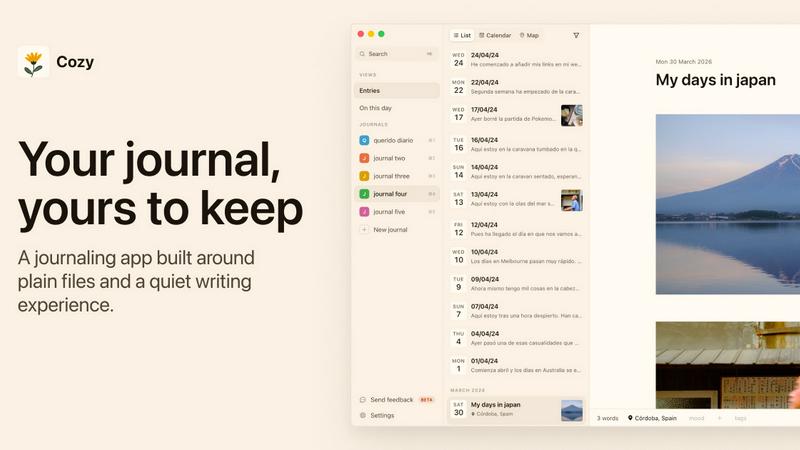
About Cozy
Cozy is a 100% local journaling app designed for people who want a private, beautiful, and distraction-free space to write. It is built for macOS and Windows and is a one-time purchase with no subscription fees. The core promise is radical privacy: your words stay on your device, are never synced to a server, and are never fed to an AI. Cozy is for anyone who wants to keep a personal diary, track habits, document travels, or simply have a quiet place to think. It stores your entries as plain Markdown files on your computer, giving you complete ownership and control. Beyond just text, you can enrich your entries with photos, audio clips, and videos. Cozy also offers features like tagging, location marking, custom habit trackers, a full-screen writing mode with ambient soundscapes, and calendar and map views to revisit your memories. It even supports writing in any language, including right-to-left scripts. If you are moving from another app, Cozy makes it easy to import your history from Notion, Day One, Obsidian, or Bear. With a 14-day money-back guarantee, you can try it risk-free. It is the journal that stays yours, built for a lifetime of writing.
Features
Your Files, on Your Computer
Cozy stores every entry as a plain Markdown file directly on your hard drive. There is no mysterious cloud, no server to breach, and no subscription to pay. You can see your journal as a folder of files, back it up with your own system, and rest easy knowing your private thoughts are truly yours forever. You are never locked into a proprietary format.
More Than Text
Your entries can be more than just words. Cozy lets you drag and drop photos, audio files, and videos into your journal. You can even embed YouTube videos. This turns your journal into a rich multimedia scrapbook, letting you capture the sounds of a rainstorm, the laughter from a party, or the view from a mountain hike, all alongside your written reflections.
Make It Yours
Cozy adapts to your unique journaling style. You can tag entries to organize them by theme, mark your location to remember where you were, and build your own custom trackers for habits, moods, or anything else you want to follow. Whether you want to track your daily water intake, your mood on a scale, or the books you are reading, Cozy bends to your needs.
A Quiet Place to Write
When you want to focus, Cozy offers a full-screen writing mode that eliminates all distractions. To help you settle in, you can choose from a selection of ambient soundscapes like rain, a forest, a café, or a crackling fireplace. These little touches create a calming environment that makes you want to open the app and write.
Different Ways to Look Back
Cozy helps you revisit your memories in beautiful, intuitive ways. You can view your entries laid out on a calendar to see your journaling habits, or pin them to a map to see where your stories took place. However you remember your life, Cozy helps you find your way back to those moments.
Write in Any Language
Your journal speaks whatever language you do. Cozy fully supports writing in Japanese, Arabic, Spanish, or any other language. You can mix multiple languages in a single entry, and languages that read right-to-left flow that way automatically. Your journal is as global as your life.
Use Cases
Personal Daily Journaling
The most classic use case is a private daily diary. Use Cozy to write about your day, your feelings, your wins, and your struggles. With the full-screen mode and ambient sounds, you can create a calming evening ritual. Because everything is local and private, you can be completely honest and vulnerable without any worry about your data being read or used elsewhere.
Travel and Adventure Log
Document your trips with Cozy by combining text, photos, and location data. Write about your morning coffee in Lisbon, drop in a photo of the view, and pin it to the map. Later, you can look back at your travel calendar and see every place you visited. It is the perfect digital travelogue that stays entirely on your device.
Habit and Mood Tracking
Use Cozy's custom trackers to follow your habits, moods, or health metrics. You can create a tracker for your daily water intake, your exercise routine, or your sleep quality. Over time, you can look back at your calendar and see patterns in your life. It is a powerful tool for personal growth, all kept in a private space.
Creative Writing and Brain Dumping
Cozy is an excellent tool for writers and creators who need a private, distraction-free space to brainstorm, draft ideas, or free-write. The quiet writing mode with soundscapes helps you get into a flow state. Since your files are plain Markdown, you can easily export and share your writing when you are ready, or keep it completely to yourself.
Frequently Asked Questions
Is my data safe and private in Cozy?
Absolutely. Cozy is 100% local. Your journal entries are stored as plain files on your own computer. Nothing is ever synced to a server, and nothing is ever fed to an AI. There is no cloud, no account, and no one else can access your words. Your privacy is the entire point of the app.
Can I import my entries from another journaling app?
Yes! Cozy makes it easy to bring your history with you. You can import entries from Notion, Day One, Obsidian, and Bear. Just export your data from the old app in the required format, and Cozy will bring it all in. You do not have to start from a blank page.
What happens if my computer breaks?
Since your journal is stored as plain Markdown files on your computer, you can back them up using any standard method, like copying the folder to an external drive, a cloud storage service you trust, or a backup tool. You are in complete control of your backups, just like your data.
What platforms does Cozy support?
Cozy is currently available for macOS and Windows. It is a one-time purchase with no subscription fees. You can try it risk-free with a 14-day money-back guarantee to see if it is the right journal for you.
Can I add photos and videos to my entries?
Yes, absolutely. Cozy supports more than just text. You can drag and drop photos, audio files, and videos into your entries. You can also embed YouTube videos. This turns your journal into a rich multimedia experience that captures all the details of your life.
Does Cozy work with languages that read right-to-left?
Yes, it does. Cozy supports writing in any language, including Japanese, Arabic, Spanish, and more. You can mix languages in a single entry, and right-to-left scripts will display correctly on their own. Your journal is built for a global world.
Similar to Cozy

Clever AI Humanizer
Clever AI Humanizer is a free tool that makes AI-generated text sound more human.

Egmatic
No-code 2D game editor: visual node logic, drag-and-drop scenes, live preview. Exports to Windows, macOS, Linux, Android, iOS, Web.

laya.tools
Free directory of 950+ projects built on Laya, the open-source model that turns text into typed decisions in milliseconds.
tallycounterweb.com
Online tally counter for tracking attendance, workouts, inventory, sports scores, visitors, habits, and everyday counting tasks.

SnitchFeed
SnitchFeed is an agentic social listening tool that surfaces high-intent conversations on LinkedIn, X, Hackernews, and more for GTM and product teams.


Hailuo AI
Hailuo AI turns prompts and images into videos with Hailuo 2.3, guided motion and camera controls, task tracking, downloads, and API access.