
Changeflow vs TinyFast
Side-by-side comparison to help you choose the right tool.

Changeflow
Stop missing critical website changes with AI-powered competitor insights that save you time!.
Last updated: March 4, 2026

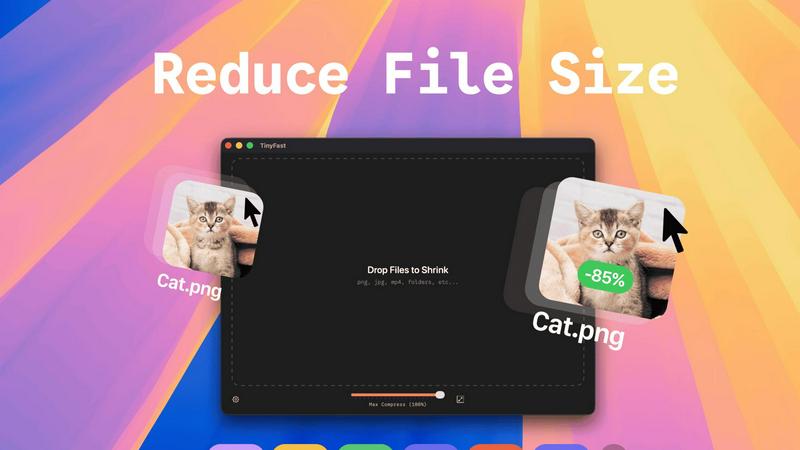
Shrink images, videos, and PDFs instantly on your Mac with TinyFast for fast, private, and hassle-free file.
Last updated: February 28, 2026
Visual Comparison
Changeflow

TinyFast
Feature Comparison
Changeflow
AI-Powered Intelligence & Summaries
Our advanced AI doesn't just detect changes—it understands them! It filters out irrelevant noise and false positives, delivering only the updates you care about. You get concise, customized summaries that explain exactly what changed and why it matters to your business, so you never have to waste time reading through entire pages again. It's like having a personal analyst on duty 24/7!
Natural Language Setup & Smart Link Following
Forget complicated RSS feeds or manual configuration! Describe what you want to monitor in plain English, and Changeflow's AI agent gets to work. Even more powerful is its ability to turn any page with links into an intelligent feed. It follows new links, reads the target pages, determines relevance, and summarizes the crucial information, automatically expanding your monitoring network!
Enterprise-Grade Reliability & Anti-Blocking
Changeflow is built for business with robust, reliable technology. Our sophisticated anti-blocking techniques mean we successfully monitor pages that other tools can't reach, ensuring you get consistent data. Combined with team collaboration features, dedicated expert support, and API access for workflow integration, it's a complete platform, not just a tool with features bolted on!
Interactive Change Viewer & Site Version Control
Go beyond simple notifications and dig deep into every update! Our interactive change viewer lets you take a forensic look at exactly what changed, with clear highlights on the important bits. Plus, Site Version Control provides timestamped archives of every page, allowing you to navigate through time and see the complete history of changes at a glance!
TinyFast
Batch & Drag-Drop Shrink
TinyFast allows you to drop entire folders into the app, providing optimized output in seconds! No more tedious one-by-one file compression; just drag and drop, and let TinyFast handle the rest. This feature is perfect for users who have multiple files to compress and want to save time.
Blazing-Fast Compression
Experience lightning-fast compression with TinyFast's optimized native engines! Unlike online tools that require uploads and downloads, TinyFast compresses files instantly on your device, eliminating wait times. You can shrink large files in seconds, streamlining your workflow and enhancing productivity.
Resize Resolution
With TinyFast, you can automatically resize the resolution of your images and videos! This feature is especially useful for those who need to adapt file sizes for different platforms or applications. Customize your output to suit your needs without compromising on quality.
100% Local & Private
TinyFast guarantees that your files remain completely private. No uploads, no cloud servers—your files never leave your machine! This design ensures total confidentiality, making it the perfect solution for anyone concerned about data security, such as developers and designers working with sensitive materials.
Use Cases
Changeflow
Competitive & Market Intelligence
Never miss a competitor's price change, product launch, or strategic announcement! Business teams use Changeflow to automatically track competitor websites, pricing pages, and market news. Get immediate, AI-summarized alerts that explain the impact, allowing you to react swiftly and maintain your competitive edge without manual daily checks!
Legal & Regulatory Compliance Monitoring
Stay ahead of complex regulatory landscapes! Compliance teams at Fortune 500 companies and legal librarians at top law firms rely on Changeflow to monitor critical sources like FDA guidance, SEC filings, court dockets, and legal citations. Get precise updates on new rulings or regulatory changes, ensuring your organization remains compliant and avoids costly oversights!
News & Brand Mention Tracking
Keep your finger on the pulse of your brand's reputation and industry news! Marketing and PR teams use Changeflow to follow news sites, review platforms, and forums for mentions of their brand, executives, or key topics. Receive clean summaries of relevant articles and discussions directly in your feed, enabling proactive communication and strategy!
Supply Chain & Vendor Monitoring
Maintain operational resilience by monitoring key partner and vendor sites! Track supplier terms of service, outage pages, shipping status portals, or procurement boards for critical updates. Changeflow's reliable monitoring and clear alerts help you anticipate disruptions, manage risks, and keep your supply chain running smoothly!
TinyFast
Creator's Toolkit
Whether you're a graphic designer, video editor, or web developer, TinyFast is an essential tool in your creative arsenal. Compress images and videos quickly to optimize your projects and improve loading times on websites, ensuring a smooth user experience.
Efficient File Management
For professionals who handle numerous files daily, TinyFast transforms the way you manage your assets. The ability to batch compress entire folders means you spend less time on file management and more time on what truly matters—your work!
Secure Document Handling
TinyFast is the go-to solution for anyone dealing with confidential documents. With the assurance that your files remain local and private, you can compress sensitive PDFs and other documents without the fear of them being stored on external servers.
Streamlined Workflow for Developers
Developers can greatly benefit from TinyFast by compressing images, audio files, and code assets efficiently. This ensures that applications run faster and consume less storage, all while maintaining high-quality visuals and sound.
Overview
About Changeflow
Stop wasting hours manually checking websites! Changeflow is your intelligent AI-powered web monitoring assistant that does the hard work for you. It doesn't just tell you "something changed" on a page—it reads, understands context, and delivers clear summaries of only the important updates that matter to your business! Built on over a decade of experience, Changeflow is trusted by Fortune 500 and Am Law 200 firms to transform noisy web data into actionable intelligence. Simply describe what you want to track in plain English, point it at any webpage, and let its advanced AI agent handle the rest. It expertly navigates login walls, JavaScript-heavy sites, and other tricky content with a 99.9% success rate, turning any page into a personalized feed of critical updates. From tracking competitor pricing and regulatory changes to monitoring news mentions and court dockets, Changeflow ensures your team never misses a beat. With shared workspaces, robust API access, and powerful Site Version Control, it's the enterprise-grade solution designed to save you time and deliver peace of mind!
About TinyFast
TinyFast is the ultimate local file compressor designed specifically for macOS users who crave speed, efficiency, and privacy! Say goodbye to the days of waiting for slow online tools and worrying about file security. With TinyFast, you can effortlessly compress a wide array of file types, including PNG, JPEG, MP4, MOV, PDF, SVG, WebP, MP3, and GIF, all from the comfort of your Mac. This powerful application allows you to simply drag and drop your files, and within seconds, you receive perfectly compressed versions without ever leaving your device. It's the ideal solution for developers, designers, and creators who frequently handle large or sensitive files. Why risk uploading confidential assets to unknown servers when you can maintain total control? TinyFast prioritizes your privacy, ensuring your files stay on your machine. Experience the blazing-fast compression with optimized native engines, batch processing capabilities for entire folders, and seamless integration into your workflow. Transform your file management process today with TinyFast, the fast, safe, and incredibly efficient way to reduce file sizes!
Frequently Asked Questions
Changeflow FAQ
How does Changeflow handle websites with logins or complex JavaScript?
Changeflow is built with advanced anti-blocking technology developed over a decade! We use sophisticated methods to navigate login walls, interact with JavaScript-rendered content, and bypass blocks that stop other tools. This gives us a 99.9% success rate on even the most challenging pages, ensuring you get reliable data from the sources that matter most!
Can I monitor hundreds of pages, and how do I add them quickly?
Absolutely! Changeflow is designed to scale. You can organize thousands of web sources into a clean, noise-free feed. Adding sources is incredibly fast with our AI agent—just describe what you need in seconds. For bulk imports, we support adding pages via CSV, Excel, or even a site crawl to get you set up in no time!
What kind of notifications will I receive?
You get concise, descriptive AI-generated alerts delivered to your Changeflow dashboard and email. You can configure multiple notification addresses. For integration into other workflows, you can connect to thousands of apps like Slack or Microsoft Teams via Zapier, ensuring your team stays informed through the channels they use every day!
How is the "Plus" plan different from the "Business" plan?
The Plus plan is perfect for getting started, offering monitoring for 20-300 pages with great support. The Business plan is for teams that need more scale and power! It includes monitoring for 500+ pages, access to our premium page unblocker for tough sites, more saved page versions, more notification addresses, and expert support for bulk import options!
TinyFast FAQ
How does TinyFast ensure file privacy?
TinyFast compresses files locally on your device without any uploads to cloud servers. This means your files never leave your machine, providing complete privacy and security for sensitive data.
What file types does TinyFast support?
TinyFast supports a wide range of file types, including images (PNG, JPG, TIFF, HEIC, WEBP, GIF, BMP, SVG), videos (MP4, MOV, M4V), documents (PDF, DOCX), code files (JS, CSS, JSON), and audio files (MP3).
Is there a limit to how many files I can compress?
With the free plan, you can compress up to 5 files per day. For those needing unlimited local compressions, TinyFast offers a lifetime plan or a monthly subscription option.
How do I get started with TinyFast?
Getting started is simple! Download TinyFast for Mac, drag your files into the app, and watch as they are compressed instantly. Enjoy the ease and efficiency of managing your file sizes locally!
Alternatives
Changeflow Alternatives
Changeflow is a powerful AI-driven market and competitor intelligence platform. It belongs to the category of web monitoring and change detection tools, but it goes far beyond simple alerts by using artificial intelligence to read, understand context, and summarize the important changes for you. Users often explore alternatives for a variety of reasons! You might be looking for a different pricing model, need specific integrations with other software in your stack, or require a tool with a different focus, like social media monitoring instead of deep web page analysis. It's a smart move to ensure you have the perfect fit for your team's workflow and budget. When evaluating other options, focus on what matters most for your use case. Key considerations include the tool's ability to handle complex, JavaScript-heavy pages and login walls, the intelligence behind its change summaries (is it just keyword matching or true AI understanding?), and collaboration features like shared workspaces. Don't forget to check for robust API access and reliable historical archiving!
TinyFast Alternatives
TinyFast is an innovative local file compressor designed specifically for macOS users, enabling them to quickly shrink images, videos, and PDFs right on their devices. This powerful tool is perfect for developers, designers, and creators who prioritize speed and privacy when managing large or sensitive files. As users navigate their options, they often seek alternatives due to various factors such as pricing, specific feature sets, or compatibility with different platforms. When searching for an alternative, it is essential to consider aspects like the speed of compression, privacy measures, ease of use, and support for multiple file formats. Users should also evaluate whether the software offers batch processing capabilities and whether it operates locally or requires an internet connection to function. Making informed choices ensures that users find a solution that fits their unique workflow and requirements.