
LuxSign vs MeetingMind
Side-by-side comparison to help you choose the right tool.

Sign documents digitally and securely in minutes with LuxSign, the compliant e-signature solution from Luxembourg!.
Last updated: February 26, 2026

MeetingMind
Capture every Zoom meeting detail effortlessly with MeetingMind's automatic recording and intelligent AI summaries!.
Last updated: March 1, 2026
Visual Comparison
LuxSign

MeetingMind
Feature Comparison
LuxSign
Multiple Signature Methods
LuxSign offers a variety of signature methods to cater to your preferences! You can draw your signature using your mouse, type your name, or even upload an image of your signature. Plus, there’s support for custom initials, allowing for quick and efficient document signing tailored to your style!
Advanced Security
Security is paramount at LuxSign! The platform employs industry-standard encryption to protect your documents during upload, storage, and transmission. With secure storage located in EU data centers, you can rest assured that your sensitive information is safeguarded against unauthorized access.
Collaboration Workspaces
Experience seamless teamwork with LuxSign's collaboration workspaces! Create shared environments where team members can organize documents in folders, manage access levels, and collaborate on signing workflows. This feature enhances productivity and ensures everyone is on the same page during the signing process.
Complete Audit Trail
Stay compliant and informed with LuxSign’s complete audit trail! Every action on your documents is logged with detailed timestamps, IP addresses, and signer information. This transparency not only enhances security but also provides necessary documentation for verification and compliance purposes.
MeetingMind
Automatic Detection
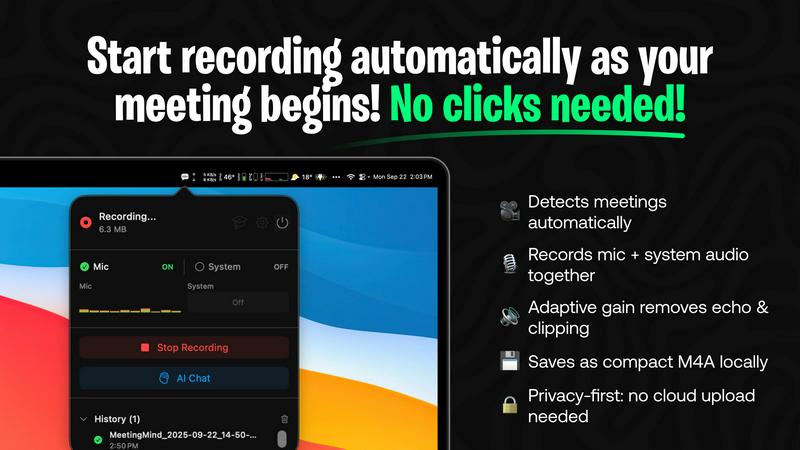
MeetingMind simplifies your meeting experience by automatically detecting and recording Zoom meetings without the need for any clicks! Just join your call, and let MeetingMind do the heavy lifting for you!
Records Everything
Capture both your microphone and system audio effortlessly with MeetingMind's adaptive gain technology. This powerful feature ensures that every voice and sound is recorded clearly, so nothing important is missed!
AI Assistant
Choose your AI assistant according to your preference! MeetingMind offers both local processing with Ollama and cloud-based processing with OpenRouter for insightful summaries and analyses. Enjoy the flexibility of tailored assistance!
Markdown Export
Say goodbye to messy notes! MeetingMind allows you to save AI-generated summaries and transcripts as beautifully formatted markdown files. This feature makes it easy to share and reference meeting notes whenever you need them!
Use Cases
LuxSign
Streamlining Contract Signing
Businesses can utilize LuxSign to streamline their contract signing processes! Whether you are onboarding new clients or finalizing business agreements, LuxSign simplifies the workflow, allowing multiple parties to sign documents quickly and efficiently, saving time and resources.
Remote Team Collaboration
LuxSign is perfect for remote teams that need to collaborate on important documents! Use collaboration workspaces to share files, manage access, and ensure all team members can contribute to the signing process from anywhere in the world, enhancing productivity and teamwork.
Legal Document Execution
Law firms and legal departments can rely on LuxSign for executing legal documents! With eIDAS SES compliance, LuxSign provides the legal validity required for most transactions across the EU, ensuring that all parties can sign documents electronically with confidence.
Efficient Bulk Signing
Companies with high-volume signing needs will find LuxSign’s bulk signing feature invaluable! Generate multiple signatures on various documents in one go, making it easier to manage large-scale operations without sacrificing security or compliance.
MeetingMind
Efficient Team Meetings
Imagine your team meetings where everyone is fully engaged, and you don't have to worry about jotting down notes. With MeetingMind, you can focus on discussions while it captures all important details for you!
Remote Work Collaboration
In an era of remote work, MeetingMind bridges the gap by ensuring that virtual meetings are productive. Easily record and summarize discussions, making sure everyone stays on the same page, no matter where they are!
Project Management
As a project manager, you can leverage MeetingMind to keep track of important action items and decisions made during meetings. The AI-generated summaries help you maintain clarity and accountability within your team!
Educational Settings
MeetingMind is not only for corporate environments! Educators can use it to record lectures and discussions, providing students with valuable notes and summaries that enhance their learning experience!
Overview
About LuxSign
LuxSign is an innovative and secure electronic signature platform designed for businesses that demand high compliance standards! Hailing from Luxembourg, LuxSign prioritizes data security and privacy by ensuring that all documents are not only encrypted end-to-end but also stored exclusively within the country, thus guaranteeing full GDPR compliance. This powerful platform is ideal for professionals, small teams, and large enterprises looking to streamline their signing processes while maintaining legal validity across the European Union. With support for eIDAS SES standards, users can confidently execute contracts and agreements knowing they are meeting legal requirements. LuxSign's user-friendly features allow for quick document uploads, customizable signing workflows, and real-time tracking of signing progress, making it the ultimate solution for secure digital signatures!
About MeetingMind
Tired of the chaos that can come with meetings? Introducing MeetingMind, your ultimate AI-powered meeting assistant for macOS! This innovative tool is designed to ensure that you never miss a crucial detail again. With MeetingMind, you can join your Zoom meetings and focus fully on the conversation, knowing that every word is being captured effortlessly. It automatically detects and records your meetings, delivering real-time, speaker-attributed transcripts and intelligent summaries with just a single click. Whether you're a busy professional, part of a remote team, or a manager looking to streamline your workflow, MeetingMind transforms meeting chaos into clear, actionable outcomes. Experience the freedom from frantic note-taking and the security of on-device processing, ensuring your data remains private. With MeetingMind, you can finally give your full attention to what truly matters in every meeting!
Frequently Asked Questions
LuxSign FAQ
How does LuxSign ensure the security of my documents?
LuxSign employs end-to-end encryption during the upload, storage, and transmission of your documents. All data is securely hosted in Luxembourg, complying with EU data protection regulations to keep your information safe!
Is LuxSign compliant with GDPR?
Absolutely! LuxSign is fully GDPR compliant, ensuring that all user data and documents are handled in accordance with strict privacy laws to protect your privacy and personal information.
Can I integrate LuxSign with other software?
Yes! LuxSign offers a full REST API along with an embeddable SDK, allowing seamless integration with your existing systems and software. This flexibility enhances your workflow and makes digital signing even easier!
What types of documents can I upload to LuxSign?
LuxSign supports a wide range of file formats including PDF, DOC, and DOCX. You can easily upload documents up to 10MB, making it convenient for various types of business documentation.
MeetingMind FAQ
How does MeetingMind ensure my privacy?
MeetingMind processes all data locally on your Mac, meaning your meetings never leave your device. You can have peace of mind knowing that your information is secure and private!
Is there a limit to the free version?
Yes! The free version allows you to record up to 60 minutes per day. This is perfect for short meetings and daily standups. When you need more, you can easily upgrade to the unlimited plan!
How do I download MeetingMind?
You can download MeetingMind directly from the Mac App Store. It is a secure process that also supports Family Sharing, allowing you to use it across devices with your family!
What if I have issues or need support?
MeetingMind provides dedicated support for users. If you encounter any issues or have questions, you can easily reach out for assistance to ensure smooth usage of the tool!
Alternatives
LuxSign Alternatives
LuxSign is an innovative electronic signature platform based in Luxembourg, designed specifically for businesses that demand high compliance and security. With its eIDAS SES compliance, it ensures that signatures are legally valid across all EU member states, making it a reliable choice for organizations operating in Europe. However, users often seek alternatives due to various reasons such as pricing, specific feature requirements, or the need for integration with other platforms. When looking for an alternative to LuxSign, it's essential to consider factors such as pricing structures, the range of features offered, ease of use, and compatibility with existing systems. Whether you prioritize advanced signing workflows or robust security measures, finding the right electronic signature solution can enhance your business operations and streamline document management.
MeetingMind Alternatives
MeetingMind is an innovative AI-powered meeting assistant specifically designed for macOS users. It falls under the productivity and management category, focusing on enhancing the meeting experience by automating note-taking and summarization. Users often seek alternatives to MeetingMind due to various factors such as pricing, specific feature requirements, or compatibility with different platforms. Understanding the unique needs of your workflow and the essential features you require—such as audio quality, transcription accuracy, and ease of use—can help you find the perfect alternative that fits your professional environment. When choosing an alternative to MeetingMind, consider key aspects such as the ability to seamlessly integrate with your existing tools, the quality of audio recordings and transcripts, and the level of privacy offered. Look for solutions that provide reliable performance, user-friendly interfaces, and additional functionalities that align with your specific meeting needs. Ultimately, the right alternative will empower you to maintain focus during discussions while ensuring that crucial details and action items are captured accurately.