
Cosy vs FilexHost
Side-by-side comparison to help you choose the right tool.

Transform your Slack into a vibrant community with automated member onboarding and personalized introductions!.
Last updated: February 28, 2026

FilexHost
Effortlessly host and share any file in seconds with FilexHost's simple drag-and-drop interface and instant links!.
Last updated: February 26, 2026
Visual Comparison
Cosy
FilexHost

Feature Comparison
Cosy
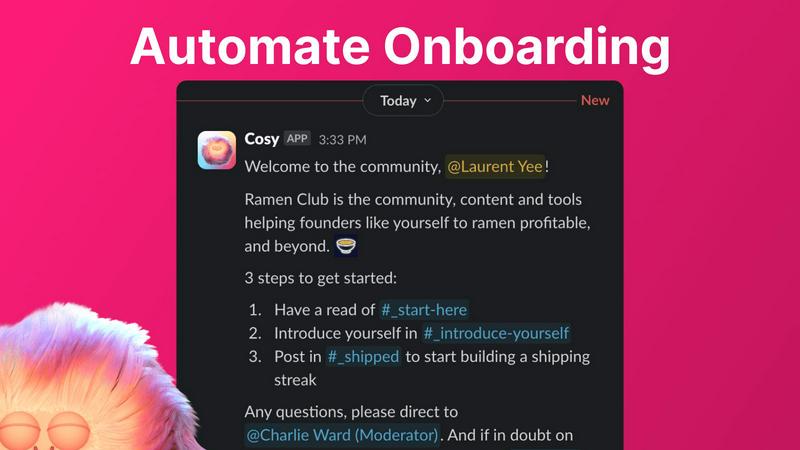
Automate Onboarding
Create and automate up to 10 distinct onboarding welcome DM sequences for new members! This feature allows you to customize messages that can be sent from either a team member or the Cosy bot, ensuring that newcomers feel welcomed immediately or at a set delay. You can personalize these messages with names, links, and emojis, saving you valuable hours each week. Whether it is 4.30am or any time of day, your new members will receive a warm greeting, allowing you to rest easy knowing no one is left unattended!
Connect Your Members
Boost engagement by introducing community members to one another automatically! With this feature, opted-in members are introduced through DMs, enhancing the sense of community and connection. You can customize how often these introductions occur, whether it be weekly or bi-weekly, and the messages can be tailored to fit your community's vibe. This automated process promotes organic conversations and friendships, creating a vibrant community atmosphere that thrives on connection!
Member Directory
Easily create a searchable directory of all your community members without them having to leave Slack! With customizable fields, you can ensure that each member fills out a profile that includes valuable information. Members can search for keywords and filter profiles to find others who share similar interests. This feature promotes engagement and helps members connect, making it simple for everyone to navigate and find helpful resources within the community!
Content Highlights
Effortlessly surface the top 10 most engaging posts in your community with a quick slash command! You can also identify messages that have gone unreplied to, ensuring that valuable conversations are not missed. This feature allows you to keep your community informed and engaged by spotlighting significant discussions and content, making it easier for members to participate and interact with the best contributions!
FilexHost
Instant Subdomains
With FileXHost, you get instant subdomains for your files, like your-file.filex.host, without any setup required! This means you can share your files immediately without wasting time on configurations.
Free SSL Encryption
Security is a top priority at FileXHost! Every link you create comes with free SSL encryption, ensuring that your files are protected during transit and remain confidential for your peace of mind.
Smart View Modes
Choose how you want your recipients to interact with your files! FileXHost offers smart view modes, allowing you to present files via direct rendering for in-browser viewing or a dedicated download page, catering to all preferences!
Built-In Viewers
Say goodbye to compatibility issues! Our built-in viewers automatically render documents, spreadsheets, images, media files, and even code snippets optimally, delivering the right experience for every file type you upload.
Use Cases
Cosy
Engaging New Members
When new members join your Slack workspace, they can feel overwhelmed. With Cosy's automated onboarding, you can ensure they receive a personalized welcome message, guiding them through the community's resources and important channels. This warm introduction sets the tone for their experience and encourages early engagement, making them feel like part of the family right away!
Fostering Connections
In a large community, members often miss out on opportunities to connect. Cosy's member introduction feature automates the process of connecting members, fostering relationships and building networks. By regularly introducing members to one another, you create a space that encourages collaboration, communication, and camaraderie, turning acquaintances into friends!
Simplifying Member Management
Managing a large community can be a daunting task. Cosy’s member directory simplifies this by providing a searchable database of members, allowing everyone to find the right contacts easily. This feature enables members to connect over shared interests and collaborate more effectively, streamlining the process of building relationships and enhancing community engagement!
Highlighting Valuable Content
In any vibrant community, important discussions can slip through the cracks. With Cosy’s content highlight feature, you can quickly identify and promote the top 10 most engaging posts or unread messages. This ensures that valuable content is always front and center, encouraging interaction and participation. Members can contribute to discussions that matter, enriching the community experience for everyone!
FilexHost
Professional File Sharing
FileXHost is perfect for professionals who need to share client reports, presentations, and other important documents quickly and securely. With just a few clicks, you can deliver files without the stress of attachment limits!
Developer Hosting
Developers love FileXHost for hosting landing pages or mock APIs! The platform allows you to upload website files effortlessly, giving you a clean hosted page and subdomain ready for instant sharing with your team or clients.
Creative Distribution
Creators can utilize FileXHost to distribute digital products, such as e-books, audio files, or video tutorials. It’s a frictionless way to share content with customers without worrying about excessive download times or access requests.
Personal File Management
Need a simple solution for personal file management? FileXHost makes it easy to host files like photos or videos for personal projects or family sharing. Just upload and share the link with friends and family!
Overview
About Cosy
Cosy is your ultimate automation powerhouse for managing Slack communities! It's designed specifically for community managers, founders, and team leaders who are tired of the tedious tasks that come with maintaining an active community. With Cosy, you can transform your Slack workspace into a thriving, self-sustaining hub where engagement flourishes! Imagine never having to manually welcome new members again, as Cosy automatically sends personalized onboarding messages to each newcomer. The platform not only facilitates intelligent introductions between like-minded members but also surfaces your most engaging content effortlessly. No more complex setups or external platforms—Cosy works natively within Slack, enabling you to focus on what truly matters: strategy, conversation, and growth. With features that save you hours of manual effort every week, you can dramatically increase member engagement and retention. Start for free with up to 250 members today and experience the magic of a connected and vibrant community!
About FilexHost
FileXHost is your ultimate solution for instant file hosting and sharing, designed to simplify the way you manage your digital assets! Whether you're dealing with documents, media files, or even entire websites, FileXHost enables you to host any file type effortlessly. With our innovative "Drop & Share" workflow, all you need to do is drag and drop your files, and you'll receive a secure URL in seconds—no server setups or DNS configurations required! This makes it perfect for professionals, developers, and creators who need a fast, reliable, and user-friendly platform for sharing files without the hassle of login requirements for recipients. And did we mention that we prioritize a seamless viewer experience? Your files will be beautifully presented, ensuring that your recipients see them exactly as intended!
Frequently Asked Questions
Cosy FAQ
How does Cosy automate member onboarding?
Cosy automates onboarding by creating customizable DM sequences that welcome new members. You can send personalized messages immediately or schedule them for a later time, ensuring that every newcomer feels welcomed and informed about the community!
Can members edit their profiles in the directory?
Yes! Members can easily edit their profiles in the directory through notifications sent by Cosy, allowing them to fill out custom fields and provide information that helps others connect with them. This keeps the directory up-to-date and relevant!
Is there a limit to the number of members I can manage with Cosy?
You can start for free with up to 250 members! If you need to manage more, Cosy offers a 30-day trial for unlimited members, allowing you to explore all the features without limitations during that period.
How does the content highlight feature work?
The content highlight feature allows you to use specific slash commands to surface the top 10 most engaging posts in a channel or across your entire community. This makes it easy to keep track of important discussions and ensures that members are always engaged with the best content available!
FilexHost FAQ
What is FileXHost?
FileXHost is a file hosting and sharing service that allows users to quickly upload and share files of any type without the need for complex setups or configurations. It features instant subdomains and secure links for easy access!
Is it really free?
Yes! FileXHost offers a free plan that allows you to host up to 1,000 files with a maximum size of 25MB each for up to 7 days, making it an excellent choice for quick sharing and testing!
What file types are supported?
FileXHost supports a wide variety of file types, including documents (PDF, XLSX), media (MP4, MP3), images (JPG, PNG), and even HTML projects! Whatever you need to share, we’ve got you covered!
How do I update my site?
Updating your site is simple with FileXHost! Just drag and drop your updated files into the platform, and we’ll generate a new link for you. You can share this new link with your audience immediately!
Alternatives
Cosy Alternatives
Cosy is an innovative tool designed to transform your Slack workspace into a vibrant community hub through automation. As a productivity and management solution, it helps community managers, founders, and team leaders effortlessly onboard new members, connect like-minded individuals, and surface valuable content—all while saving time! However, users often seek alternatives due to factors such as pricing, feature sets, and specific platform needs that may better align with their organization’s goals. When exploring alternatives to Cosy, it’s essential to consider what features matter most to you and your community. Look for tools that offer seamless integration with Slack, robust automation capabilities, and user-friendly interfaces. Additionally, evaluate the pricing structure to ensure it fits within your budget while providing the value and support necessary for your community's growth and engagement.
FilexHost Alternatives
FilexHost is an innovative file hosting and sharing platform that simplifies the way users manage and distribute their files. With its intuitive "Drop & Share" functionality, users can quickly upload any file type and receive a secure, shareable URL in seconds. This service is particularly popular among professionals, developers, and creators who need a seamless and efficient way to deliver files without the hassle of traditional methods. Users often seek alternatives to FilexHost for various reasons, including pricing structures, specific feature sets, and compatibility with their preferred platforms. When looking for an alternative, it's essential to consider factors such as file size limits, security options, ease of use, and the overall user experience. Finding a solution that aligns with your unique needs can enhance your efficiency and ensure your files are shared smoothly and securely.