
BRCKS vs Cosy
Side-by-side comparison to help you choose the right tool.

BRCKS seamlessly connects your construction team on WhatsApp, automating project updates into one powerful platform with zero disruption!.
Last updated: April 4, 2026

Transform your Slack into a vibrant community with automated member onboarding and personalized introductions!.
Last updated: February 28, 2026
Visual Comparison
BRCKS

Cosy
Feature Comparison
BRCKS
BRCKS Bot for WhatsApp
Say goodbye to app-switching! The brilliant BRCKS Bot lets your team update projects, check tasks, and get instant answers directly from WhatsApp. Simply send a text, and BRCKS automatically logs the update, assigns the task, and keeps your project feed current. It means zero disruption to your team's workflow while ensuring every piece of communication is captured and organized in your central platform!
Free Subcontractor Access
Unlock true collaboration without the cost! With BRCKS, you can invite every single trade onto the platform and give them full access to their relevant projects - including checklists, calendars, files, and schedules - completely free of charge. You only pay for your core company users. This removes the biggest barrier to digital adoption and ensures your entire supply chain is connected and accountable!
Dedicated Client Portal
Keep your clients perfectly informed without giving them the keys to your internal systems! The beautiful, read-only Client Portal provides homeowners with a streamlined view of their project's progress, including photos, milestone updates, and key decisions. It enhances transparency and trust while protecting your operational tools and internal communications from unnecessary interference!
Unified Project Feed & Checklists
Gain instant project clarity! The central Feed shows you every update across all projects in one chronological timeline. Pair this with powerful, assignable Checklists to break down work into actionable tasks, monitor real-time progress, and ensure nothing ever slips through the cracks. From daily site lists to snagging, it's the ultimate tool for accountability and on-time delivery!
Cosy
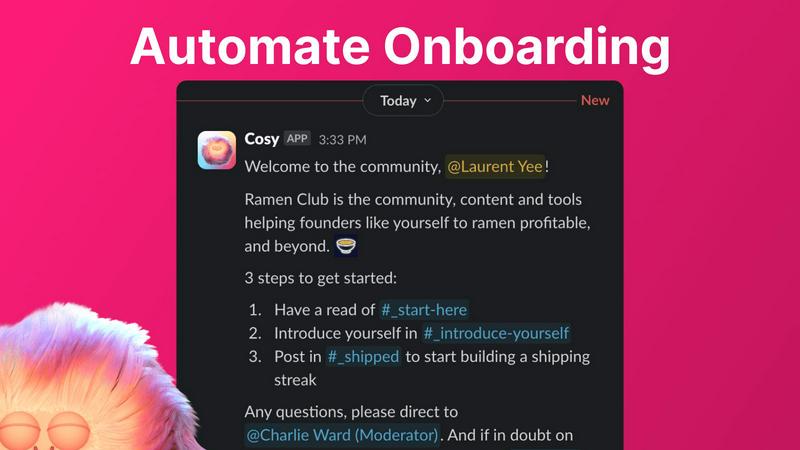
Automate Onboarding
Create and automate up to 10 distinct onboarding welcome DM sequences for new members! This feature allows you to customize messages that can be sent from either a team member or the Cosy bot, ensuring that newcomers feel welcomed immediately or at a set delay. You can personalize these messages with names, links, and emojis, saving you valuable hours each week. Whether it is 4.30am or any time of day, your new members will receive a warm greeting, allowing you to rest easy knowing no one is left unattended!
Connect Your Members
Boost engagement by introducing community members to one another automatically! With this feature, opted-in members are introduced through DMs, enhancing the sense of community and connection. You can customize how often these introductions occur, whether it be weekly or bi-weekly, and the messages can be tailored to fit your community's vibe. This automated process promotes organic conversations and friendships, creating a vibrant community atmosphere that thrives on connection!
Member Directory
Easily create a searchable directory of all your community members without them having to leave Slack! With customizable fields, you can ensure that each member fills out a profile that includes valuable information. Members can search for keywords and filter profiles to find others who share similar interests. This feature promotes engagement and helps members connect, making it simple for everyone to navigate and find helpful resources within the community!
Content Highlights
Effortlessly surface the top 10 most engaging posts in your community with a quick slash command! You can also identify messages that have gone unreplied to, ensuring that valuable conversations are not missed. This feature allows you to keep your community informed and engaged by spotlighting significant discussions and content, making it easier for members to participate and interact with the best contributions!
Use Cases
BRCKS
Streamlining Daily Site Communication & Task Management
Eliminate the "he said, she said"! Site managers use BRCKS to send daily briefings, assign tasks via checklists, and receive photo updates of completed work - all consolidated from WhatsApp messages into one platform. This replaces chaotic group texts and ensures every action item is tracked, visible, and accountable, cutting down resolution times from days to mere hours!
Onboarding and Managing Subcontractor Teams
Integrate your trades seamlessly! A main contractor can invite all electricians, plumbers, and carpenters to the project for free. Each trade gets their own schedule and checklist, can report issues via the BRCKS Bot, and access relevant files. This creates a coordinated, efficient workflow where everyone is on the same page, drastically reducing delays and miscommunication!
Enhancing Client Transparency and Reporting
Delight your homeowners with effortless updates! Instead of scrambling for photos and updates for client meetings, builders use the BRCKS Client Portal to automatically share progress. Clients get a beautiful, simple dashboard showing milestones, photos, and key decisions, which builds immense trust and reduces the time spent on manual reporting and status calls!
Centralizing Project Documentation and Meetings
Never lose a critical document or decision again! Project teams use BRCKS as their single source of truth. All meeting notes, site photos, material invoices, and plan revisions are uploaded and stored in one searchable location. The "Ask BRCKS" feature lets anyone instantly find information, saving countless hours previously wasted digging through emails and file folders!
Cosy
Engaging New Members
When new members join your Slack workspace, they can feel overwhelmed. With Cosy's automated onboarding, you can ensure they receive a personalized welcome message, guiding them through the community's resources and important channels. This warm introduction sets the tone for their experience and encourages early engagement, making them feel like part of the family right away!
Fostering Connections
In a large community, members often miss out on opportunities to connect. Cosy's member introduction feature automates the process of connecting members, fostering relationships and building networks. By regularly introducing members to one another, you create a space that encourages collaboration, communication, and camaraderie, turning acquaintances into friends!
Simplifying Member Management
Managing a large community can be a daunting task. Cosy’s member directory simplifies this by providing a searchable database of members, allowing everyone to find the right contacts easily. This feature enables members to connect over shared interests and collaborate more effectively, streamlining the process of building relationships and enhancing community engagement!
Highlighting Valuable Content
In any vibrant community, important discussions can slip through the cracks. With Cosy’s content highlight feature, you can quickly identify and promote the top 10 most engaging posts or unread messages. This ensures that valuable content is always front and center, encouraging interaction and participation. Members can contribute to discussions that matter, enriching the community experience for everyone!
Overview
About BRCKS
Tired of construction chaos? BRCKS is the revolutionary project management and communication platform built specifically for the real world of residential construction! It's designed for builders, tradespeople, and homeowners who are fed up with critical information getting buried in endless WhatsApp threads, lost emails, and scattered documents. BRCKS brings absolute order to your projects by keeping every single conversation, checklist, task, file, photo, and meeting note in one centralized, accessible place. The best part? It integrates seamlessly with the tools your team already uses, like WhatsApp, eliminating disruption and the need for lengthy training. Imagine saving over 2 hours every day by having a single source of truth for your entire project team - from directors and site managers to every subcontractor and the client. With BRCKS, you can finally organise day-to-site communication, track actions to completion, share beautiful updates with homeowners, and maintain a crystal-clear record of every decision. It's the simple, practical, and powerful solution to run smoother, faster, and more profitable projects!
About Cosy
Cosy is your ultimate automation powerhouse for managing Slack communities! It's designed specifically for community managers, founders, and team leaders who are tired of the tedious tasks that come with maintaining an active community. With Cosy, you can transform your Slack workspace into a thriving, self-sustaining hub where engagement flourishes! Imagine never having to manually welcome new members again, as Cosy automatically sends personalized onboarding messages to each newcomer. The platform not only facilitates intelligent introductions between like-minded members but also surfaces your most engaging content effortlessly. No more complex setups or external platforms—Cosy works natively within Slack, enabling you to focus on what truly matters: strategy, conversation, and growth. With features that save you hours of manual effort every week, you can dramatically increase member engagement and retention. Start for free with up to 250 members today and experience the magic of a connected and vibrant community!
Frequently Asked Questions
BRCKS FAQ
How does the BRCKS Bot for WhatsApp work?
It's incredibly simple! You add the BRCKS Bot as a contact in your WhatsApp, just like a team member. Then, your team can send messages, photos, and voice notes directly to the Bot. BRCKS intelligently processes this information, logging it to the correct project, creating tasks, or updating checklists automatically. Your team stays in WhatsApp, and BRCKS does all the heavy lifting of organization in the background!
Is it really free to add my subcontractors?
Yes, absolutely! We believe collaboration shouldn't have a per-head cost. You can invite an unlimited number of subcontractors and clients to your projects. They get full access to the features they need for their work on your projects - like calendars, tasks, and files - completely free. You only pay for the licensed users within your own core company team.
What if my team or trades aren't tech-savvy?
BRCKS is built for real construction sites, not tech experts! The magic is that it requires no training for your trades because they can interact entirely through the familiar WhatsApp interface via the BRCKS Bot. For your core team, the platform is designed to be intuitive and practical. We focus on simplicity so you can get started immediately and see benefits from day one!
How does BRCKS improve project profitability?
By saving you massive amounts of time and preventing costly errors! When communication is centralized and tasks are tracked, you eliminate rework, reduce delays, and minimize disputes. Saving 2+ hours per day per team (as our users report) directly translates to lower overheads and the ability to take on more work. Fewer mistakes and happier clients also lead to more referrals and repeat business!
Cosy FAQ
How does Cosy automate member onboarding?
Cosy automates onboarding by creating customizable DM sequences that welcome new members. You can send personalized messages immediately or schedule them for a later time, ensuring that every newcomer feels welcomed and informed about the community!
Can members edit their profiles in the directory?
Yes! Members can easily edit their profiles in the directory through notifications sent by Cosy, allowing them to fill out custom fields and provide information that helps others connect with them. This keeps the directory up-to-date and relevant!
Is there a limit to the number of members I can manage with Cosy?
You can start for free with up to 250 members! If you need to manage more, Cosy offers a 30-day trial for unlimited members, allowing you to explore all the features without limitations during that period.
How does the content highlight feature work?
The content highlight feature allows you to use specific slash commands to surface the top 10 most engaging posts in a channel or across your entire community. This makes it easy to keep track of important discussions and ensures that members are always engaged with the best content available!
Alternatives
BRCKS Alternatives
BRCKS is an energetic construction project management platform designed to bring order to the chaos of site communication! It falls squarely into the productivity and management software category, helping residential builders, trades, and homeowners keep every conversation, task, and file in one unified hub. Even the best tools aren't a perfect fit for everyone, which is why teams explore alternatives. Common reasons include finding a solution that better matches their budget, offers specific advanced features they need, or integrates with other software in their workflow. Some teams might also be looking for a platform tailored to different project scales or company sizes. When you're evaluating other options, focus on what truly matters for your daily grind! Look for core functionality that centralizes communication, offers robust task tracking, and provides easy client updates. Prioritize a tool that's genuinely simple and practical for your team to adopt, ensuring it solves more problems than it creates.
Cosy Alternatives
Cosy is an innovative tool designed to transform your Slack workspace into a vibrant community hub through automation. As a productivity and management solution, it helps community managers, founders, and team leaders effortlessly onboard new members, connect like-minded individuals, and surface valuable content—all while saving time! However, users often seek alternatives due to factors such as pricing, feature sets, and specific platform needs that may better align with their organization’s goals. When exploring alternatives to Cosy, it’s essential to consider what features matter most to you and your community. Look for tools that offer seamless integration with Slack, robust automation capabilities, and user-friendly interfaces. Additionally, evaluate the pricing structure to ensure it fits within your budget while providing the value and support necessary for your community's growth and engagement.