

Subclip
Subclip is your all-in-one AI video editor for effortless editing, captioning, and dubbing, transforming your content creation experience!.
tool Details
Explore More
Alternatives
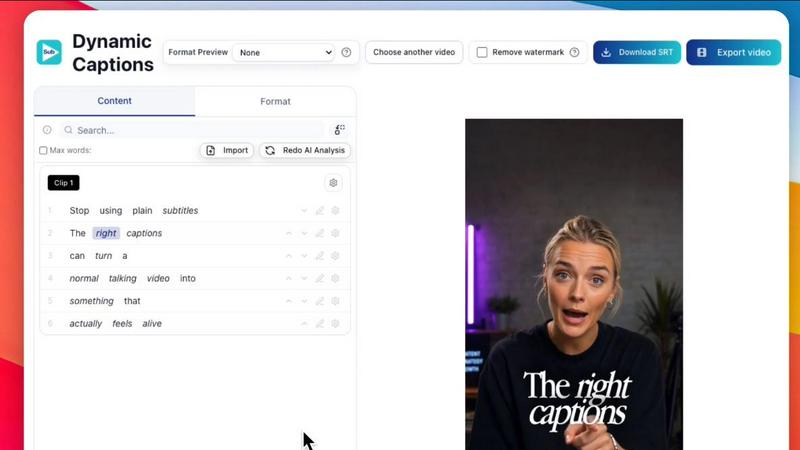
About Subclip
Subclip is an innovative AI-powered video editing platform designed for creators, marketers, and educators who want to simplify and supercharge their video production workflow! With Subclip, you can edit videos intuitively, allowing you to treat video transcripts like documents. Just drag and drop, and start editing! The platform's standout features include voice cloning to re-record parts of your video, one-click removal of silences and filler words, accurate auto-generated subtitles, and the ability to dub your videos into multiple languages while preserving background music. Whether you're a YouTuber, podcaster, course creator, or part of a content team, Subclip is tailored for you! It streamlines your entire video production process, enhancing productivity and creativity by replacing complex editing tools with intuitive, AI-driven features. Experience the freedom to reclaim 80% of your editing time, making video creation accessible and efficient for everyone!
Features
Rough Cut Using Text Transcript
Edit your video transcripts just like a Google Doc! Subclip allows you to trim mistakes instantly and update your timeline without any manual rework. Need to export? You can easily transfer your NLE timeline to popular editing software like DaVinci Resolve, Final Cut Pro, and Adobe Premiere Pro!
AI Clipping
Harness the power of AI to scan your footage for high-energy segments, punchlines, and emotional shifts! Subclip's AI Clipping feature automatically identifies the best moments in your video, turning long-form content into short, engaging clips that maximize viewer retention and engagement.
One-Click Unlimited Captions
Say goodbye to tedious captioning! Subclip generates unlimited subtitles in over 48 languages, ensuring your videos are accessible to a global audience. With just one click, you can create dynamic captions and customize their formatting before exporting your videos.
AI Dubbing with Voice Clone
Take your content global with Subclip's AI Dubbing feature! Translate your voice into 21+ languages while maintaining your original tone and emotion. This means you can reach a wider audience without the hassle of re-recording. Just upload your video, and Subclip does the rest!
Use Cases
For Creators & Podcasters
Creators and podcasters can clip long-form videos effortlessly, increasing their viewership with minimal effort! Subclip allows you to focus on content creation rather than the nitty-gritty of editing, giving you the freedom to produce high-quality videos that resonate with your audience.
For Coaches
Coaches can dub their recorded videos or courses into over 20 languages, using their own voice! This feature makes it easy to reach international clients and provide training materials that cater to a diverse audience, enhancing the impact of your coaching sessions.
For Vloggers
Vloggers can add captions, B-Roll, and audio enhancements effortlessly! With Subclip, you can remove background noise and silences, ensuring every clip sounds professional and polished before exporting to your favorite platforms with ease.
For Agencies & Freelancers
Agencies and freelancers can significantly boost their output with Subclip's unlimited transcription, export options, and team collaboration features! This means you can handle multiple projects simultaneously without sacrificing quality or efficiency, making it a game-changer for busy professionals.
Frequently Asked Questions
How does Subclip streamline the editing process?
Subclip simplifies video editing by allowing users to edit transcripts like text documents, automatically removing silences and filler words, and generating subtitles and translations with just a few clicks. This saves hours of manual editing work!
Can I collaborate with my team using Subclip?
Absolutely! Subclip has built-in collaboration features that enable you to share projects, collect feedback, and work together in a single workspace, making it easy for teams to produce high-quality video content efficiently.
What types of files can I export from Subclip?
You can export your edited videos in multiple formats suitable for various platforms. Subclip supports exporting to DaVinci Resolve, Final Cut Pro, and Adobe Premiere Pro, ensuring compatibility with your preferred editing software.
Is Subclip suitable for beginners?
Yes! Subclip is designed to be user-friendly, making it accessible for both beginners and experienced editors. Its intuitive interface and AI-driven features help simplify the editing process, allowing anyone to create professional-quality videos with ease.
Similar to Subclip

Hailuo AI
Hailuo AI turns prompts and images into videos with Hailuo 2.3, guided motion and camera controls, task tracking, downloads, and API access.

HubVanta
HubVanta is a free AI creative toolkit for generating images, videos, voices, and visual edits from one browser workspace.

Hush Touch | Voice-to-Text for MacOS
Transform your Mac into a smart dictation tool that learns your voice and vocabulary for precise, offline.

Glossa
Break language barriers with Glossa's fast, accurate AI translations for your church services in 100+ languages!.

Bantr: Offline & Unlimited TTS for Mac
Bantr is your ultimate offline text-to-speech solution for Mac, delivering unlimited, private, and natural-sounding.

KaiCalls
KaiCalls is your 24/7 AI phone agent that instantly answers calls, captures leads, and books appointments for your.

Vowen
Vowen turns your voice into text and actions instantly, making dictation and smart automation effortless and private!.