
Magic Hour vs Shrinkpad
Side-by-side comparison to help you choose the right tool.

Magic Hour
Create professional videos and images instantly with 100+ free AI tools in one studio!.
Last updated: March 4, 2026

Shrinkpad
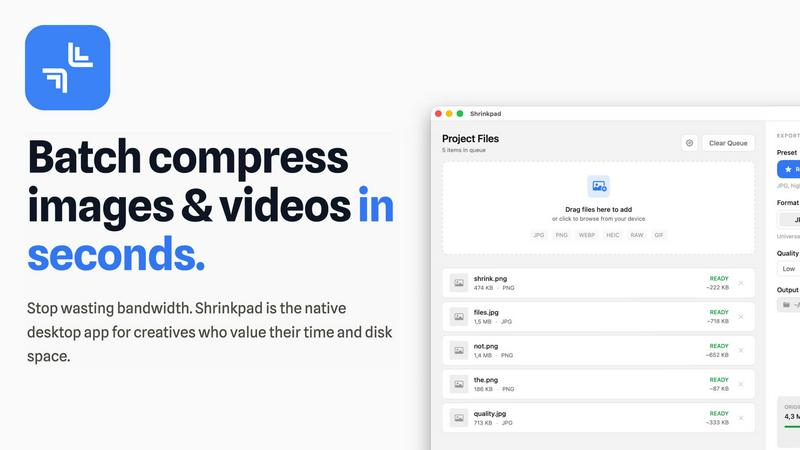
Shrinkpad instantly compresses your images and videos on Mac to save massive space and time!.
Last updated: February 28, 2026
Visual Comparison
Magic Hour

Shrinkpad
Feature Comparison
Magic Hour
Text-to-Video Generation
Bring your scripts and ideas to life instantly! Simply type a text prompt describing your scene, and Magic Hour's powerful AI will generate a professional, engaging video for you. No cameras, no crew, just your imagination and a click. It's the perfect tool for quickly creating explainer videos, social media clips, or ad content from scratch, saving you hours of production time!
AI Face Swap & Lip Sync
Personalize any video with incredible ease! The Face Swap tool lets you seamlessly place a face into any video or photo, opening doors for fun content, virtual try-ons, or personalized marketing. Pair it with the advanced Lip Sync feature to make your characters or swapped faces deliver any message perfectly in sync. It's like having a professional VFX and dubbing studio right in your browser!
Video-to-Video Style Transfer
Transform the look and feel of your existing footage in moments! Upload any video clip and apply a new artistic style, mood, or visual effect with AI. Want your vlog to look like a vintage film or your product demo to have a cyberpunk aesthetic? This feature lets you experiment and reinvent your content without needing to reshoot a single frame!
Unified AI Image Studio
Go beyond video with a full suite of image creation and editing tools! Generate original images from text, edit photos using simple text commands, upscale image quality, create professional AI headshots, and so much more. All these powerful image tools are integrated into the same seamless platform as your video projects, making Magic Hour a true all-in-one creative powerhouse!
Shrinkpad
Lightning-Fast Batch Processing
Unleash the power of your Mac! Shrinkpad is optimized for Apple Silicon and uses multi-threaded compression to process thousands of images and videos in minutes, not hours. Forget about one-by-one exports—just drag, drop, and let it crush your queue with incredible speed. Handle massive batches that would crash web-based tools, all with smooth, reliable performance that saves you hours of busywork!
Intelligent Quality Optimization
Stop guessing compression settings! Shrinkpad's smart engine automatically analyzes the visual complexity of each image to apply the perfect compression ratio. This means you get maximum file size reduction without introducing ugly artifacts or compromising the visual integrity of your stunning photos and videos. Enjoy peace of mind with consistently excellent results every single time!
Privacy-First Local Processing
Your files never leave your machine—ever! In a world of cloud uploads and privacy concerns, Shrinkpad stands firm. All compression happens securely and instantly on your local device. This guarantees complete confidentiality for your sensitive client projects, proprietary assets, and personal media, all while working perfectly offline. Your privacy is our top priority!
Folder Mode & Smart Detection
Revolutionize your workflow with one-drop simplicity! Just drag any folder onto Shrinkpad and it instantly, intelligently scans for all supported media files inside. It automatically identifies over 30 image formats (including professional RAW files) and all major video formats, adding them to your batch while safely ignoring non-media files. Process mixed photos and videos together in one seamless, powerful operation!
Use Cases
Magic Hour
Social Media Content Creation
Never run out of engaging posts again! Magic Hour is a social media manager's dream, enabling the rapid creation of eye-catching videos, personalized memes, and stunning graphics tailored for every platform. Quickly produce trending content, maintain a consistent brand aesthetic, and publish directly to engage your audience faster than ever before!
Personalized Marketing & Advertising
Create ads that truly resonate! Use AI to generate unique user-generated content (UGC) style videos, personalize messages with face swap for local targeting, or produce thousands of asset variations for A/B testing. Magic Hour helps marketers launch live campaigns that drive real engagement and can be scaled effortlessly to reach wider audiences.
Team Training & Internal Communications
Make internal comms captivating! Easily turn dry documents or scripts into engaging training videos, animated explainers, or talking-head presentations using AI avatars. The platform allows teams to collaborate, review, and refine content on the go, ensuring everyone stays informed with professional and clear visual communications.
Rapid Prototyping for Creators
Bring your creative visions to life in minutes! Whether you're a filmmaker storyboarding a scene, a designer mocking up a concept, or an entrepreneur pitching an idea, Magic Hour lets you prototype high-fidelity visuals and videos instantly. This rapid iteration allows for faster feedback loops and more time to perfect your final masterpiece!
Shrinkpad
Web Developers & Designers
Dramatically improve website performance and user experience! Use Shrinkpad to batch-optimize all hero images, product shots, and promotional videos before deployment. Reduce bundle sizes and slash load times, leading to better Lighthouse scores (like faster LCP) and higher SEO rankings. Deliver blazing-fast sites that keep visitors engaged and happy!
Photographers & Content Creators
Reclaim terabytes of storage and streamline your publishing pipeline! Quickly compress entire shoots—including RAW and HEIC files—for client delivery, portfolio sites, or social media. Maintain gorgeous quality while making files easy to email, share, and archive. Free up space on your drives for new projects without losing your original high-res masters!
App & Game Developers
Optimize asset bundles and reduce final app size with ease! Compress thousands of UI icons, textures, in-game screenshots, and promo videos in one fell swoop. Smaller app sizes lead to faster downloads, higher conversion rates, and happier users. It's an essential tool for hitting strict size limits on app stores!
Marketing & Social Media Teams
Create and ship content campaigns at record speed! Export batches of graphics from Figma or Photoshop at 2x/4x resolution, then let Shrinkpad automatically optimize and rename them all for web, email, and ad platforms. Quickly prepare entire libraries of product videos and images for upload, saving countless hours of manual, repetitive export work!
Overview
About Magic Hour
Welcome to the future of content creation! Magic Hour is your all-in-one, browser-based AI studio designed to make professional video and image creation fast, easy, and accessible to everyone. Imagine consolidating over 100 powerful AI tools into a single, intuitive platform where you can generate, edit, and enhance stunning media in seconds! Whether you're a solo creator, a marketer on a tight deadline, or part of a team needing scalable content, Magic Hour empowers you to produce cinematic visuals without expensive equipment, complex software, or reshoots. Start with a simple text prompt, an image, or a video clip and watch it transform into engaging content for social media, ads, training clips, and more. With features like text-to-video, AI face swap, lip sync, and professional headshot generation, it streamlines your entire creative workflow. Best of all, you can start creating for free right from your web browser and join over 3 million trusted creators who are already stepping into the magic!
About Shrinkpad
Tired of bloated media files devouring your precious Mac storage and slowing down your creative flow? Meet Shrinkpad, your ultimate desktop weapon for lightning-fast, batch image and video compression! This powerful, native macOS app is engineered for speed, privacy, and breathtaking simplicity. Built specifically for photographers, designers, developers, and content creators, Shrinkpad empowers you to reclaim gigabytes of valuable disk space in seconds, not hours! Just drag and drop hundreds of files or entire folders, choose your settings, and watch the magic happen—reducing file sizes by up to 90% while meticulously preserving stunning visual quality. The absolute best part? Every single bit of processing happens 100% locally on your Mac. No cloud uploads, no internet dependency, and absolute privacy for your sensitive client assets. Stop wrestling with clunky web tools and tedious manual exports. With seamless support for over 50 formats including JPG, PNG, HEIC, WebP, AVIF, MP4, and MOV, Shrinkpad is the all-in-one, pro-grade solution for anyone serious about optimizing their media, speeding up websites, and supercharging their entire creative workflow!
Frequently Asked Questions
Magic Hour FAQ
Is Magic Hour really free to use?
Yes, you can start creating absolutely free! Magic Hour offers free access to a wide range of its powerful AI tools, allowing you to generate videos, edit images, and explore the platform's capabilities without a credit card. This makes it easy for anyone to jump in and experience the magic of AI-powered creation firsthand!
What kind of videos can I create with Magic Hour?
The possibilities are nearly endless! You can create cinematic scenes, social media shorts, promotional ads, animated explainers, personalized messages with face swap, talking photos, and much more. With tools for text-to-video, image-to-video, and style transfer, you have the flexibility to produce professional content for any purpose or platform.
Do I need technical or design skills to use Magic Hour?
Not at all! Magic Hour is built for everyone. Its intuitive, browser-based interface is designed to be user-friendly. You create content using simple text prompts or by uploading your own media. The AI handles the complex parts, allowing creators of all skill levels to produce stunning visuals with ease and confidence.
Can I use Magic Hour for my business or team?
Absolutely! Magic Hour is trusted by thousands of teams and agencies. It offers scalable solutions, including API access for developers to integrate AI generation directly into applications. For teams, it streamlines collaborative workflows, maintains brand consistency, and enables the high-volume production of assets needed for modern marketing campaigns.
Shrinkpad FAQ
Can I use Shrinkpad for free?
Absolutely! The Free Starter plan lets you experience Shrinkpad's core power at no cost. You can compress up to 10 files per batch in common formats like JPG and PNG, with a max file size of 1GB. It's perfect for trying out the app and handling small, casual tasks. For unlimited processing and all pro features, you can upgrade to a one-time paid plan!
What file formats does Shrinkpad support?
Shrinkpad is a format powerhouse! It supports over 50 different media types out of the box. This includes all major image formats like JPG, PNG, HEIC, WebP, AVIF, and even professional RAW files from various cameras. For video, it seamlessly handles MP4, MOV, and other popular formats. Just drag and drop—chances are, Shrinkpad can optimize it!
Does Shrinkpad support video compression?
Yes, and it's incredibly powerful! Shrinkpad isn't just for images. It expertly compresses video files like MP4 and MOV, significantly reducing their size while maintaining excellent visual quality. You can even mix images and videos in the same batch for ultimate workflow efficiency. Reclaim huge amounts of space from your 4K demo reels and promotional clips!
How many files can I process at once?
With Shrinkpad, the sky's the limit! Unlike web tools that crash under pressure, Shrinkpad is built for heavy-duty, unlimited batch processing. You can queue up thousands of files from entire folder structures and process them all in one go. It handles massive queues with ease, making it perfect for large projects and professional workflows!
Alternatives
Magic Hour Alternatives
Magic Hour is a fantastic, all-in-one AI studio that lets you create professional videos and images directly in your web browser! It falls into the exciting categories of content creation, video production, and image generation. By consolidating over 100 powerful AI tools into a single, intuitive platform, it makes high-quality visual content accessible to everyone, from solo creators to marketing teams. Users often explore other options for a variety of reasons. Some might be looking for different pricing structures or subscription plans that better fit their budget. Others may need very specific features or workflows that a different platform specializes in. Platform needs also play a role, as some creators prefer desktop software over browser-based tools or require integration with other apps in their tech stack. When searching for a different solution, focus on what matters most for your projects. Consider the core AI capabilities you need, like text-to-video or image upscaling. Evaluate the overall user experience and learning curve. Don't forget to check output quality, customization options, and how well the tool fits into your existing creative process. The right platform is the one that empowers your unique vision!
Shrinkpad Alternatives
Shrinkpad is a powerful, native macOS application designed for lightning-fast batch compression of images and videos! It's the ultimate desktop tool for reclaiming storage and speeding up workflows by drastically reducing media file sizes right on your Mac. Users often explore alternatives for various reasons! Maybe they need a solution for Windows or a cross-platform tool, require a different pricing model or free tier, or are looking for very specific advanced features like detailed format support or integration with other creative software. It's all about finding the perfect fit for your unique needs and system! When choosing your media compression powerhouse, focus on a few key aspects! Prioritize tools that offer robust batch processing to handle large volumes of files efficiently. Strongly consider where your data is processed—local, offline tools offer maximum privacy and speed. Finally, ensure it supports all the file formats you commonly use and delivers the quality-to-size ratio you demand for your projects!