
Img Editor vs Seedream 4.0
Side-by-side comparison to help you choose the right tool.

Img Editor
Create breathtaking AI-generated images from your ideas in seconds with Img Editor's powerful and intuitive tools!.
Last updated: February 28, 2026

Seedream 4.0
Unleash stunning 4K AI images and edits instantly with just a single sentence in Seedream 4.0!.
Last updated: March 1, 2026
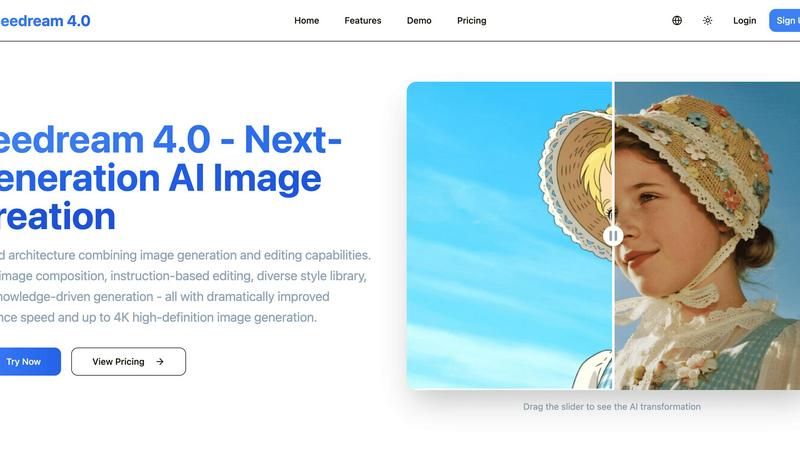
Visual Comparison
Img Editor

Seedream 4.0
Feature Comparison
Img Editor
Text to Image Generation
The core feature of Img Editor is its ability to generate images from textual descriptions. Simply describe what you envision, and watch as the AI transforms your words into stunning visuals, facilitating an effortless creative process for any user!
Image Editing Made Easy
Img Editor allows you to enhance existing images using advanced AI tools. With a few text prompts, you can adjust colors, add elements, or completely transform the look of your image, making it a versatile choice for all your editing needs!
Prompt Generator
Struggling with creativity? The built-in prompt generator sparks your imagination by providing unique and engaging ideas for image creation! You can explore popular prompts from the community, ensuring that you always have fresh inspiration at your fingertips!
High-Quality Output Options
Img Editor offers multiple quality settings for your generated images, including 1K, 2K, and 4K options. This allows users to choose the perfect resolution for their needs, whether for social media, prints, or professional presentations!
Seedream 4.0
Multi-Image Composition
Unlock complex visual storytelling with ease! Input multiple reference images and describe your vision in a single sentence to achieve seamless, intelligent composition. This powerful feature supports batch output, making it perfect for creating cohesive brand assets, detailed scenes, and narrative-driven artwork with incredible efficiency. Say goodbye to tedious manual compositing and hello to a fluid, inspired workflow!
Instruction-Based Editing
Experience true "what you say is what you get" creativity! Generate stunning, high-quality images from a simple text prompt, or upload your own photos and transform them using plain English instructions. Want to change the setting, add an object, or alter the style? Just ask! This intuitive, natural language control puts precise editing power directly at your fingertips, making both generation and refinement astonishingly simple and direct.
Diverse Style Library
Instantly access a world of professional visual aesthetics right at your fingertips! Our extensive style library lets you apply anything from beautiful watercolor and oil painting effects to gritty cyberpunk and futuristic looks with a single click. Whether you're generating new stylized images from scratch or transforming your own photos, crafting a unique and compelling visual language has never been easier or more exciting!
Knowledge-Driven Generation
Go beyond simple patterns and create with enhanced understanding! Seedream 4.0 leverages rich knowledge and reasoning capabilities to produce not just beautiful, but also accurate and informative images. This is ideal for creating detailed educational illustrations, precise charts, professional diagrams, and any content that requires a deeper level of conceptual accuracy and clarity, elevating the intelligence of your creations.
Use Cases
Img Editor
Creative Projects for Artists
Artists can harness Img Editor to create original artwork based on imaginative concepts, saving time and resources while exploring new styles and techniques. Whether for personal use or professional portfolios, the possibilities are endless!
Marketing Material Creation
Marketers can utilize Img Editor to create eye-catching visuals for campaigns, social media posts, and advertisements. With the ability to generate images tailored to specific themes or messages, it enhances brand storytelling effectively!
Personalized Gifts and Prints
With Img Editor, you can design unique personalized gifts, such as custom prints or greeting cards. By generating images that reflect personal stories or sentiments, you can make thoughtful and memorable gifts for loved ones!
Educational Resources
Educators can use Img Editor to create engaging visuals for presentations, learning materials, and classroom activities. Custom visuals can enhance student learning experiences, making complex subjects more relatable and fun!
Seedream 4.0
Marketing & Advertising Design
Supercharge your campaign creation! Generate eye-catching social media graphics, compelling ad banners, and unique product visualizations in minutes, not hours. Easily maintain brand consistency across multiple assets using the multi-image composition feature, and experiment with different styles from the library to instantly match any campaign vibe. It's a game-changer for agile marketing teams!
Concept Art & Visualization
Bring your ideas to life before the first sketch! Writers, game developers, and filmmakers can instantly visualize characters, scenes, and worlds from descriptive text. Architects and product designers can rapidly iterate on concepts and styles. Transform vague ideas into tangible, stunning visual references that inspire your entire team and accelerate the creative development process dramatically!
Personal Art & Photo Enhancement
Unleash your inner artist! Turn your photographs into stunning works of art by applying professional styles from our library, like turning a portrait into a classic oil painting. Use instruction-based editing to creatively alter your images—change backgrounds, add elements, or reimagine the entire scene—all with simple commands. It's the perfect tool for hobbyists and digital art enthusiasts to explore and create!
Educational & Professional Content
Create superior instructional and professional materials with ease! Generate accurate, detailed illustrations for textbooks, blogs, or presentations. Produce clear charts, diagrams, and infographics that communicate complex data beautifully. The knowledge-driven generation ensures your visuals are not only attractive but also factually coherent, making learning and professional communication more effective and engaging.
Overview
About Img Editor
Img Editor is an innovative AI image generation platform designed to unleash your creativity without financial constraints! Catering to artists, designers, marketers, and anyone with a flair for creativity, Img Editor enables you to effortlessly transform your ideas into breathtaking visuals. By leveraging cutting-edge AI technology, it takes just a few descriptive prompts to generate stunning images that capture your imagination! You can also edit existing images to perfection with simple text instructions. Whether you are looking for unique artwork, marketing materials, or personal projects, Img Editor makes professional-quality image creation accessible to everyone. With 10 free generation opportunities every day and the chance to earn even more by engaging with the community, Img Editor not only serves as a tool but also as your creative companion, breaking down barriers to artistic expression and opening the door to endless possibilities!
About Seedream 4.0
Welcome to the future of visual creation! Seedream 4.0 is a revolutionary, all-in-one AI platform that completely shatters the barrier between your imagination and reality! This isn't just another image tool; it's your ultimate creative partner designed for everyone from hobbyists and professional artists to entire marketing teams. The core magic lies in its unified architecture, which seamlessly combines powerful AI image generation with intuitive, instruction-based editing in a single, streamlined workflow. Forget the frustration of juggling multiple apps! Simply describe what you want to see, and watch as Seedream 4.0 brings it to life with breathtaking speed and stunning quality, up to crystal-clear 4K resolution. Whether you're starting from a text prompt or transforming your own uploaded images with natural language commands, you gain unprecedented creative control. It's built for speed, quality, and simplicity, empowering you to craft concept art, design marketing materials, visualize groundbreaking ideas, and bring your wildest dreams to life faster than ever before!
Frequently Asked Questions
Img Editor FAQ
How does Img Editor work?
Img Editor uses advanced AI algorithms to convert text descriptions into visually stunning images. Simply enter your prompt, and the AI will generate an image that aligns with your vision in seconds!
Is there a limit to the number of images I can generate?
Yes! Users can enjoy 10 free image generations every day. Additionally, you can earn more generations by actively participating in the community and contributing to the gallery!
Can I edit existing images with Img Editor?
Absolutely! Img Editor allows users to edit existing images through simple text prompts, providing an intuitive and user-friendly way to enhance your visuals without complex software.
What kind of output quality can I expect?
Img Editor offers various output quality options, including 1K, 2K, and high-quality 4K resolutions. This flexibility ensures that you can create images suitable for any project or platform!
Seedream 4.0 FAQ
Can I try Seedream 4.0 for free?
Yes! You can experience the power of Seedream 4.0 by trying our demo editor. Simply visit the website, upload an image, and describe your desired transformation to see the AI in action. This allows you to test the core instruction-based editing capabilities and see the stunning results for yourself before committing to a subscription plan!
How does Seedream 4.0 work?
Seedream 4.0 uses advanced artificial intelligence models trained on vast datasets. You provide input, either as a text prompt or an uploaded image with instructions. The AI analyzes your request, understands the context and desired outcome (leveraging its knowledge-driven capabilities), and generates or edits the image accordingly. The unified architecture processes everything in one smooth, fast workflow!
What makes Seedream 4.0 different from other AI tools?
The key differentiator is our unified all-in-one platform! Unlike other tools that separate generation and editing into different apps, Seedream 4.0 combines them seamlessly. This, combined with features like Multi-Image Composition, a vast Style Library, and Knowledge-Driven Generation, offers unparalleled creative control, speed, and professional-grade output quality—all in a single, intuitive interface!
Can I use the generated images commercially?
Absolutely! You own the images you create with Seedream 4.0 and can use them for commercial purposes, including in marketing materials, products, publications, and client work. This makes it an incredibly powerful tool for freelancers, agencies, and businesses looking to produce original, royalty-free visual content quickly and cost-effectively. Always check the latest Terms of Service for full details.
Alternatives
Img Editor Alternatives
Img Editor is an innovative AI image generation platform that belongs to the Image & Photo category. It allows users to unleash their creativity by transforming ideas into stunning visuals effortlessly. Despite its amazing features, users often seek alternatives due to various reasons such as pricing structures, specific feature sets, or platform compatibility needs. Some might find that Img Editor's offerings do not align perfectly with their creative workflows or technical requirements. When searching for alternatives, it's essential to consider factors such as ease of use, variety of features, and community engagement. Look for platforms that not only offer robust image generation capabilities but also provide additional editing tools and a supportive community. This ensures that your creative journey remains inspiring and productive, with plenty of opportunities to refine and showcase your work!
Seedream 4.0 Alternatives
Seedream 4.0 is a powerhouse all-in-one AI image generator and editor that's taking the creative world by storm! It belongs to the exciting category of AI-powered visual creation tools, designed to turn your imagination into stunning, high-quality visuals with incredible speed and control. It's a fantastic platform for anyone looking to streamline their workflow from idea to final artwork. Even with such a powerful tool, creators often explore alternatives for various reasons. Maybe you're looking for a different pricing model or a free tier to start. Perhaps you need specific features like a particular art style, integration with other software, or platform compatibility that better suits your device. It's all about finding the perfect creative partner that aligns with your unique needs and budget! When choosing an alternative, focus on what matters most for your projects. Consider the core quality and speed of image generation, the depth and ease of the editing tools, and whether the platform offers a unified workflow. Don't forget to evaluate output resolution, the flexibility of pricing plans, and the overall user experience. The right tool should feel like an extension of your creativity, removing barriers, not creating them!