
ScopeSnap vs SupaSidebar
Side-by-side comparison to help you choose the right tool.

ScopeSnap
ScopeSnap instantly turns your messy project notes into clear, client-ready proposals and estimates!.
Last updated: March 18, 2026

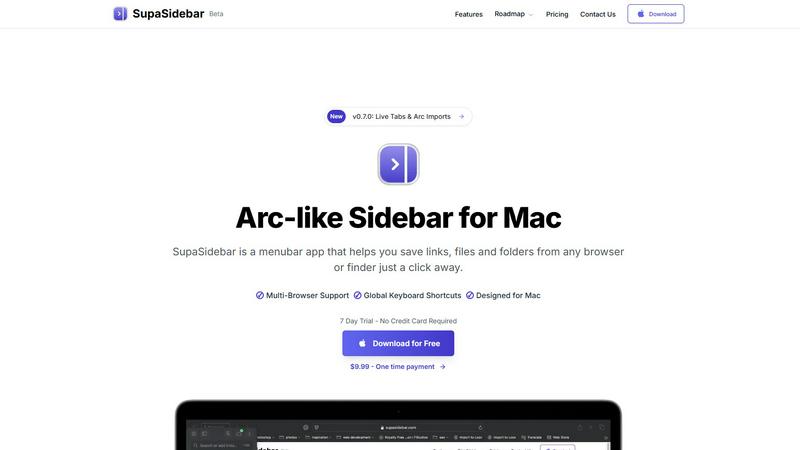
SupaSidebar
Instantly save and open any link, file, or folder on your Mac with a single click!.
Last updated: February 28, 2026
Visual Comparison
ScopeSnap

SupaSidebar
Feature Comparison
ScopeSnap
AI-Powered Scope Generation
Stop starting from a blank page! Simply paste in your raw discovery materials—like call transcripts, email threads, and meeting notes. ScopeSnap's AI gets to work instantly, analyzing the content to identify key requirements, break them down into structured epics and scope items, and build an initial project backlog. It even surfaces critical open questions and flags underlying assumptions you need to address, ensuring nothing important slips through the cracks from the very beginning!
Interactive Scope Refinement & Estimation
Your initial AI-generated scope is just the starting point for collaboration! ScopeSnap provides a clear, visual backlog board where you can easily review, edit, and reorganize tasks. Assign roles, set time or complexity estimates, and iteratively refine each feature until it's perfectly understood. This interactive environment turns vague ideas into concretely estimatable work items, giving you the confidence to provide accurate quotes and timelines to your clients.
Automated Proposal & SOW Creation
Seal the deal faster than ever! Once your scope and estimates are finalized, ScopeSnap automatically generates a polished, professional document ready for client eyes. Choose between proposal formats or a detailed Statement of Work (SOW). The tool populates it with your structured scope, estimates, assumptions, and terms, saving you hours of tedious copying, pasting, and formatting. You get a client-ready deliverable in minutes, accelerating your sales cycle dramatically!
Centralized Project Scoping Hub
Bring order to your pre-sales chaos! ScopeSnap acts as a single source of truth for all your project discovery and scoping work. Keep all your client conversations, notes, evolving scope backlogs, and final proposals organized in one secure place. This streamlined workflow ensures consistency, makes it easy to revisit past decisions, and allows you to manage multiple client engagements efficiently without dropping the ball!
SupaSidebar
Universal Sidebar Access
SupaSidebar creates a beautifully designed, persistent sidebar that lives in your menubar, ready to spring into action! This isn't just for your browser; it's a universal hub for your entire Mac. You can save and access links from any supported browser, files and folders from Finder, and even your favorite applications, all from one centralized, instantly accessible location. It's your digital cockpit, designed to keep you in the flow without constant app switching!
Powerful Global Keyboard Shortcuts
Take control with lightning-fast keyboard shortcuts that work anywhere on your Mac! Save your current website link directly to the sidebar with a simple CMD+CTRL+S, or copy it with CMD+CTRL+C. Need to find anything in your sidebar instantly? Just press CMD+CTRL+K to bring up a blazing-fast search that scans through all your saved items, recent history, and more. These shortcuts are global, meaning they work no matter which app you're currently using, saving you countless clicks and seconds throughout your day!
Recents & Pinned Favorites
Never lose your work again! The "Recents" feature automatically tracks every website you've visited in the last 48 hours, so you can quickly jump back to that important article or research tab you had open yesterday. For your essential tools, you can pin items to the top of your sidebar for permanent, one-click access. This combination ensures both your current workflow and your core resources are always immediately available, eliminating frustrating searches!
Seamless Multi-Browser Integration
SupaSidebar works harmoniously with the browser you love! It offers full support for all major browsers including Safari, Google Chrome, Mozilla Firefox, Brave, and the innovative Arc browser. This means you can save links and access your sidebar content regardless of which browser you're using at any given moment. It unifies your web experience across different tools, making your browsing faster and more organized than ever before!
Use Cases
ScopeSnap
For Freelance Developers
As a solo developer, you wear every hat! ScopeSnap empowers you to compete with agencies by providing a professional, structured scoping process. Quickly turn post-call notes into a clear scope and a stunning proposal that builds immense client trust. It helps you avoid under-scoping projects, leading to more accurate estimates, fewer stressful "scope creep" conversations, and ultimately, more profitable and predictable engagements!
For Software Agency Sales Teams
Speed up your sales pipeline and improve win rates! ScopeSnap enables your sales and technical teams to collaborate seamlessly after discovery calls. Transform messy handoff notes into a unified, detailed scope that your delivery team can stand behind. Generate consistent, high-quality proposals and SOWs that reflect your agency's professionalism, helping you close deals faster and set up projects for successful, well-defined execution from day one!
For Technical Consultants
Clarity is your currency! When advising clients on complex software projects, you need to define phases, deliverables, and expectations precisely. ScopeSnap helps you structure your recommendations into actionable plans. Use it to create detailed roadmaps, outline phased approaches, and produce formal documentation that aligns all stakeholders, ensuring everyone is on the same page before a single line of code is written!
For Managing Fixed-Price Projects
Mitigate your biggest risk with confidence! Fixed-price contracts require airtight scopes. ScopeSnap is essential for meticulously defining what is in and what is out of a project. Its AI helps identify edge cases and assumptions, while the detailed backlog becomes the contractual foundation. This process protects your margins, manages client expectations, and provides a clear reference point throughout the project lifecycle!
SupaSidebar
The Tab-Hoarding Researcher
Are you a student or professional who ends every research session with 50+ browser tabs open, terrified of closing them? SupaSidebar is your salvation! Quickly save all your reference links, important papers, and data sources directly to organized spaces in the sidebar with a simple shortcut. Clear your browser clutter without fear, knowing every crucial link is safely stored and instantly retrievable from your elegant sidebar, ready for when you need to cite or revisit!
The Creative Content Juggler
For creators, designers, and developers, inspiration and resources come from everywhere! SupaSidebar acts as your creative swiss army knife. Save mood board images, tutorial videos, code repositories, design asset folders, and inspiration websites all in one place. When you're deep in a project, just hit your global shortcut to pull up your sidebar and grab exactly what you need without breaking your creative flow to dig through bookmarks or finder windows!
The Multitasking Project Manager
Juggling multiple clients, projects, and deadlines? SupaSidebar helps you compartmentalize and conquer! Create separate spaces for each project or client. Instantly save relevant emails, briefs, spreadsheets, and dashboard links into their dedicated space. With a quick keystroke, you can switch your entire sidebar context from "Client A Website Redesign" to "Q4 Financial Planning," keeping all your resources perfectly organized and dramatically reducing context-switching overhead!
The Efficiency-Obsessed Professional
If you value speed and hate repetitive actions, SupaSidebar is your ultimate productivity booster! Stop manually copying and pasting URLs into documents or messages. Use the copy shortcut to grab a link and paste it anywhere in a flash. Keep your daily drive folders, frequent Slack channels, or routine reports pinned for one-click access. Turn those small, time-consuming tasks into effortless, keyboard-driven actions and reclaim hours of productive time every week!
Overview
About ScopeSnap
Tired of the chaotic scramble after a client discovery call? ScopeSnap is your AI-powered co-pilot for turning messy notes and vague ideas into crystal-clear project plans and winning proposals! Built specifically for freelance developers, consultants, and software agencies, ScopeSnap tackles the most tedious and risky part of the job: scoping and estimation. Stop losing hours manually dissecting requirements and drafting documents from scratch. Our platform intelligently analyzes your discovery call transcripts, emails, and notes to automatically generate a structured backlog of epics and tasks. This gives you a solid foundation to refine, estimate accurately, and resolve assumptions with confidence. Once your scope is locked in, ScopeSnap transforms it into a professional, client-ready proposal or Statement of Work in minutes, not hours. It's the ultimate workflow to de-risk projects, impress clients with your clarity, and win more business with less administrative headache!
About SupaSidebar
Tired of digital chaos derailing your focus and slowing you down? Meet SupaSidebar, your beautiful new command center for Mac! This is a revolutionary, Arc-inspired sidebar designed from the ground up to supercharge your productivity by putting everything you need instantly at your fingertips. SupaSidebar is a lightweight, native menubar application that helps you stay organized, browse faster, and maintain your creative flow without ever leaving your desktop. Imagine having immediate, one-click access to all your saved links, important files, favorite folders, and even your open browser tabs from one elegant, distraction-free panel! It's the ultimate solution for anyone who multitasks on a Mac. Whether you're a researcher drowning in a sea of tabs, a creator juggling dozens of resources, or a professional switching between multiple projects, SupaSidebar is built for you. Its core promise is powerful and simple: stop wasting precious time searching and start doing! With powerful global keyboard shortcuts and seamless integration across all major browsers like Safari, Chrome, Arc, Firefox, and Brave, SupaSidebar ensures your most important digital assets are always just a keystroke away. Best of all, your data is private and never leaves your Mac. It's time to transform how you work and unlock a new level of efficiency!
Frequently Asked Questions
ScopeSnap FAQ
What kind of input does ScopeSnap need to work?
ScopeSnap is designed to work with the unstructured text you already have! You can paste in notes from discovery calls, meeting transcripts, email threads with client requirements, bullet-point lists, or even voice-to-text summaries. The AI analyzes this text to identify themes, requirements, and user stories to build your initial structured scope. The more context you provide, the better the starting point will be!
How accurate are the AI-generated estimates?
ScopeSnap's AI is fantastic at breaking down scope and identifying tasks, but it doesn't provide final estimates on its own. The true power lies in giving you a complete, structured breakdown to make estimation easy and accurate for you. You review the generated tasks, assign your own expert estimates based on complexity or hours, and refine as needed. This ensures the final numbers are based on your expertise, not a black-box algorithm!
Can I customize the generated proposals?
Absolutely! The auto-generated proposals and Statements of Work are fully customizable templates. You can edit every section—add your company logo, modify the wording, adjust terms and conditions, and fine-tune the presentation of the scope and pricing. ScopeSnap gives you a huge head start with professionally formatted content, but you retain full control to make it perfectly match your brand and the specific deal!
Is my client data safe and private?
Security is a top priority! All data you input into ScopeSnap is encrypted and handled with strict confidentiality. We do not use your client conversations or proprietary project details to train our AI models. Your scopes, estimates, and business information remain private and secure within your account. We recommend reviewing our detailed Privacy Policy for comprehensive information on our security practices and data handling policies!
SupaSidebar FAQ
Is SupaSidebar a browser extension?
No, SupaSidebar is not a browser extension! It is a powerful, standalone native application for macOS that lives in your menubar. It integrates with your browsers through secure, native methods to read and save tab information, but it operates independently as its own app. This means it can also manage files and folders from your Finder and work globally across your entire Mac system, not just inside a browser window!
Which browsers does SupaSidebar work with?
SupaSidebar offers fantastic compatibility and works seamlessly with all major browsers on your Mac! This includes Safari, Google Chrome, Mozilla Firefox, the Brave browser, and the popular Arc browser. The app is designed to be your universal companion, so no matter which browser you prefer for different tasks, you can save links and access your sidebar content consistently and without any hassle!
What macOS version do I need?
To run SupaSidebar and enjoy all its powerful features, you will need a Mac running macOS 13 (Ventura) or a newer version. This ensures the app can utilize the latest macOS technologies for performance, security, and seamless system integration, providing you with the smooth, native experience it's designed to deliver!
Where is my data stored?
Your privacy and security are paramount! All the data you save into SupaSidebar--your links, your file paths, your organizational spaces--is stored locally and privately on your own Mac. Nothing is sent to or stored on external servers. This "nothing leaves your Mac" philosophy means you have complete control and ownership over your information at all times!
Alternatives
ScopeSnap Alternatives
ScopeSnap is an AI-powered project scoping and proposal tool designed for freelance developers and software agencies. It belongs to the productivity and project management category, helping you transform chaotic discovery notes into clear, actionable project plans and client-ready documents in minutes! Users often explore alternatives for various reasons, like finding a better fit for their budget, needing specific integrations with other platforms, or requiring a different set of collaborative features. It's all about finding the perfect tool that aligns with your unique workflow and business needs. When evaluating other options, focus on what truly matters for your scoping process. Look for core capabilities in breaking down complex projects, accuracy in estimation, and the quality of the final proposals generated. The right tool should save you time, reduce risk, and give you confidence in every quote you send!
SupaSidebar Alternatives
SupaSidebar is a powerful menubar app for Mac that acts as your ultimate digital command center! It belongs to the productivity and management category, designed to eliminate clutter by giving you instant, one-click access to saved links, files, folders, and even your open browser tabs. It’s all about speeding up your workflow and keeping you in a state of flow! Even the best tools aren't a perfect fit for everyone. Users often explore alternatives for various reasons, such as budget constraints, a need for different features, or because they use multiple operating systems beyond macOS. It’s smart to shop around and find the solution that truly matches your unique workflow and tech setup! When searching for an alternative, focus on what matters most for your daily routine. Consider the core functionality: does it offer fast search and quick access to your digital assets? Check for compatibility with your preferred browsers and whether it supports powerful global keyboard shortcuts. Ultimately, you want a tool that feels intuitive and removes friction, not adds to it!