
Never Drop vs Refbox
Side-by-side comparison to help you choose the right tool.

Never Drop
NeverDrop captures contacts and crafts personalized follow-ups instantly, turning every handshake into a deal!.
Last updated: February 28, 2026

Refbox gives you instant, distraction-free access to all your references right above your workspace while you create!.
Last updated: February 28, 2026
Visual Comparison
Never Drop

Refbox
Feature Comparison
Never Drop
Instant Business Card Scanning
With Never Drop, you can scan any business card in seconds! Simply snap a photo at the booth and watch as our AI-powered OCR technology instantly extracts essential contact details such as name, company, title, phone number, and email. No more typing or squinting at tiny print—just quick, accurate data capture for your leads!
Automatic Email Enrichment
Never worry about generic emails again! Never Drop automatically enriches your captured contacts by finding verified work emails based on their name and company. This feature eliminates the guesswork and manual searches on LinkedIn, ensuring you have the best possible contact information at your fingertips!
AI-Generated Follow-Up Emails
Imagine having personalized follow-up emails drafted for you while you still stand at the booth! Using your voice notes and conversation context, Never Drop crafts tailored emails that feel genuine and relevant. Review, tweak, and send your follow-up in under two minutes—it's that fast and efficient!
Team Collaboration Dashboard
Stay aligned with your team and keep everything organized! Never Drop's dashboard allows you to categorize scans by event, reassign leads between team members, and track your team's activities—all in one workspace. This ensures that nothing slips through the cracks, and everyone is on the same page!
Refbox
Floating Reference Frames
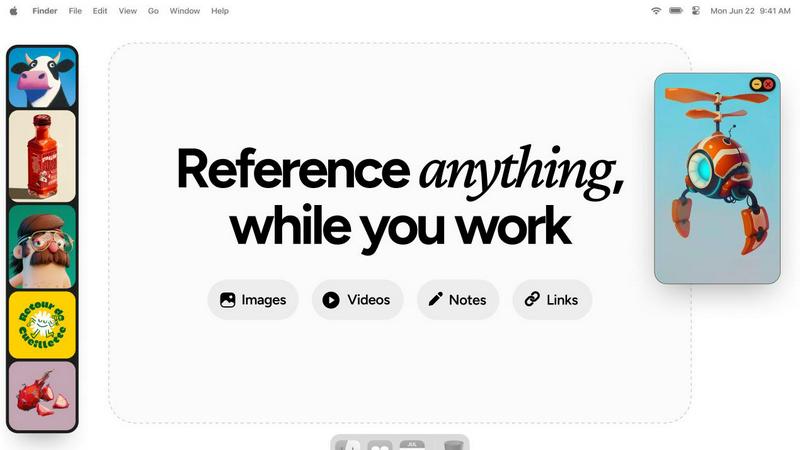
Refbox allows you to pin your references in always-on-top frames that float above any application you are working in, ensuring your inspiration is always within reach!
Masonry Mode & Full-Screen Gallery
View your references in a stunning Masonry Mode or switch to a full-screen Gallery for an immersive experience. This makes it easy to compare visuals and keep your creativity flowing!
Markdown-Enabled Notes
Never lose track of your ideas! Refbox lets you add markdown-enabled notes, complete with styling options and checklists, ensuring your thoughts are organized and readily accessible.
Instant Collection Switching
Manage multiple projects effortlessly! With Refbox, you can create and switch between various collections instantly, allowing you to focus on what matters most without any interruptions.
Use Cases
Never Drop
Trade Shows
Never Drop shines at trade shows! Quickly scan business cards of potential clients and instantly enrich their profiles with accurate contact information, ensuring you can follow up with them while the conversation is still fresh in their minds.
Networking Events
At networking events, time is of the essence! Use Never Drop to capture leads swiftly and efficiently, adding voice notes to remind you about specific conversations, which helps you personalize your follow-ups and make lasting impressions.
Conferences
Conferences can be overwhelming with countless connections to make. With Never Drop, you can scan and manage leads by event, making it easy to organize your follow-up strategy and keep track of all your valuable contacts.
Business Dinners
Even in more intimate settings like business dinners, Never Drop is a game-changer! Capture contacts seamlessly and enrich profiles on the spot, ensuring you can send personalized follow-ups that reflect the conversations you had, fostering stronger relationships.
Refbox
Streamlined Design Workflow
Graphic designers can keep all their reference materials—such as color palettes, typography samples, and layout inspirations—visible in one place, enhancing their workflow and creativity!
Enhanced Animation Process
Animators benefit from having reference images and videos floating above their animation software, allowing them to reference movement and styles without breaking their flow or losing focus.
Efficient UI/UX Development
UI and UX designers can quickly access design inspirations, user flow diagrams, and feedback notes while working on their applications, making it easier to iterate and improve their designs.
Comprehensive Moodboarding
Photographers and creatives can effortlessly gather and display a variety of images, GIFs, and notes for moodboarding, leading to a more cohesive vision for their projects without the hassle of constant switching.
Overview
About Never Drop
Never Drop is your go-to lead-capture app, meticulously crafted for sales teams navigating the high-octane environments of trade shows, conferences, and networking events! This innovative tool simplifies how you collect and manage leads by allowing users to effortlessly scan business cards using their smartphones. Imagine being able to enrich that captured data with valuable voice notes or text context about your discussions—ensuring you never forget crucial details about each lead! With advanced AI capabilities, Never Drop drafts personalized follow-up emails in under two minutes, ensuring no lead ever falls through the cracks. Seamlessly integrating with popular CRMs like HubSpot, Never Drop keeps your sales pipeline organized, efficient, and ready for action. Say goodbye to lost leads and hello to a streamlined follow-up process that turns connections into closed deals—it's time to elevate your sales game!
About Refbox
Tired of the constant alt-tabbing and window switching that disrupts your creative flow? Meet Refbox, the ultimate floating reference app designed specifically for artists, designers, animators, and creators who need their inspiration right at their fingertips! Refbox keeps your reference materials visible and accessible, allowing you to pin images, GIFs, videos, and notes in resizable frames that float above your primary work applications like Photoshop, Blender, or Figma. With Refbox, you can say goodbye to cluttered folders and lost momentum! It centralizes your inspiration into a sleek, organized sidebar, enabling you to view everything in a beautiful Masonry Mode or a full-screen Gallery for additional monitor space. Plus, you can add markdown-enabled notes for ideas and checklists, save clickable bookmarks to tutorials, and scrub through videos frame-by-frame. With the ability to create multiple collections for various projects, Refbox transforms your chaotic reference process into a streamlined workflow. Designed for professionals who cannot afford distractions, Refbox is your essential upgrade for faster, more accurate, and more inspired creation!
Frequently Asked Questions
Never Drop FAQ
What is Never Drop?
Never Drop is a lead-capture app designed for sales teams at events, allowing users to scan business cards, add contextual voice notes, and automatically generate personalized follow-up emails—all in less than two minutes!
How does business card scanning work?
To scan a business card, just take a photo using the Never Drop mobile app. The app's AI-powered OCR technology extracts the contact's name, company, title, phone number, and email in seconds. Manual entry is also an option if you prefer!
What types of events is Never Drop for?
Never Drop is perfect for any event where you meet new contacts, including trade shows, conferences, networking events, meetups, and business dinners. It allows you to organize scans by event for better lead tracking!
Do I need the mobile app?
Yes! The mobile app is essential for scanning business cards, recording voice context, and triggering follow-ups on the go. There's also a web dashboard for managing your team and reviewing scans, both of which work seamlessly together!
Refbox FAQ
How does Refbox integrate with other applications?
Refbox floats above any application, providing seamless access to your references while you work without interrupting your creative process.
Can I use Refbox on multiple monitors?
Absolutely! Refbox can be utilized on multiple monitors, allowing you to take full advantage of its full-screen Gallery mode for a more immersive experience.
Is there a mobile version of Refbox?
Currently, Refbox is designed for desktop use, ensuring that creatives have the most efficient and distraction-free experience while working on their projects.
What types of media can I store in Refbox?
Refbox supports images, GIFs, videos, notes, and even clickable bookmarks, making it a versatile tool for storing all your references in one convenient location.
Alternatives
Never Drop Alternatives
Never Drop is a cutting-edge lead-capture app specifically designed for sales teams operating in dynamic settings like trade shows, conferences, and networking events. It streamlines the process of gathering and managing leads, allowing users to scan business cards with their smartphones and enrich the captured data with vital conversation notes. This innovative tool falls into the Productivity & Management category, helping users transform every handshake into a deal! Users often seek alternatives to Never Drop for various reasons, such as pricing, specific feature requirements, or compatibility with their existing platforms. When choosing an alternative, it's crucial to assess factors like ease of use, integration capabilities with your current CRM systems, and the overall efficiency of lead management. Selecting the right tool can significantly enhance your sales process and ensure no lead is ever lost!
Refbox Alternatives
Refbox is an innovative floating reference app designed specifically for creative professionals, allowing users to keep their inspirations visible and easily accessible while working. It helps streamline the creative process by eliminating the frustration of constant window switching and cluttered folders. Users often seek alternatives to Refbox for various reasons, such as pricing concerns, the need for specific features, or compatibility with different platforms. When choosing an alternative, it's crucial to consider the functionality, ease of use, and how well it integrates into your existing workflow to ensure that your creative process remains uninterrupted. --- [{"question": "What is Refbox?", "answer": "Refbox is a floating reference app that keeps your inspirations visible and accessible while you work on creative projects."},{"question": "Who is Refbox for?", "answer": "Refbox is designed for artists, designers, animators, and creators who need constant access to their references without distractions."},{"question": "Is Refbox free?", "answer": "Details on pricing for Refbox can vary, so it's best to check the official website for the most current information."},{"question": "What are the main features of Refbox?", "answer": "Refbox features always-on-top floating frames, versatile media organization, markdown-enabled notes, and the ability to create multiple collections for different projects."}]