
PseudoRun vs YouTube to Transcript
Side-by-side comparison to help you choose the right tool.

PseudoRun
Master IGCSE pseudocode for free with real-time validation and step-by-step debugging!.
Last updated: March 1, 2026

YouTube to Transcript
Instantly convert any YouTube video to a transcript for free, with no signup and support for over 100 languages!.
Last updated: February 26, 2026
Visual Comparison
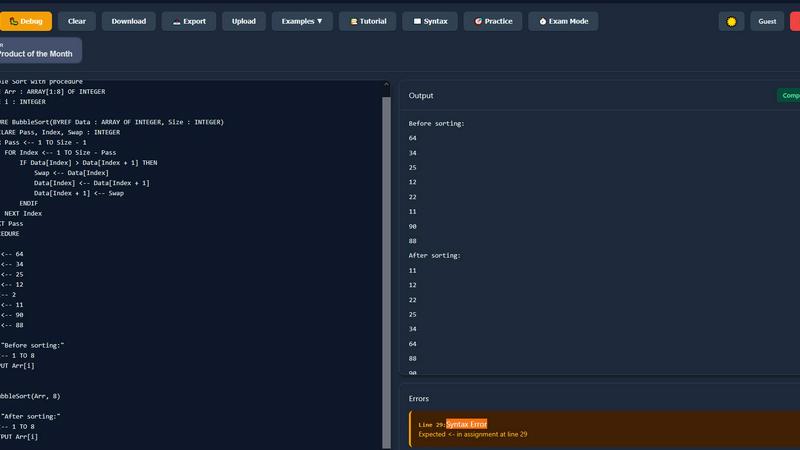
PseudoRun
YouTube to Transcript

Feature Comparison
PseudoRun
IGCSE Exam-Focused Editor
This isn't just any pseudocode tool—it's built specifically for the Cambridge IGCSE! The editor and syntax are 100% aligned with the official syllabus specifications and exam patterns. You practice exactly what you'll be tested on, from variable declarations to complex procedures, ensuring there are no surprises on exam day. It's like having the exam board's blueprint as your coding environment!
Real-Time Validation & Error Detection
Get instant feedback as you type! Our intelligent system performs live syntax checking and highlights errors the moment they occur. This immediate correction loop helps you learn proper IGCSE pseudocode structure quickly and write perfect code, building strong foundational habits that are essential for both exams and future programming.
Step-by-Step Interactive Debugger
Master algorithms inside and out with our powerful debugger! Execute your pseudocode line-by-line, watch how data flows, and track variable values in real-time. This deep, visual understanding of how each instruction affects your program is invaluable for troubleshooting logic errors and truly comprehending complex topics like loops and arrays.
Comprehensive IGCSE Practice Library
Jumpstart your learning with over 50+ curated IGCSE-style examples and exercises! This library covers every major topic—from basic loops and conditionals to advanced arrays and procedures. It’s the perfect resource for structured practice, revision, and building the confidence needed to tackle any problem the exam throws your way.
YouTube to Transcript
Completely Free
YouTube to Transcript is 100% free with no hidden fees or premium tiers! Users can access the full functionality of the tool without worrying about costs, making it an incredibly valuable resource for anyone needing transcripts.
No Registration Required
Get started immediately without the hassle of creating an account! This feature eliminates barriers and allows users to focus solely on generating transcripts from their favorite YouTube videos.
Unlimited Usage
Enjoy the freedom of unlimited transcript generation! There are no restrictions on the number of videos you can transcribe, empowering users to extract text from as many videos as they desire without limitations.
Multi-Language Support
Translate transcripts into over 125 languages with just one click! This feature ensures that users from diverse linguistic backgrounds can benefit from the tool, making it accessible to a global audience.
Use Cases
PseudoRun
IGCSE Exam Preparation & Practice
Ace your Computer Science exams with targeted practice! Use PseudoRun to work through syllabus-specific problems, utilize the Exam Mode Timer to simulate real test conditions, and refine your pseudocode skills. It's the most effective way to build speed, accuracy, and confidence, turning exam anxiety into exam mastery!
Classroom Teaching & Demonstrations
Educators, revolutionize how you teach algorithms! Use PseudoRun in class to write and execute pseudocode live on a projector. The step-by-step debugger is perfect for visually demonstrating how algorithms flow, making abstract concepts concrete and engaging for every student in the room.
Self-Paced Learning for Beginners
New to programming? Start your journey here! PseudoRun's distraction-free interface and instant feedback provide a supportive, low-pressure environment to learn core computational thinking. You can experiment freely, learn from mistakes in real-time, and build a solid understanding before moving to a full programming language.
Algorithm Design & Logic Prototyping
Even experienced coders can benefit! Quickly draft, test, and iterate on algorithm logic without getting bogged down by language-specific syntax. Whether you're planning a complex program or solving a logic puzzle, PseudoRun is the perfect scratchpad to validate your ideas before implementation.
YouTube to Transcript
Content Creation
Content creators can easily convert their video scripts or research materials from YouTube into text form for blogs, articles, and social media posts, enhancing their content marketing strategies!
Academic Research
Students and researchers can transcribe educational YouTube videos to compile notes and references, simplifying the study process and making it easier to cite sources in their work.
Accessibility
YouTube to Transcript is a fantastic tool for individuals with hearing impairments, allowing them to access video content through readable transcripts. This feature promotes inclusivity and ensures everyone can enjoy video resources!
Language Learning
Language learners can use transcripts to improve their comprehension and language skills by reading along with videos in their target language, making the learning process more interactive and engaging!
Overview
About PseudoRun
Welcome to PseudoRun, the ultimate interactive playground for mastering pseudocode! Designed from the ground up for aspiring programmers, students, and educators, PseudoRun eliminates the intimidating complexities of traditional coding environments. It's the #1 free online IGCSE pseudocode editor and simulator, laser-focused on helping you write, run, and debug algorithms in real-time! Imagine having a powerful tool that's 100% aligned with the Cambridge IGCSE Computer Science syllabus, providing you with the most relevant and exam-focused practice possible. With PseudoRun, you bridge the critical gap between theoretical concepts and practical application, making algorithm design accessible, engaging, and incredibly effective. Our mission is simple: to provide every student with a distraction-free, ad-free, and completely free platform dedicated to IGCSE success. Ditch the confusing setups and start turning your pseudocode ideas into executable logic today!
About YouTube to Transcript
YouTube to Transcript is a revolutionary online tool designed to convert YouTube videos into readable text efficiently and effortlessly! Perfect for content creators, students, researchers, and professionals alike, this service allows users to extract high-quality transcripts from any YouTube video within seconds. Simply copy the video URL, paste it into the tool, and voilà! Your transcript is ready for copying or downloading. The platform is completely free and requires no registration, making it accessible to everyone! With support for over 125 languages, it’s the ideal solution for anyone looking to enhance their understanding or repurpose video content into written formats. Say goodbye to tedious note-taking and hello to instant transcripts!
Frequently Asked Questions
PseudoRun FAQ
Is PseudoRun really completely free?
Yes, absolutely! PseudoRun is built on a promise of being forever free with zero ads. We believe essential educational tools should be accessible to all students. Every feature, including the debugger, cloud storage, and practice problems, is available without any cost, credit card, or hidden premium paywalls.
How does PseudoRun help with IGCSE exams?
PseudoRun is meticulously designed around the Cambridge IGCSE Computer Science syllabus. The editor uses official pseudocode syntax, the practice problems mirror exam-style questions, and features like the Exam Mode Timer help you practice under timed conditions. This focused approach ensures your practice is directly relevant to achieving top marks.
Can I save my pseudocode programs?
Definitely! With our free cloud storage, you can save an unlimited number of programs. Your work is securely stored online, allowing you to access and continue editing your pseudocode from any device—be it a school computer, your laptop, or a tablet at home. It's perfect for ongoing projects and revision.
Do I need to create an account to use it?
No, you can start coding immediately without any login! We offer a "Try Now without Login" option to get you practicing in seconds. You can choose to create a free account later if you wish to save your programs to the cloud and access them across different devices for seamless study sessions.
YouTube to Transcript FAQ
Is YouTube to Transcript free to use?
Absolutely! YouTube to Transcript is entirely free, with no hidden fees or premium plans. You can generate transcripts without any costs involved!
How do I get a transcript of a YouTube video?
Simply copy the URL of the YouTube video you want to transcribe and paste it into the designated input field on the YouTube to Transcript website. Click the generate button, and your transcript will be ready in seconds!
How long does it take to generate the transcript?
The transcript generation process is extremely quick! Typically, you can expect your transcript to be ready almost instantly after you paste the URL and click the generate button.
Can I download the transcript?
Yes! Once your transcript is generated, you can easily copy the text to your clipboard or download it as a TXT file for convenient access and use in your projects!
Alternatives
PseudoRun Alternatives
PseudoRun is the ultimate interactive platform for mastering IGCSE pseudocode! It's a specialized educational tool that lets you write, run, and debug algorithms in real-time, perfectly aligned with the Cambridge syllabus. This focus makes it a top choice for students and teachers aiming for exam success. Users often explore alternatives for various reasons. Some might need features beyond IGCSE, like support for other programming languages or exam boards. Others may seek different pricing models, offline access, or platforms with a broader collaborative or community focus. It's all about finding the perfect fit for your unique learning journey! When choosing an alternative, prioritize what matters most to you! Look for strong syllabus alignment, real-time feedback, and a clear, intuitive interface. Consider if you need advanced debugging tools, cloud storage, or mobile access. The best tool is the one that makes mastering pseudocode feel effortless and exciting!
YouTube to Transcript Alternatives
YouTube to Transcript is an incredible web-based tool that allows users to instantly extract high-quality transcripts and subtitles from any YouTube video by simply pasting the video URL. It falls under the categories of Education & Learning, Productivity & Management, and Video, making it a versatile resource for content creators, students, and researchers alike. Users frequently seek alternatives to YouTube to Transcript due to various reasons such as pricing, additional features, platform compatibility, or specific functionality that better suits their needs. When searching for alternative tools, it's essential to consider factors like ease of use, the range of supported languages, any limitations on video duration, and whether registration is required. A great alternative should offer a similar level of quality, flexibility, and convenience as YouTube to Transcript while addressing any unique requirements you may have. Keep these points in mind to find the perfect tool for your transcription needs!