
Nani vs Prompt Builder
Side-by-side comparison to help you choose the right tool.

Nani empowers you to effortlessly create stunning AI images with organized prompts and seamless workflows—start today!.
Last updated: February 26, 2026

Prompt Builder
Create, optimize, and manage AI prompts effortlessly with Prompt Builder, turning ideas into results in seconds!.
Last updated: April 13, 2026
Visual Comparison
Nani

Prompt Builder
Feature Comparison
Nani
User-Friendly Interface
Nani boasts an intuitive design that makes it easy for anyone to jump in and start creating! With no complicated learning curves, you can type a prompt and hit generate, allowing for a seamless creative experience.
Reusable Prompt Sets
Organize your creative process by grouping images and saving prompts as reusable sets! This feature maintains consistency in your characters, styles, and workflows, making it easier than ever to replicate your artistic vision.
Organized Folders
Keep your creative library tidy and efficient with Nani's folder system! Create custom folders, filter by favorites, and bulk-select images to manage your work effortlessly as your projects scale.
Simple Credit-Based Billing
Forget about complicated subscriptions! Nani operates on a pay-as-you-go system where you only pay for what you generate, making it affordable and flexible. With credits that never expire, you can create at your own pace!
Prompt Builder
Prompt Generator
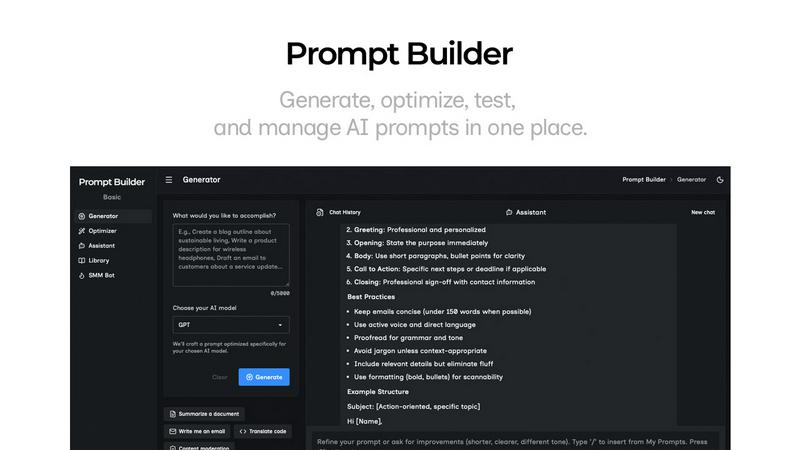
The Prompt Generator allows users to turn their ideas into model-optimized prompts in just a few clicks! Simply describe your idea, select your target AI model, and watch as Prompt Builder crafts a professional-grade prompt that you can further refine in chat. It's designed for all major AI models including Gemini, Claude, and GPT, ensuring tailored results every time!
Prompt Assistant
With the Prompt Assistant feature, you can run your prompts directly within the Prompt Builder interface. This eliminates the need to switch between tools, allowing for seamless testing and iteration. Choose from a variety of assistant models like Grok, Gemini, and DeepSeek to enhance your prompt experience. Keep everything organized and efficient!
Prompt Optimizer
Transform existing prompts into clearer, more effective versions using the Prompt Optimizer! Just paste your prompt or select one from your Library, and it will provide structured improvements in seconds. This feature focuses on enhancing clarity, constraints, output formats, and examples, ensuring you get the best possible results.
Prompt Library
The Prompt Library is your personal repository for managing and reusing prompts across various projects and teams. Save, organize, and search through your best prompts with ease. You can also explore community-contributed prompts, adding favorites to your Library, making it a versatile tool for collaboration and resource sharing.
Use Cases
Nani
Graphic Designers
Graphic designers can utilize Nani to streamline their project workflows! By saving reusable prompt sets, they can maintain consistent styles and themes across multiple projects, enhancing productivity.
Content Creators
Content creators can leverage Nani to quickly generate stunning visuals for their social media posts, blogs, and videos! With fast image generation, they can keep their content fresh and engaging without spending hours on design.
Artists
Artists can experiment with new styles and concepts using Nani! The ability to save and reuse prompts allows them to dive deep into their creative process without getting bogged down by repetitive tasks.
Marketing Teams
Marketing teams can use Nani to create eye-catching visuals for campaigns! The organized folder system helps them manage assets efficiently, ensuring that they can access and share images quickly when needed.
Prompt Builder
Content Creation
Prompt Builder is perfect for content creators looking to generate engaging articles, social media posts, or marketing copy. By quickly refining prompts for various AI models, you can produce high-quality content that resonates with your audience in no time!
Research and Development
Researchers can utilize Prompt Builder to create targeted prompts for information extraction from AI models. Whether you need summaries, data analysis, or literature reviews, crafting precise prompts will lead to more accurate and relevant outputs.
Education and Training
Educators can leverage Prompt Builder to develop instructional materials and assessments. By generating prompts that align with specific learning objectives, teachers can create tailored content that enhances student engagement and understanding.
Marketing Campaigns
Marketers can use Prompt Builder to develop compelling ad copy, email newsletters, and social media strategies. With optimized prompts for different platforms, your marketing messages will be more effective and targeted, driving better engagement and conversions.
Overview
About Nani
Nani is an innovative workflow tool designed to revolutionize the way you approach AI image generation! It caters specifically to artists, designers, and content creators who engage in regular and repetitive tasks. Unlike traditional AI image tools that focus on one-off creations, Nani streamlines the entire process, allowing you to efficiently sidestep the hassle of rewriting prompts and endlessly scrolling through image feeds. Thanks to its foundation on Google's cutting-edge Nano Banana Pro (Gemini), Nani offers a supercharged creative experience. With a user-friendly interface that puts you in control, you can generate stunning images in mere seconds! Its unique features, such as reusable prompt sets and organized folders, ensure your workflow remains consistent and efficient. With Nani, unleash your creativity and focus on what truly matters—bringing your ideas to life!
About Prompt Builder
Prompt Builder is your ultimate prompt engineering workspace, designed to streamline the creation, testing, and saving of prompts for various AI models. Whether you're a content creator, developer, or AI enthusiast, this tool has your back! Imagine starting with a rough draft and polishing it to perfection in a chat interface, then saving or pinning your best versions for future use. With compatibility across leading AI models like GPT, Claude, Gemini, Llama, and Mistral, Prompt Builder ensures that you can craft prompts tailored to your specific needs, without the hassle of rewriting for different platforms. Plus, the built-in Optimizer and community library of reusable prompts make it easy to enhance your ideas into actionable prompts in mere seconds. Say goodbye to the chaos of messy chat threads and wasted tokens! With Prompt Builder, you’ll find a clean, efficient, and collaborative space to generate, refine, and manage your prompts seamlessly!
Frequently Asked Questions
Nani FAQ
How does Nani enhance AI image generation?
Nani streamlines the image generation process by allowing users to save reusable prompts and organize their work in a user-friendly interface, making it ideal for repetitive tasks.
What makes Nani different from other AI image tools?
Unlike many AI image tools that focus on one-off creations, Nani is designed for users who require regular and repetitive work, providing features that enhance workflow efficiency.
Is there a free trial for Nani?
Yes! Nani offers 5 free credits to get started with no credit card required, allowing you to explore its features without any commitment.
How does the billing work with Nani?
Nani uses a simple credit-based billing system where you only pay for the images you generate, ensuring you have a flexible and cost-effective way to create without monthly fees.
Prompt Builder FAQ
What AI models does Prompt Builder support?
Prompt Builder supports a wide range of AI models including GPT, Claude, Gemini, Llama, Mistral, DeepSeek, Grok, and Perplexity. This versatility allows users to create optimized prompts tailored to their specific needs.
How does the Prompt Optimizer work?
The Prompt Optimizer takes an existing prompt and improves its clarity, structure, and effectiveness. By providing suggestions on constraints, output formats, and examples, it helps users refine their prompts for better results.
Can I save and reuse my prompts?
Absolutely! The Prompt Library enables you to save, organize, pin, and reuse prompts across projects and teams. You can also explore community prompts to enhance your library and find inspiration.
Is there a free trial available for Prompt Builder?
Yes! Prompt Builder offers a free trial that includes 25 assistant requests per month, with no credit card required. This allows you to explore the features and capabilities of the tool before committing to a paid plan.
Alternatives
Nani Alternatives
Nani is a revolutionary workflow tool designed specifically for AI image generation, making it an invaluable asset for artists, designers, and content creators. By organizing prompts and images into reusable sets, it simplifies the entire creative process, allowing users to focus on their imaginative work rather than tedious tasks. However, users often seek alternatives to Nani for various reasons, such as pricing, specific feature sets, or compatibility with different platforms. When searching for an alternative, consider factors like ease of use, the ability to manage and reuse prompts and images, and the overall efficiency of the tool. Look for solutions that enhance your creative workflow while meeting your specific needs, ensuring that you can continue producing high-quality work with ease!
Prompt Builder Alternatives
Prompt Builder is an innovative workspace designed for crafting, testing, and managing AI prompts with ease! As part of the AI Assistants category, it empowers users to transform their ideas into actionable prompts in just seconds. However, many users find themselves exploring alternatives due to varying needs such as pricing, feature sets, or specific platform requirements. It's essential to assess what functionalities matter most to you, whether it’s ease of use, customization options, or community support when searching for an alternative that fits your unique needs. When selecting an alternative, consider factors like compatibility with different AI models, the availability of optimization tools, and the richness of the prompt library. A user-friendly interface and robust testing capabilities can also enhance your experience, making it easier to generate high-quality prompts efficiently. Ultimately, the right choice will depend on your specific use cases and objectives in the realm of AI prompt engineering!