
BarBrain vs invoice Sonic
Side-by-side comparison to help you choose the right tool.

BarBrain
Streamline your inventory process with BarBrain, cutting your counting time in half for accurate and reliable results every time!.
Last updated: April 4, 2026

Create stunning professional invoices in seconds for free with InvoiceSonic, no signup needed!.
Last updated: February 28, 2026
Visual Comparison
BarBrain

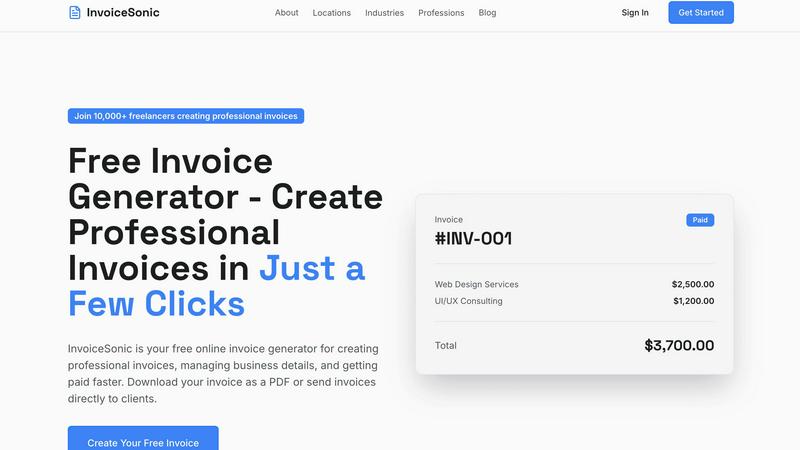
invoice Sonic
Feature Comparison
BarBrain
Parallel Counting on Multiple Devices
With BarBrain, you can count inventory simultaneously on multiple iOS and Android devices! This feature enables your team to work together efficiently, drastically reducing the time spent on inventory tasks.
Extensive Product Catalog
BarBrain boasts an extensive product catalog with over 30,000 items! From spirits and soft drinks to food items and housekeeping supplies, you can count everything with ease. Our team is here to assist you in setting up your product catalog effortlessly.
Automatic Inventory Reports
Say goodbye to tedious post-counting edits! BarBrain automatically generates a comprehensive inventory report after every count, eliminating the need for manual data entry and ensuring accuracy in your records.
Fill Level Slider for Open Food Items
Capture food and beverage products in just a tap! BarBrain's fill level slider allows you to easily account for both opened and unopened items, streamlining the inventory process and enhancing precision.
invoice Sonic
Completely Free Invoice Generation
InvoiceSonic offers a fantastic free tier that allows you to create up to 5 invoices each month without any hidden fees or credit card requirements! This enables you to kickstart your invoicing journey without any financial commitment.
Professional, Modern Invoice Templates
Choose from a variety of beautifully designed templates tailored for different industries. Whether you need a standard professional invoice or something more specific, our templates ensure your invoices look modern and appealing.
Instant PDF Downloads
Generate and download your invoices as polished PDF files in just a few clicks! This feature ensures you can send your invoices to clients immediately after creation, speeding up your billing process.
Automatic Calculations
Say goodbye to manual calculations! InvoiceSonic automatically calculates totals, taxes, and balances for you. This feature saves you time and reduces the risk of errors, ensuring your invoices are always accurate.
Use Cases
BarBrain
Single Establishment Management
BarBrain is perfect for individual bar and restaurant owners looking to streamline their inventory process! It simplifies counting, reduces errors, and helps save costs, allowing owners to focus on running their business.
Multi-Location Oversight
For operators running multiple establishments, BarBrain provides a unified inventory management solution. It offers a holistic view of stock usage across all locations, ensuring consistency and control over your operations.
Hospitality Inventory Control
Whether you manage a bustling hotel or a fine dining restaurant, BarBrain empowers you to conduct comprehensive inventory checks. This ensures that all food and beverage products are accounted for, maximizing efficiency and minimizing waste.
Event-Based Inventory Tracking
Planning a special event? Use BarBrain to keep track of inventory levels for specific occasions! It allows you to manage stock effectively, ensuring you have the right amounts of products on hand while minimizing excess.
invoice Sonic
Freelancers Managing Multiple Clients
Freelancers can use InvoiceSonic to create professional invoices for various clients quickly and easily. With the ability to customize each invoice, freelancers can maintain a consistent brand image while saving time on billing.
Startups Seeking Cost-Effective Solutions
Startups can leverage InvoiceSonic’s free tier to manage invoicing without incurring additional costs. This allows them to focus more on growth and less on administrative tasks, making it an ideal solution for budding entrepreneurs.
Small Business Owners Handling Regular Billing
Small business owners can streamline their billing processes by creating and managing recurring invoices with InvoiceSonic. This ensures they get paid on time while also reducing the overhead of manual invoicing.
Creative Professionals Needing Custom Branding
Creative professionals can utilize InvoiceSonic to showcase their brand identity through customizable invoice templates. By adding their logo and unique business details, they can present a professional image that impresses clients.
Overview
About BarBrain
BarBrain is the ultimate inventory management solution tailored specifically for the hospitality industry! Designed from the ground up, BarBrain addresses the unique challenges faced by bar and restaurant owners. Say goodbye to the tedious hours spent counting bottles, cross-referencing spreadsheets, and dealing with inaccurate data. With BarBrain, you can count stock in minutes, not hours! This powerful tool provides real-time insights into your inventory, enabling you to calculate precise costs for drinks and dishes, flag waste and shrinkage, and manage supplier orders seamlessly. Whether you run a trendy cocktail bar or a bustling multi-location restaurant, BarBrain equips you with the accurate numbers needed to protect your margins and maximize profitability. Join over 1,000 satisfied customers and discover how BarBrain can transform your inventory process, giving you more time for what truly matters!
About invoice Sonic
InvoiceSonic is your go-to solution for creating stunning, professional invoices without the hassle of clunky spreadsheets or expensive software! This innovative free invoice generator is designed for freelancers, startups, and small business owners who need a reliable and efficient way to manage their billing. With InvoiceSonic, you can create beautiful, compliant invoices in mere seconds, all while maintaining a polished and professional appearance. The platform allows you to input your business details, client information, and service items effortlessly, generating an invoice that not only looks great but also facilitates faster payments! With a generous free tier offering multiple invoices each month, you can manage your billing confidently without breaking the bank. Whether you need a standard invoice, a proforma invoice for quotes, or a fully branded document featuring your logo, InvoiceSonic has you covered. Join the growing community of over 10,000 professionals who trust InvoiceSonic to streamline their invoicing process and elevate their business image!
Frequently Asked Questions
BarBrain FAQ
How does BarBrain save time on inventory?
BarBrain reduces inventory counting time by over 75%! This time-saving feature allows you to focus on other important tasks in your establishment, ultimately improving operational efficiency.
Is BarBrain easy to implement?
Absolutely! Getting started with BarBrain is quick and simple. After scheduling a demo, our team will assist you in setting up your account and help you with your first digital inventory process.
Can BarBrain be used on multiple devices?
Yes! BarBrain can be accessed on multiple iOS and Android devices simultaneously. This feature allows your team to collaborate in real-time, significantly speeding up the inventory process.
What types of products can I count with BarBrain?
BarBrain’s extensive product catalog covers a wide range of items! You can count everything from alcoholic beverages and soft drinks to food items and housekeeping supplies, making it a versatile tool for hospitality businesses.
invoice Sonic FAQ
Is there a limit to the number of invoices I can create with InvoiceSonic?
Yes! With the free tier, you can create up to 5 invoices per month without any hidden fees or credit card requirements. This is perfect for freelancers or small businesses just starting out!
Can I customize the invoice templates with my logo?
Absolutely! InvoiceSonic allows you to add your business logo and customize the invoice templates to reflect your brand identity, ensuring a consistent and professional look.
How do I download my invoices?
Once you have created your invoice, simply click the download button, and your professionally formatted invoice will be saved as a PDF file instantly, ready to be sent to your clients.
Does InvoiceSonic support different types of invoices?
Yes! InvoiceSonic supports various invoice types, including standard invoices, proforma invoices for quotes, and customizable templates. This versatility makes it suitable for numerous business needs.
Alternatives
BarBrain Alternatives
BarBrain is a revolutionary inventory management solution specifically designed for the hospitality industry. Unlike generic warehouse software, it understands the unique needs of bars and restaurants, streamlining the often tedious process of counting stock and managing supplies. Users often seek alternatives to BarBrain for various reasons, including pricing, specific feature requirements, or compatibility with existing platforms. The right alternative should offer intuitive functionality tailored for hospitality operators, ensuring efficiency in inventory counting, cost management, and supplier orders. When searching for an alternative to BarBrain, consider factors such as ease of use, relevant features that cater to the bar and restaurant environment, and the ability to integrate seamlessly with your existing systems. A user-friendly interface can significantly reduce the time spent on inventory tasks, while robust analytics can help you maintain profitability and minimize waste. Aim for a solution that empowers your operations and supports your business goals!
invoice Sonic Alternatives
InvoiceSonic is a dynamic invoicing tool designed to simplify the billing process for freelancers, startups, and small businesses. As a free invoice generator, it falls within the Productivity & Management category, enabling users to create professional invoices instantly without the hassle of complicated software or high costs. Users often seek alternatives to InvoiceSonic for various reasons, including pricing options, additional features, or specific platform requirements that better fit their unique business needs. When choosing an alternative, it's essential to consider factors such as ease of use, customization capabilities, available templates, and whether the platform provides the right balance of functionality and affordability for your invoicing tasks.