
Image3D AI vs Supermachine
Side-by-side comparison to help you choose the right tool.

Image3D AI
Instantly transform any 2D image into a high-quality 3D model for printing and games.
Last updated: March 1, 2026

Supermachine
Supermachine empowers creators to effortlessly generate stunning, commercial-ready AI images and videos with over 60 innovative models!.
Last updated: March 18, 2026
Visual Comparison
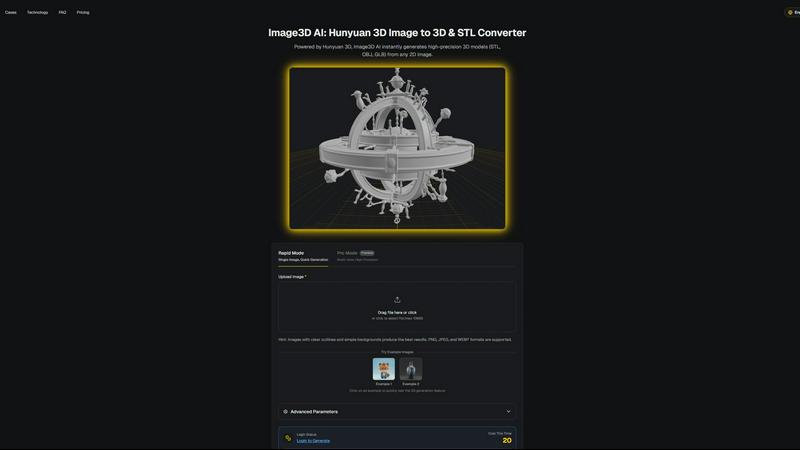
Image3D AI
Supermachine

Feature Comparison
Image3D AI
Dual Generation Modes
Unlock the perfect balance of speed and precision! Choose Rapid Mode for lightning-fast generation from a single image, ideal for quick concepts. Or, select Pro Mode for premium, high-precision results by uploading multiple views of your subject, ensuring physically accurate and detailed 3D reconstructions for complex objects!
Industry-Standard File Export
Your 3D creations are ready for any project instantly! Image3D AI exports directly to the most widely-used formats: download print-ready STL files for 3D printing, versatile OBJ files for editing in software like Blender or Maya, and modern GLB files that are perfect for web, AR, and game engines with textures and models packed into one!
Advanced Parameter Control
Take command of your 3D output! Go beyond basic conversion with advanced settings that let you fine-tune the generation process. Optimize for specific needs like lower polygon counts for game assets or focus purely on geometry for 3D printing, giving you professional-level control over the final model's characteristics!
Powered by Hunyuan 3D AI
Experience the cutting edge of AI reconstruction! At the core of Image3D AI is Tencent's advanced Hunyuan 3D engine, a powerhouse technology that delivers high-precision models with remarkable detail and texture. This ensures your generated assets are not just simple shapes, but rich, high-quality 3D models suitable for professional use cases!
Supermachine
ControlNet
ControlNet is a groundbreaking feature that enhances your creative control by allowing you to guide AI image generation with precision! This means you can specify and manipulate various aspects of your visuals, ensuring that the end result aligns perfectly with your creative vision. Whether you're adjusting the composition or the style, ControlNet empowers you to take charge of your artwork like never before!
Instruction Model
The Instruction Model is designed to interpret and execute commands effortlessly, making it incredibly user-friendly! Simply input what you want, and watch as Supermachine transforms your ideas into captivating visuals. This feature is ideal for those who may not have technical expertise but still want to create stunning content with ease—just tell the AI what you need, and it delivers!
Video Generation
With the Video Generation feature, you can create engaging short-form videos in a flash! This tool allows you to transform static images into dynamic video content, perfect for capturing your audience's attention on social media or marketing campaigns. Get ready to elevate your storytelling with eye-catching visuals that pop!
AI Image Edit Tool
The AI Image Edit Tool is your digital canvas for creativity, packed with powerful editing capabilities! Enhance your existing images by adjusting colors, adding effects, or even modifying elements within the picture. This feature is perfect for fine-tuning your visuals to achieve that professional finish, making your content truly stand out!
Use Cases
Image3D AI
For 3D Printing Enthusiasts
Turn any idea into a tangible object! Instantly convert sketches, logos, or product photos into high-precision, watertight STL files ready for your 3D printer. It's the fastest way to prototype, create custom gifts, or produce functional parts without any modeling expertise!
For Game & AR Developers
Rapidly populate your digital worlds! Generate game-ready 3D assets from character concept art, prop sketches, or reference images in minutes. With PBR material support and low-poly options, you can create assets perfect for real-time rendering in Unity, Unreal Engine, or AR applications!
For E-Commerce & Marketing
Revolutionize online shopping! Transform flat product photos into interactive 3D models and AR previews that customers can view from every angle. This immersive experience boosts engagement, reduces returns, and sets your online store apart from the competition instantly!
For Architects & Designers
Visualize concepts with breathtaking speed! Quickly generate 3D models of products, architectural elements, or design concepts from simple sketches or reference images. This saves countless hours of manual modeling, allowing for faster iteration and presentation of ideas to clients!
Supermachine
Social Media Content Creation
Social media managers can use Supermachine to generate fresh, eye-catching visuals for their platforms in mere seconds! With the ability to create tailored images and videos, they can keep their content calendar full and engage their audience with stunning graphics that resonate.
Marketing Campaigns
Marketers can leverage Supermachine to craft compelling visuals that elevate their campaigns. From attention-grabbing ad images to informative infographics, the platform makes it easy to produce high-quality content that drives engagement and converts leads into customers!
Artistic Exploration
Artists can explore new digital mediums with Supermachine, experimenting with various styles and techniques without the need for extensive training! The intuitive interface and powerful AI tools allow creatives to push boundaries and discover unique artistic expressions that reflect their vision.
Small Business Advertising
Small business owners can create impactful advertisements quickly and efficiently! Supermachine enables them to design promotional materials, social media ads, and website visuals that capture their brand's essence, helping them reach their target audience effectively without breaking the bank.
Overview
About Image3D AI
Welcome to the creative revolution! Image3D AI is your ultimate gateway to effortless 3D creation, transforming simple 2D images into stunning, production-ready 3D models in seconds! This professional-grade tool shatters the barriers of traditional 3D modeling, eliminating the need for complex software like Blender and its steep learning curve. Built on the powerhouse Tencent Hunyuan 3D engine, it solves the age-old problem of tedious modeling by letting you generate high-fidelity, textured 3D assets from just a single photo or a set of multi-view images. Whether you're a hobbyist, a game developer on a tight deadline, a 3D printing enthusiast needing a perfect STL file, or an e-commerce manager creating interactive AR previews, Image3D AI supercharges your workflow! It's not just a converter; it's your creative partner that instantly bridges the gap between your imagination and three-dimensional reality, making professional 3D modeling accessible to everyone!
About Supermachine
Supermachine is your ultimate creative powerhouse, expertly designed to harness the magic of artificial intelligence! Whether you're a seasoned professional or just stepping into the world of digital creation, Supermachine makes it easy to produce stunning images and videos with a few simple clicks. Imagine generating professional-quality visuals in under 15 seconds, regardless of your experience level! From social media managers needing eye-catching daily content to artists exploring new digital realms, Supermachine is the go-to platform. With over 100,000 satisfied creators generating a whopping one million images weekly, our platform's core value lies in its speed and simplicity. Featuring a curated selection of over 60 high-performing AI models, Supermachine ensures you have access to tools that are genuinely effective and reliable. Say goodbye to the hassle of complex prompt engineering and hello to a world of creative possibilities at your fingertips!
Frequently Asked Questions
Image3D AI FAQ
What image formats does Image3D AI support?
We support all common image formats to make getting started easy! You can upload PNG, JPEG, and WEBP files. For the best 3D conversion results, we recommend using high-quality images (max 10MB) with clear outlines, good contrast, and a simple, uncluttered background!
How long does it take to generate a 3D model?
Get your 3D model at lightning speed! Thanks to our powerful Hunyuan 3D AI engine, the typical generation time is around 60 seconds. The exact time may vary slightly depending on the complexity of your image and the generation mode you select, but you'll have your result in just over a minute!
What is the difference between Single Image and Multi-view mode?
Choose the right tool for your project! Single Image mode is perfect for converting logos, sketches, or images where you only have one angle. For real-world objects like a shoe or a vase, Multi-view mode (Pro Mode) is superior! By providing front, side, and back photos, the AI can perform a much more accurate and detailed 3D reconstruction!
Which 3D file format should I download?
Select the perfect format for your workflow! For 3D printing, download the STL file. To edit your model in software like Blender or Maya, choose the OBJ format. For use on the web, in AR experiences, or game engines, the GLB format is the modern standard as it contains the model, textures, and materials in a single, efficient file!
Supermachine FAQ
How does Supermachine generate images and videos?
Supermachine employs advanced AI models that are specifically designed to interpret user inputs and generate high-quality images and videos. By utilizing cutting-edge technology, the platform streamlines the creative process, allowing users to produce visuals in seconds!
Do I need any design experience to use Supermachine?
Absolutely not! Supermachine is designed for creators of all skill levels, meaning anyone can use the platform to create stunning visuals without prior design experience. The user-friendly interface and intuitive features make it easy for everyone!
Can I customize the images and videos I create?
Yes! Supermachine offers a variety of customization options, allowing you to adjust elements such as colors, styles, and formats. With features like the AI Image Edit Tool, you can refine your creations to perfectly match your vision!
Is there a trial version available for Supermachine?
Yes! Supermachine offers a 5-day trial package starting at just $5, allowing you to explore the platform and its features before committing to a subscription. It's a great way to experience the power of AI-driven creativity firsthand!
Alternatives
Image3D AI Alternatives
So you've discovered the magic of Image3D AI, the revolutionary tool that instantly transforms your 2D images into stunning, textured 3D models! It's a game-changer in the world of AI-powered design tools, making professional 3D creation accessible to everyone. But maybe you're exploring your options to find the perfect fit for your specific needs, budget, or creative workflow. Users often look for alternatives for a variety of reasons. Perhaps you need a different pricing model, require a specific feature set like animation rigging, or need a tool that integrates directly with a particular platform or software you already use. It's all about finding the right tool to unlock your 3D potential! When choosing your ideal 3D generation tool, focus on what matters most for your projects. Consider the quality and realism of the output, the supported export formats for your 3D printer or game engine, the ease of use, and of course, the value for your investment. The goal is to find a powerful creative partner that turns your vision into reality without slowing you down!
Supermachine Alternatives
Supermachine is an innovative creative studio that empowers users to generate striking, commercial-ready AI images and videos in a flash! Designed for creators of all skill levels, it simplifies the process of producing professional-quality content with its extensive library of over 60 high-performing AI models. Users often seek alternatives to Supermachine for various reasons, such as budget constraints, the need for specific features, or compatibility with their existing platforms. With the right alternative, creators can find a tool that meets their unique needs while maintaining efficiency and quality. When choosing an alternative, it’s essential to consider factors like ease of use, the range of available features, and the quality of generated content. Look for platforms that offer robust support for creators, a variety of model options, and a user-friendly interface to ensure that your creative process remains seamless and enjoyable. Ultimately, the goal is to find a solution that enhances your creativity while fitting your specific requirements!