
Image3D AI vs PNG to Cursor
Side-by-side comparison to help you choose the right tool.

Image3D AI
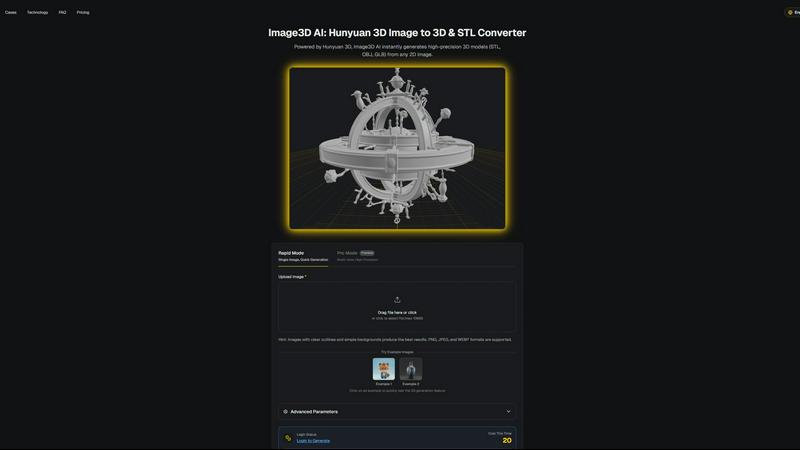
Instantly transform any 2D image into a high-quality 3D model for printing and games.
Last updated: March 1, 2026

PNG to Cursor
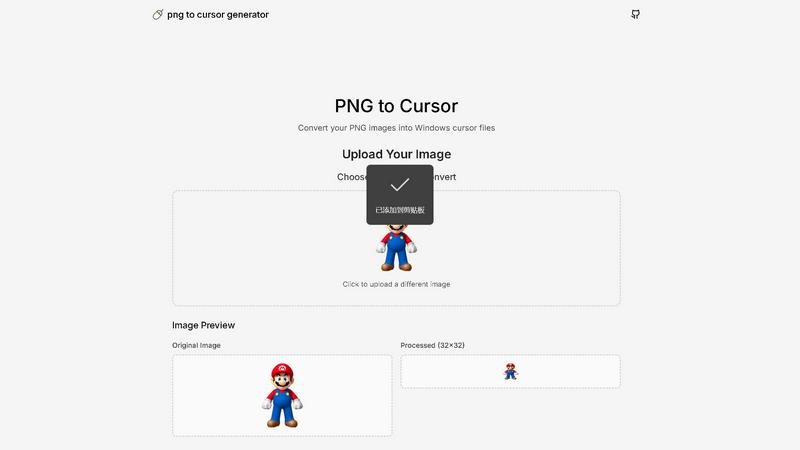
Turn any PNG image into a fully functional, custom cursor for your website instantly!.
Last updated: February 28, 2026
Visual Comparison
Image3D AI
PNG to Cursor
Feature Comparison
Image3D AI
Dual Generation Modes
Unlock the perfect balance of speed and precision! Choose Rapid Mode for lightning-fast generation from a single image, ideal for quick concepts. Or, select Pro Mode for premium, high-precision results by uploading multiple views of your subject, ensuring physically accurate and detailed 3D reconstructions for complex objects!
Industry-Standard File Export
Your 3D creations are ready for any project instantly! Image3D AI exports directly to the most widely-used formats: download print-ready STL files for 3D printing, versatile OBJ files for editing in software like Blender or Maya, and modern GLB files that are perfect for web, AR, and game engines with textures and models packed into one!
Advanced Parameter Control
Take command of your 3D output! Go beyond basic conversion with advanced settings that let you fine-tune the generation process. Optimize for specific needs like lower polygon counts for game assets or focus purely on geometry for 3D printing, giving you professional-level control over the final model's characteristics!
Powered by Hunyuan 3D AI
Experience the cutting edge of AI reconstruction! At the core of Image3D AI is Tencent's advanced Hunyuan 3D engine, a powerhouse technology that delivers high-precision models with remarkable detail and texture. This ensures your generated assets are not just simple shapes, but rich, high-quality 3D models suitable for professional use cases!
PNG to Cursor
AI-Powered Pixelation Engine
Say goodbye to blurry, low-quality conversions! Our intelligent AI engine expertly transforms your uploaded PNG or JPEG images into crisp, clear pixel art that's perfectly suited for cursor use. You have full control with adjustable pixelation intensity, allowing you to fine-tune the look from subtly stylized to charmingly retro blocky perfection! This ensures your custom cursor remains sharp and recognizable at any size.
Complete Cursor State Generation
We don't just give you one icon; we deliver an entire ecosystem! PNG to Cursor automatically generates a full suite of cursor states for a seamless user experience. This includes the standard arrow, busy/waiting, precision crosshair, text select I-beam, hand pointer, resize arrows, and more! It even creates animated .ANI files for dynamic states like the loading spinner, so every interaction on your desktop is fully themed and visually cohesive.
One-Click Installer Package
Transforming your cursor has never been easier! PNG to Cursor bundles your complete custom cursor set into a ready-to-use ZIP file. Inside, you'll find a simple, automatic installer that handles all the technical setup for you. Just run the installer, and your new cursor pack is applied instantly! This hassle-free process works seamlessly on Windows 7, 10, 11, and beyond, making personalization accessible to everyone.
100% Free & No Sign-Up Required
Unleash your creativity without any barriers! PNG to Cursor is completely free to use with no hidden costs, watermarks, or feature-limited trials. You don't need to create an account or provide any personal information. Simply visit the website, upload your image, generate your cursor pack, and download it immediately! We believe powerful customization tools should be available to all users at zero cost.
Use Cases
Image3D AI
For 3D Printing Enthusiasts
Turn any idea into a tangible object! Instantly convert sketches, logos, or product photos into high-precision, watertight STL files ready for your 3D printer. It's the fastest way to prototype, create custom gifts, or produce functional parts without any modeling expertise!
For Game & AR Developers
Rapidly populate your digital worlds! Generate game-ready 3D assets from character concept art, prop sketches, or reference images in minutes. With PBR material support and low-poly options, you can create assets perfect for real-time rendering in Unity, Unreal Engine, or AR applications!
For E-Commerce & Marketing
Revolutionize online shopping! Transform flat product photos into interactive 3D models and AR previews that customers can view from every angle. This immersive experience boosts engagement, reduces returns, and sets your online store apart from the competition instantly!
For Architects & Designers
Visualize concepts with breathtaking speed! Quickly generate 3D models of products, architectural elements, or design concepts from simple sketches or reference images. This saves countless hours of manual modeling, allowing for faster iteration and presentation of ideas to clients!
PNG to Cursor
For Gamers & Streaming Personalities
Level up your streaming overlay and gaming setup with a cursor that matches your brand! Gamers can create cursors based on their favorite in-game logos, weapons, or symbols, while streamers can design cursors featuring their channel mascot or logo. This adds a incredible layer of professional polish and personal flair that viewers will notice and love, making your digital presence truly unique!
For Content Creators & Digital Artists
Inject your artistic style into every part of your workflow! Digital artists, graphic designers, and video editors can transform their signature or a tiny version of their logo into a custom cursor. It's a fantastic way to brand your creative process and work in a digital environment that feels genuinely yours. Show off your personality with every click and drag across the canvas!
For Brand Managers & Businesses
Promote your brand in a subtle yet impactful way across your entire organization! Businesses can create custom cursor packs featuring their company logo or mascot for a unified look on all employee computers. It's an excellent tool for building brand identity internally during presentations, training, or daily use, fostering a strong sense of team cohesion and professional appearance.
For Personal Desktop Customization Enthusiasts
Break free from the default and express yourself! Anyone who loves personalizing their PC can turn their favorite animal, cartoon character, hobby symbol, or abstract design into a functional cursor. It's a simple, fun, and highly visible way to make your computer feel truly personal and enjoyable to use every single day, bringing a smile to your face with every mouse movement!
Overview
About Image3D AI
Welcome to the creative revolution! Image3D AI is your ultimate gateway to effortless 3D creation, transforming simple 2D images into stunning, production-ready 3D models in seconds! This professional-grade tool shatters the barriers of traditional 3D modeling, eliminating the need for complex software like Blender and its steep learning curve. Built on the powerhouse Tencent Hunyuan 3D engine, it solves the age-old problem of tedious modeling by letting you generate high-fidelity, textured 3D assets from just a single photo or a set of multi-view images. Whether you're a hobbyist, a game developer on a tight deadline, a 3D printing enthusiast needing a perfect STL file, or an e-commerce manager creating interactive AR previews, Image3D AI supercharges your workflow! It's not just a converter; it's your creative partner that instantly bridges the gap between your imagination and three-dimensional reality, making professional 3D modeling accessible to everyone!
About PNG to Cursor
Tired of the same old boring mouse cursor on your Windows PC? It's time for a personal revolution! PNG to Cursor is your ultimate, free online toolkit for transforming any PNG or JPEG image into a fully functional, custom Windows cursor pack! This powerful generator is designed for creators, gamers, streamers, and anyone who wants to inject a massive dose of personality into their digital workspace. Forget complicated software or expensive subscriptions! With just a few clicks, you can upload your favorite logo, character, or design and watch it become the star of your desktop! The magic happens with its intelligent AI pixelation engine, which expertly converts your image into crisp, clear pixel art perfect for cursor use. But it doesn't stop at a single static icon! PNG to Cursor automatically generates a COMPLETE set of cursor states - from the normal arrow and busy spinning wheel to the precise crosshair and text select I-beam - ensuring your custom theme works flawlessly across all applications. It even creates animated .ANI files for dynamic states! The tool outputs a ready-to-install ZIP file, complete with an automatic installer, making setup on Windows incredibly simple. Best of all? It's 100% free, requires no sign-up, and adds no watermarks. Unleash your creativity and redefine your point-and-click experience today!
Frequently Asked Questions
Image3D AI FAQ
What image formats does Image3D AI support?
We support all common image formats to make getting started easy! You can upload PNG, JPEG, and WEBP files. For the best 3D conversion results, we recommend using high-quality images (max 10MB) with clear outlines, good contrast, and a simple, uncluttered background!
How long does it take to generate a 3D model?
Get your 3D model at lightning speed! Thanks to our powerful Hunyuan 3D AI engine, the typical generation time is around 60 seconds. The exact time may vary slightly depending on the complexity of your image and the generation mode you select, but you'll have your result in just over a minute!
What is the difference between Single Image and Multi-view mode?
Choose the right tool for your project! Single Image mode is perfect for converting logos, sketches, or images where you only have one angle. For real-world objects like a shoe or a vase, Multi-view mode (Pro Mode) is superior! By providing front, side, and back photos, the AI can perform a much more accurate and detailed 3D reconstruction!
Which 3D file format should I download?
Select the perfect format for your workflow! For 3D printing, download the STL file. To edit your model in software like Blender or Maya, choose the OBJ format. For use on the web, in AR experiences, or game engines, the GLB format is the modern standard as it contains the model, textures, and materials in a single, efficient file!
PNG to Cursor FAQ
Is PNG to Cursor really free to use?
Absolutely, yes! PNG to Cursor is 100% free with no hidden charges, watermarks, or limitations. You can generate and download complete cursor packs without ever needing to sign up for an account or enter payment information. We are committed to providing a powerful customization tool at no cost to our users!
What image formats does the tool support?
Our tool currently supports the most common and versatile image formats: PNG and JPEG (JPG). Simply ensure your image has a transparent or solid background for best results, upload it, and let our AI engine work its magic to convert it into a perfect cursor set!
Which versions of Windows are supported?
The cursor packs generated by PNG to Cursor are fully compatible with a wide range of Windows operating systems! This includes Windows 7, Windows 8, Windows 10, and Windows 11. The included automatic installer makes applying your new cursors a breeze on any of these systems.
Does it create animated cursors?
Yes, it does! For dynamic cursor states like the "Busy" or "Working in Background" state, PNG to Cursor automatically generates animated .ANI cursor files. This means your loading spinner will actually spin, adding a professional and polished touch to your complete custom cursor theme!
Alternatives
Image3D AI Alternatives
So you've discovered the magic of Image3D AI, the revolutionary tool that instantly transforms your 2D images into stunning, textured 3D models! It's a game-changer in the world of AI-powered design tools, making professional 3D creation accessible to everyone. But maybe you're exploring your options to find the perfect fit for your specific needs, budget, or creative workflow. Users often look for alternatives for a variety of reasons. Perhaps you need a different pricing model, require a specific feature set like animation rigging, or need a tool that integrates directly with a particular platform or software you already use. It's all about finding the right tool to unlock your 3D potential! When choosing your ideal 3D generation tool, focus on what matters most for your projects. Consider the quality and realism of the output, the supported export formats for your 3D printer or game engine, the ease of use, and of course, the value for your investment. The goal is to find a powerful creative partner that turns your vision into reality without slowing you down!
PNG to Cursor Alternatives
PNG to Cursor is a fantastic free online tool in the Design Tools category that lets you transform any image into a custom Windows cursor pack in minutes! It uses smart AI to create pixel-perfect icons and automatically generates a complete set of functional cursor states, making desktop personalization incredibly easy. People often search for alternatives for various reasons. Some might need tools for different operating systems like Mac or Linux, while others may seek advanced editing features, different pricing models, or even simpler, more manual creation methods. The quest for the perfect tool is all about matching specific needs and workflows. When evaluating other options, focus on what matters most to you. Consider the platform compatibility, the range of cursor states generated, the quality of image conversion, and of course, the cost. Whether you prioritize powerful features, absolute simplicity, or cross-platform support, knowing your core requirements will guide you to the best solution for your creative projects!