
dmaya vs Image3D AI
Side-by-side comparison to help you choose the right tool.

dmaya
dMaya empowers agencies to design stunning UI with AI, collaborate seamlessly, and export pixel-perfect code in a flash!.
Last updated: April 13, 2026

Image3D AI
Instantly transform any 2D image into a high-quality 3D model for printing and games.
Last updated: March 1, 2026
Visual Comparison
dmaya
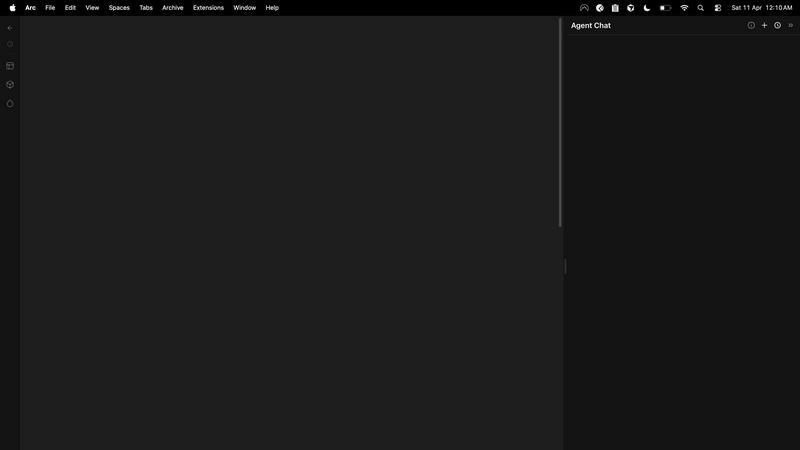
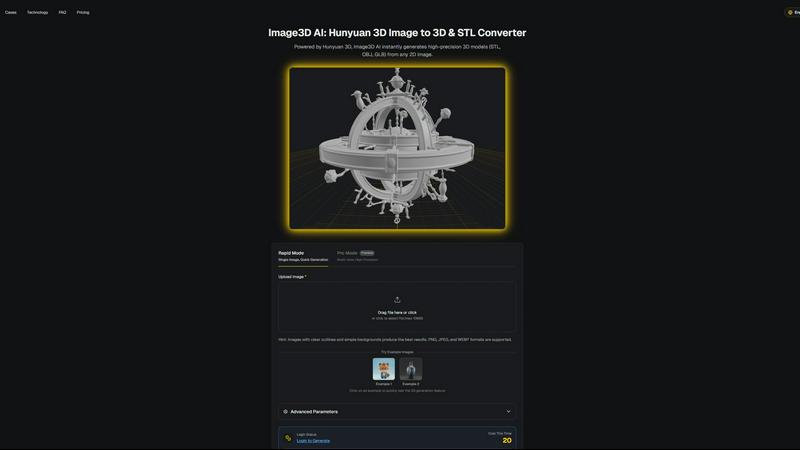
Image3D AI
Feature Comparison
dmaya
AI-Powered Design Generation
With dMaya, you can describe your design needs in plain language! The platform uses AI to generate production-ready UI designs complete with layouts, component systems, and responsive variants in seconds, saving you valuable time and effort.
Multi-Screen Canvas
dMaya offers an infinite canvas, allowing you to work across desktop and mobile frames simultaneously! This feature lets you drag, zoom, and organize screens just like in Figma, but with the added advantage of AI doing the heavy lifting for you.
Built for Teams & Collaboration
Collaboration has never been easier! dMaya enables you to invite team members, share projects with clients, leave comments, and work together in real time. Role-based access ensures that everyone has the right tools for their tasks!
Client Presentation Mode
Impress your clients with polished, interactive previews! Share a single link for clients to review projects without needing to create an account. Collecting feedback and iterating on designs happens seamlessly, all within the dMaya platform.
Image3D AI
Dual Generation Modes
Unlock the perfect balance of speed and precision! Choose Rapid Mode for lightning-fast generation from a single image, ideal for quick concepts. Or, select Pro Mode for premium, high-precision results by uploading multiple views of your subject, ensuring physically accurate and detailed 3D reconstructions for complex objects!
Industry-Standard File Export
Your 3D creations are ready for any project instantly! Image3D AI exports directly to the most widely-used formats: download print-ready STL files for 3D printing, versatile OBJ files for editing in software like Blender or Maya, and modern GLB files that are perfect for web, AR, and game engines with textures and models packed into one!
Advanced Parameter Control
Take command of your 3D output! Go beyond basic conversion with advanced settings that let you fine-tune the generation process. Optimize for specific needs like lower polygon counts for game assets or focus purely on geometry for 3D printing, giving you professional-level control over the final model's characteristics!
Powered by Hunyuan 3D AI
Experience the cutting edge of AI reconstruction! At the core of Image3D AI is Tencent's advanced Hunyuan 3D engine, a powerhouse technology that delivers high-precision models with remarkable detail and texture. This ensures your generated assets are not just simple shapes, but rich, high-quality 3D models suitable for professional use cases!
Use Cases
dmaya
Agencies
Agencies can leverage dMaya to pitch faster and win more clients! Generate design concepts during discovery calls and present multiple directions to stakeholders in hours rather than weeks, significantly enhancing your workflow.
Product Teams
Product teams benefit from moving from ideation to sign-off at lightning speed! Explore various UI directions before committing engineering resources, allowing for effective collaboration across design, product, and engineering teams in one unified workspace.
Freelancers
Freelancers can take on more projects without sacrificing quality or hours! With dMaya, you can deliver high-quality designs efficiently, allowing you to charge more and impress clients with your swift turnaround times.
Startups
Startups can use dMaya to rapidly prototype and validate their product ideas! Create and iterate on designs quickly, ensuring that your vision aligns with user needs before diving into development, thus saving time and resources.
Image3D AI
For 3D Printing Enthusiasts
Turn any idea into a tangible object! Instantly convert sketches, logos, or product photos into high-precision, watertight STL files ready for your 3D printer. It's the fastest way to prototype, create custom gifts, or produce functional parts without any modeling expertise!
For Game & AR Developers
Rapidly populate your digital worlds! Generate game-ready 3D assets from character concept art, prop sketches, or reference images in minutes. With PBR material support and low-poly options, you can create assets perfect for real-time rendering in Unity, Unreal Engine, or AR applications!
For E-Commerce & Marketing
Revolutionize online shopping! Transform flat product photos into interactive 3D models and AR previews that customers can view from every angle. This immersive experience boosts engagement, reduces returns, and sets your online store apart from the competition instantly!
For Architects & Designers
Visualize concepts with breathtaking speed! Quickly generate 3D models of products, architectural elements, or design concepts from simple sketches or reference images. This saves countless hours of manual modeling, allowing for faster iteration and presentation of ideas to clients!
Overview
About dmaya
dMaya is the ultimate vibe design platform tailored for agencies, teams, and freelancers who prioritize design before coding! With the ability to generate professional UI designs from simple text descriptions, dMaya streamlines the creative process like never before. Imagine describing a SaaS dashboard, e-commerce flow, or mobile app, and receiving polished screens in mere seconds! The platform empowers users to iterate through conversations, making instant adjustments to colors, layouts, typography, and more. Design tokens ensure consistency across all screens automatically, eliminating the guesswork. When it's time for client review, dMaya provides a hassle-free preview link that requires no account for feedback—transforming days of review cycles into minutes! Once designs are approved, users can export clean HTML, CSS, and JS code for seamless integration with coding agents like Cursor or Claude Code. dMaya embraces the design-first workflow, ensuring that teams can present, approve, and ship their projects with absolute confidence!
About Image3D AI
Welcome to the creative revolution! Image3D AI is your ultimate gateway to effortless 3D creation, transforming simple 2D images into stunning, production-ready 3D models in seconds! This professional-grade tool shatters the barriers of traditional 3D modeling, eliminating the need for complex software like Blender and its steep learning curve. Built on the powerhouse Tencent Hunyuan 3D engine, it solves the age-old problem of tedious modeling by letting you generate high-fidelity, textured 3D assets from just a single photo or a set of multi-view images. Whether you're a hobbyist, a game developer on a tight deadline, a 3D printing enthusiast needing a perfect STL file, or an e-commerce manager creating interactive AR previews, Image3D AI supercharges your workflow! It's not just a converter; it's your creative partner that instantly bridges the gap between your imagination and three-dimensional reality, making professional 3D modeling accessible to everyone!
Frequently Asked Questions
dmaya FAQ
What types of designs can I create with dMaya?
You can create a variety of designs, including SaaS dashboards, e-commerce flows, mobile apps, and more! The platform is versatile enough to handle any UI design project.
Is there a limit to how many designs I can generate?
Currently, there are no specified limits on design generation. You can iteratively create and refine as many designs as you need to achieve the perfect outcome!
Do clients need an account to review designs?
No, clients do not need to create an account to review your designs! Simply share a preview link, and they can provide feedback effortlessly.
How does the design-to-code export work?
Once your design is approved, you can export it as clean HTML, CSS, and JS code! You can then hand this off to any coding agent, like Cursor or Claude Code, to build in your preferred framework.
Image3D AI FAQ
What image formats does Image3D AI support?
We support all common image formats to make getting started easy! You can upload PNG, JPEG, and WEBP files. For the best 3D conversion results, we recommend using high-quality images (max 10MB) with clear outlines, good contrast, and a simple, uncluttered background!
How long does it take to generate a 3D model?
Get your 3D model at lightning speed! Thanks to our powerful Hunyuan 3D AI engine, the typical generation time is around 60 seconds. The exact time may vary slightly depending on the complexity of your image and the generation mode you select, but you'll have your result in just over a minute!
What is the difference between Single Image and Multi-view mode?
Choose the right tool for your project! Single Image mode is perfect for converting logos, sketches, or images where you only have one angle. For real-world objects like a shoe or a vase, Multi-view mode (Pro Mode) is superior! By providing front, side, and back photos, the AI can perform a much more accurate and detailed 3D reconstruction!
Which 3D file format should I download?
Select the perfect format for your workflow! For 3D printing, download the STL file. To edit your model in software like Blender or Maya, choose the OBJ format. For use on the web, in AR experiences, or game engines, the GLB format is the modern standard as it contains the model, textures, and materials in a single, efficient file!
Alternatives
dmaya Alternatives
dMaya is an innovative AI vibe design platform tailored for agencies, teams, and freelancers who prioritize the design phase before diving into coding. With its ability to transform text descriptions into striking UI designs in seconds, dMaya empowers users to create everything from SaaS dashboards to mobile apps effortlessly. However, users might seek alternatives for various reasons, such as pricing structures, specific feature sets, or compatibility with their existing workflows. When searching for alternatives, it’s essential to consider factors like ease of use, collaboration capabilities, and the quality of generated designs. Look for platforms that not only streamline the design process but also ensure seamless communication with clients and efficient export options. Prioritizing these elements will help you find a solution that aligns perfectly with your design and development needs.
Image3D AI Alternatives
So you've discovered the magic of Image3D AI, the revolutionary tool that instantly transforms your 2D images into stunning, textured 3D models! It's a game-changer in the world of AI-powered design tools, making professional 3D creation accessible to everyone. But maybe you're exploring your options to find the perfect fit for your specific needs, budget, or creative workflow. Users often look for alternatives for a variety of reasons. Perhaps you need a different pricing model, require a specific feature set like animation rigging, or need a tool that integrates directly with a particular platform or software you already use. It's all about finding the right tool to unlock your 3D potential! When choosing your ideal 3D generation tool, focus on what matters most for your projects. Consider the quality and realism of the output, the supported export formats for your 3D printer or game engine, the ease of use, and of course, the value for your investment. The goal is to find a powerful creative partner that turns your vision into reality without slowing you down!