
Dubvid vs StatPecker
Side-by-side comparison to help you choose the right tool.

Dubvid
Dubvid dubs your audio and video into multiple languages with natural voices and optional lip-sync in just minutes!.
Last updated: February 27, 2026

StatPecker
StatPecker instantly turns your data into stunning, shareable AI insights and visuals!.
Last updated: March 1, 2026
Visual Comparison
Dubvid
StatPecker
Feature Comparison
Dubvid
Seamless Dubbing Process
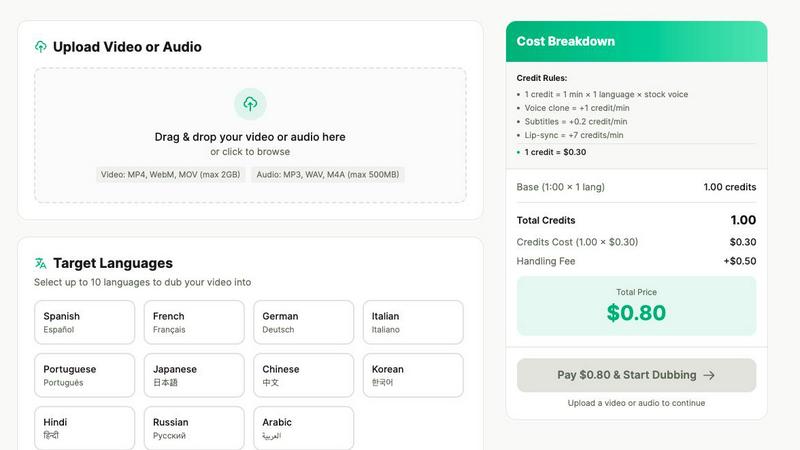
Dubvid offers a streamlined three-step process for dubbing videos. First, you simply upload your video in various formats, such as MP4, MOV, or WebM. Next, you select your desired target languages and choose from a variety of natural AI voices, or even clone your own voice for a personalized touch. Finally, you can download your localized videos, ready to be shared across platforms like YouTube, educational sites, and customer support channels!
Multi-Language Support
With Dubvid, you can reach audiences in over 10 different languages! This extensive language support empowers creators and businesses to tailor their content for specific markets, thereby maximizing engagement and outreach. Whether you want to dub in Spanish, French, Hindi, or any of the other supported languages, Dubvid has you covered, allowing you to expand your audience exponentially!
Cost-Effective Pricing Model
Dubvid operates on a flexible, usage-based pricing model that allows you to pay only for the minutes you localize. You won't find any hidden fees or mandatory subscriptions here! The simple credit system means you can easily estimate your costs based on your project needs. This approach makes it affordable for everyone, from individual creators to larger teams!
Optional Lip-Sync Feature
For those looking to enhance the realism of their dubbed content, Dubvid offers an optional lip-sync feature. This premium feature syncs the dubbed audio with the mouth movements of the original video, creating a more immersive viewing experience. Ideal for talking-head videos and tutorials, lip-sync adds a professional touch that can significantly improve audience engagement!
StatPecker
Ask Your Query
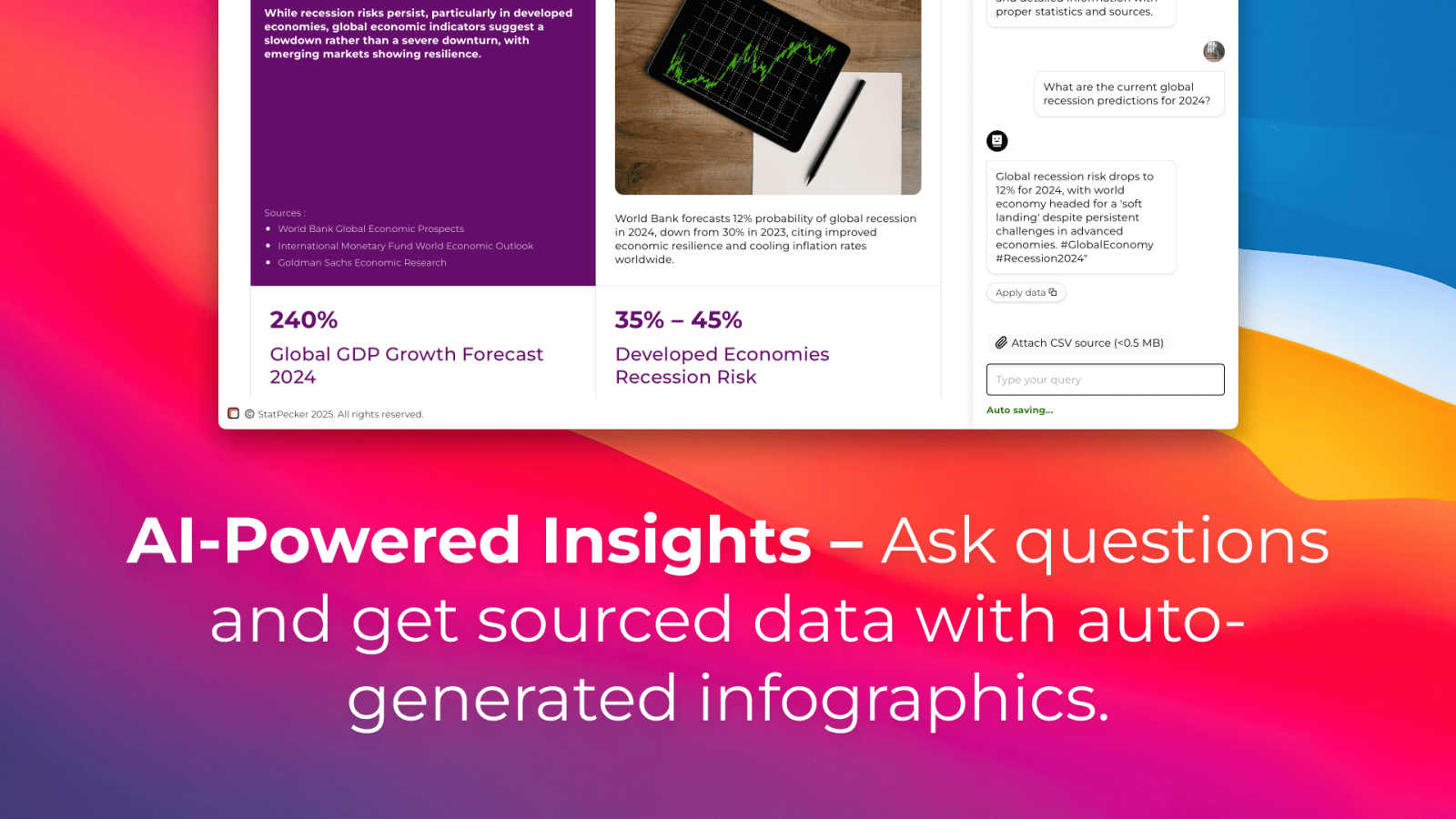
Get instant insights from validated sources using powerful AI! No complex tools or coding knowledge is required. Just ask a question in plain English, and StatPecker will generate credible answers accompanied by clean, ready-to-share charts and visuals. It's the fastest way to go from curiosity to a publishable graphic!
Upload & Analyze CSVs
Extract key insights from your local data files with absolute privacy! Upload a CSV (up to 50 MB) and explore it with simple questions. Everything runs securely on your device with the Local SQL Agent, keeping your data private by default. Watch as it prepares, analyzes, and visualizes your data into actionable insights without the spreadsheet hassle!
Publish & Embed
Make your data visuals interactive and seamlessly integrate them anywhere! StatPecker lets you embed your stunning infographics directly into blogs, articles, and websites with ease. This feature ensures your audience gets an engaging, dynamic view of the data, boosting comprehension and shareability across all your platforms!
Download & Use Anywhere
Export your creations as high-quality images for maximum flexibility! Download your infographics and use them in reports, presentations, social media, and printed materials. This gives you complete freedom to tell your data story anywhere, ensuring your impactful visuals work across every medium and meeting!
Use Cases
Dubvid
Short-Form Creators
Dubvid is perfect for short-form content creators! Whether you're making YouTube Shorts, Instagram Reels, or TikTok videos, you can quickly dub your content into multiple languages, multiplying your reach and engaging a wider audience. Say goodbye to the limitations of language!
Course Creators
Educators and course creators can use Dubvid to translate their lessons and tutorials for global learners in mere minutes! This allows you to broaden your impact and ensure that your knowledge reaches students around the world, making education more accessible than ever.
Customer Support Localization
Businesses can reduce support tickets by localizing their help center videos and onboarding flows using Dubvid! This ensures that customers from different regions can understand product demos, support videos, and onboarding materials, improving overall customer satisfaction and reducing misunderstandings.
Podcast Dubbing
Podcast creators can release their episodes in multiple languages without the hassle of additional production! With Dubvid, you can easily dub your audio or video podcasts, making them available to international listeners and increasing your audience base effortlessly.
StatPecker
Supercharging Business Reports
Transform dense quarterly sales data into compelling visual narratives in seconds! Analysts and managers can upload their CSV files, ask "Which regions drove the most revenue?" and instantly get a beautiful chart. This turns lengthy, tedious reports into engaging presentations that stakeholders love and understand immediately!
Enriching Blog Posts & Articles
Captivate your readers with interactive, data-driven visuals embedded directly in your content! Bloggers and content creators can use StatPecker to quickly find supporting statistics and turn them into stunning infographics. This boosts credibility, increases time-on-page, and makes complex topics easily digestible for your audience!
Simplifying Educational Material
Make learning engaging by turning abstract numbers into clear, visual stories! Educators and trainers can simplify complex datasets for students. By visualizing trends and comparisons, StatPecker helps explain difficult concepts quickly, making lessons more interactive and memorable for everyone in the classroom!
Empowering Marketing Analytics
Visualize campaign performance and customer insights with stunning clarity! Marketing teams can analyze CSV exports from their tools to identify top-performing channels or demographic trends. Creating shareable infographics from this data helps align teams and create persuasive content for case studies and social proof!
Overview
About Dubvid
Dubvid is an innovative AI-powered platform that revolutionizes the way creators, businesses, and brands approach video and audio dubbing! Designed for anyone wanting to connect with a global audience, Dubvid simplifies the process by allowing users to upload their original videos and select from multiple target languages. The platform automatically translates and recreates your voice, ensuring that the natural tone, pacing, and emotion are preserved. This game-changing solution eliminates the need for traditional studios, voice actors, and complex editing workflows, making it accessible to everyone! Whether you are a YouTuber aiming to expand your reach, an educator sharing lessons worldwide, or a marketing team localizing content quickly, Dubvid enables you to scale your content internationally in just minutes! With support for over 10 languages, bridging language barriers and engaging diverse audiences has never been easier!
About StatPecker
Tired of staring at endless spreadsheets and struggling to make your data tell a story? Meet StatPecker, the revolutionary AI-powered tool that transforms raw, boring data into stunning, impactful infographics in seconds! It's the ultimate solution for creators, analysts, marketers, and educators who need to communicate data clearly and powerfully without the hassle of complex design software. StatPecker automates the entire data storytelling process, empowering you to unlock the true potential of your information. Simply ask a question in plain English or upload a CSV file, and watch as our intelligent platform extracts key trends and insights, turning them into beautiful, publication-ready visuals. Whether you're enriching a blog post, supercharging a business report, or simplifying a complex topic, StatPecker saves you immense time, cuts down on costs, and dramatically boosts the engagement and impact of your work. Stop letting your data sit idle and start creating visuals that captivate and inform your audience today!
Frequently Asked Questions
Dubvid FAQ
How does Dubvid ensure high-quality dubbing?
Dubvid utilizes advanced AI technology to maintain the natural tone, pacing, and emotion of your voice during the dubbing process. You can also choose from various voice options, including your own voice clone, to achieve the best quality for your project!
Can I try Dubvid for free?
Absolutely! Dubvid offers a free trial that includes 2 credits, allowing you to dub up to 60 seconds of audio or video without needing a credit card. This way, you can test the quality and effectiveness of the platform before making any commitments.
What file formats does Dubvid support?
Dubvid supports a variety of file formats, including MP4, MOV, WebM for video, and MP3, WAV for audio. You can easily upload your files without worrying about compatibility issues, making it convenient to get started!
Is there a subscription fee for using Dubvid?
No, Dubvid operates on a pay-as-you-go model with no subscription fees! You only pay for the minutes you localize, which makes it a cost-effective solution for both individual creators and businesses alike. Enjoy flexibility without the burden of ongoing costs!
StatPecker FAQ
How does the Local SQL Agent ensure my data is private?
Your privacy is our top priority! When you upload a CSV file, the Local SQL Agent processes everything directly on your own device. Your data never leaves your computer to be sent to our servers. The analysis happens locally, generating insights and visuals securely, so you get powerful analytics with complete peace of mind!
What kind of questions can I ask StatPecker?
You can ask almost anything about your data or general knowledge! For your CSV files, ask things like "Show sales by month" or "What is the average customer age?". For general insights, ask about market trends or global statistics. The AI is designed to understand plain English and deliver credible, visualized answers instantly!
Can I edit the infographics after they are created?
Yes, you have full control! While StatPecker automates the creation of beautiful, publication-ready visuals, you retain the ability to make manual edits. You can adjust colors, and labels, or tweak the design directly before embedding or downloading, ensuring the final graphic perfectly matches your brand and message!
What are the limits of the Free Tier?
The Free Tier is incredibly powerful for getting started! It includes unlimited projects and embeds, 25 AI queries, and 10 CSV uploads. This allows you to fully experience the magic of automated data storytelling, create multiple visuals, and share them widely without any upfront cost!
Alternatives
Dubvid Alternatives
Dubvid is an innovative AI-powered platform that revolutionizes the way creators, businesses, and brands dub their audio and video content into multiple languages! By simplifying the dubbing process, Dubvid allows users to connect with global audiences effortlessly and engage diverse groups in just minutes! However, users often seek alternatives due to various reasons, including pricing concerns, specific feature requirements, or compatibility with different platforms. When searching for an alternative, it's essential to consider factors such as ease of use, language support, voice quality, and the flexibility of the dubbing process. Ultimately, you want a solution that meets your unique content creation needs and enhances your ability to reach international viewers while maintaining high-quality results!
StatPecker Alternatives
StatPecker is a revolutionary AI-powered data storytelling and infographic creation tool. It belongs to the category of automated data visualization and insight generation platforms, designed to turn raw data into stunning, communicative visuals instantly. Users often explore alternatives for various reasons, such as finding a solution that better fits their budget, offers specific advanced features, integrates with their existing tech stack, or caters to a different use case like real-time dashboards or more complex statistical modeling. It's a smart move to ensure you have the perfect tool for your unique data communication needs. When evaluating other options, focus on what matters most for your workflow. Key considerations include the ease of use and learning curve, the quality and customizability of the generated visuals, the depth of AI-powered analysis, robust data security and privacy measures, and of course, the overall value for the investment. The right tool should make you feel empowered, not overwhelmed.