
Dokie AI vs Image3D AI
Side-by-side comparison to help you choose the right tool.

Dokie AI
Transform your ideas into stunning, professional presentations in minutes with Dokie AI's powerful Claude Opus engine!.
Last updated: March 19, 2026

Image3D AI
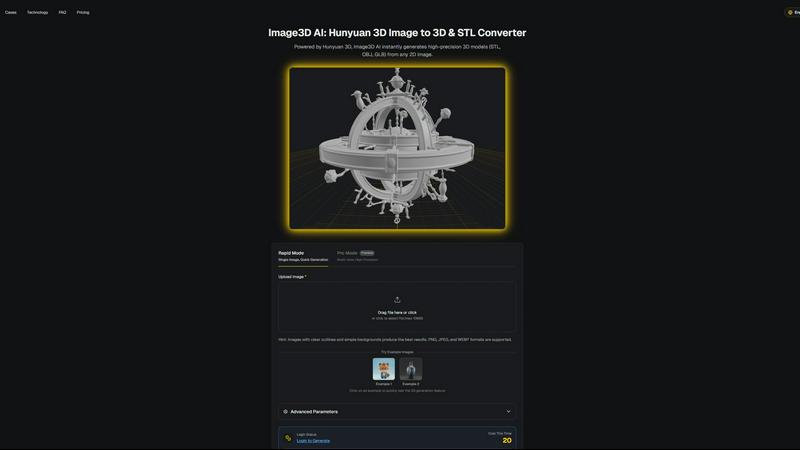
Instantly transform any 2D image into a high-quality 3D model for printing and games.
Last updated: March 1, 2026
Visual Comparison
Dokie AI

Image3D AI
Feature Comparison
Dokie AI
AI Generate PPT
Describe your presentation topic or idea in simple text, and let Dokie AI's powerful engine do the rest! It intelligently analyzes your prompt to create a complete, structured slide deck from scratch. This includes generating compelling content, selecting professional layouts, incorporating relevant charts or icons, and applying a cohesive, visually stunning design theme. It's like having a professional designer and content strategist working for you instantly!
AI Beautify PPT
Have an existing PowerPoint that looks dull or unprofessional? Upload it to Dokie AI and let the AI work its magic! The Beautify feature analyzes your slides, preserves your core content, and completely transforms the design. It fixes awkward layouts, applies modern color schemes and typography, and enhances visual elements to give your entire presentation a massive, professional upgrade in seconds!
Multi-Format Conversion
Dokie AI breaks down barriers between formats! This powerful suite of tools allows you to convert various file types directly into editable PowerPoint presentations. Seamlessly turn PDF documents, Word files, HTML web pages, and even YouTube videos into structured, beautifully designed slide decks. It's the ultimate tool for repurposing content and saving countless hours of manual copying and pasting!
Speech Notes & Reverse Prompt
Never present unprepared again! Dokie AI can automatically generate detailed speaker notes and talking points for each slide in your deck, helping you deliver confident and fluent presentations. Plus, the innovative Reverse Prompt feature can analyze any uploaded presentation and extract the core creative prompts, giving you incredible insight into the design and content strategy!
Image3D AI
Dual Generation Modes
Unlock the perfect balance of speed and precision! Choose Rapid Mode for lightning-fast generation from a single image, ideal for quick concepts. Or, select Pro Mode for premium, high-precision results by uploading multiple views of your subject, ensuring physically accurate and detailed 3D reconstructions for complex objects!
Industry-Standard File Export
Your 3D creations are ready for any project instantly! Image3D AI exports directly to the most widely-used formats: download print-ready STL files for 3D printing, versatile OBJ files for editing in software like Blender or Maya, and modern GLB files that are perfect for web, AR, and game engines with textures and models packed into one!
Advanced Parameter Control
Take command of your 3D output! Go beyond basic conversion with advanced settings that let you fine-tune the generation process. Optimize for specific needs like lower polygon counts for game assets or focus purely on geometry for 3D printing, giving you professional-level control over the final model's characteristics!
Powered by Hunyuan 3D AI
Experience the cutting edge of AI reconstruction! At the core of Image3D AI is Tencent's advanced Hunyuan 3D engine, a powerhouse technology that delivers high-precision models with remarkable detail and texture. This ensures your generated assets are not just simple shapes, but rich, high-quality 3D models suitable for professional use cases!
Use Cases
Dokie AI
Startup Pitch Deck Creation
Startup founders can move at lightning speed! Transform a business idea or executive summary into a compelling, investor-ready pitch deck in minutes. Dokie AI ensures your vision is communicated with professional visuals and a clear narrative structure, helping you secure funding and make a powerful first impression without hiring a design agency!
Marketing & Sales Presentations
Marketers and sales teams can craft stunning proposals, product launches, and campaign reports effortlessly. Input your data and key messages, and Dokie AI outputs a visually engaging presentation that captivates clients and aligns perfectly with your brand, enabling you to close more deals and communicate value effectively!
Academic & Training Materials
Educators and trainers can revolutionize their lesson planning! Quickly convert lecture notes, research papers, or training manuals into clear, visually appealing educational slide decks. This saves immense preparation time and increases student engagement through professional layouts and complementary visuals that enhance learning!
Corporate Business Reviews
Business professionals can prepare for quarterly reviews, strategy meetings, and executive briefings with ease. Upload a dense report or describe your performance metrics, and Dokie AI will structure the information into a logical, easy-to-follow presentation with charts and clean designs, making complex data accessible and impressive for any audience!
Image3D AI
For 3D Printing Enthusiasts
Turn any idea into a tangible object! Instantly convert sketches, logos, or product photos into high-precision, watertight STL files ready for your 3D printer. It's the fastest way to prototype, create custom gifts, or produce functional parts without any modeling expertise!
For Game & AR Developers
Rapidly populate your digital worlds! Generate game-ready 3D assets from character concept art, prop sketches, or reference images in minutes. With PBR material support and low-poly options, you can create assets perfect for real-time rendering in Unity, Unreal Engine, or AR applications!
For E-Commerce & Marketing
Revolutionize online shopping! Transform flat product photos into interactive 3D models and AR previews that customers can view from every angle. This immersive experience boosts engagement, reduces returns, and sets your online store apart from the competition instantly!
For Architects & Designers
Visualize concepts with breathtaking speed! Quickly generate 3D models of products, architectural elements, or design concepts from simple sketches or reference images. This saves countless hours of manual modeling, allowing for faster iteration and presentation of ideas to clients!
Overview
About Dokie AI
Dokie AI is the revolutionary AI presentation maker that's transforming how professionals create stunning slides! Forget tedious hours spent wrestling with templates and design tools. Dokie AI is your intelligent co-pilot, powered by the advanced Claude Opus 4.6 model, that handles the entire heavy lifting of presentation creation. Simply describe your idea in plain text, and watch as Dokie AI automatically generates a complete, polished slide deck with perfect content structure, professional layouts, beautiful typography, and cohesive visual design in minutes! It's built for business professionals, educators, marketers, and startup founders who need to communicate ideas powerfully but lack the time or design skills. Unlike basic template fillers, Dokie AI offers true AI generation and a full suite of smart tools, including beautifying existing slides, converting documents to PPT, and generating speaker notes. The value proposition is clear: achieve designer-quality presentations effortlessly, accelerate your workflow dramatically, and communicate with unmatched visual impact every single time!
About Image3D AI
Welcome to the creative revolution! Image3D AI is your ultimate gateway to effortless 3D creation, transforming simple 2D images into stunning, production-ready 3D models in seconds! This professional-grade tool shatters the barriers of traditional 3D modeling, eliminating the need for complex software like Blender and its steep learning curve. Built on the powerhouse Tencent Hunyuan 3D engine, it solves the age-old problem of tedious modeling by letting you generate high-fidelity, textured 3D assets from just a single photo or a set of multi-view images. Whether you're a hobbyist, a game developer on a tight deadline, a 3D printing enthusiast needing a perfect STL file, or an e-commerce manager creating interactive AR previews, Image3D AI supercharges your workflow! It's not just a converter; it's your creative partner that instantly bridges the gap between your imagination and three-dimensional reality, making professional 3D modeling accessible to everyone!
Frequently Asked Questions
Dokie AI FAQ
How does Dokie AI differ from traditional PowerPoint templates?
Dokie AI is fundamentally different! While templates are static and require you to manually fill in content and adjust everything, Dokie AI uses true artificial intelligence (Claude Opus 4.6) to dynamically generate both content and design based on your specific topic. It creates a unique, cohesive presentation tailored to your prompt, handling structure, layout, writing, and styling automatically for a result that feels custom-designed, not templated!
What file formats can I use with Dokie AI?
Dokie AI is incredibly versatile! You can start from a simple text prompt to generate a PPT from scratch. For enhancement and conversion, you can upload existing PowerPoint files (PPT/PPTX) to beautify them. Additionally, you can convert PDFs, Microsoft Word documents (DOC/DOCX), HTML files, and even YouTube video links directly into fully designed PowerPoint presentations!
Can I edit the presentations created by Dokie AI?
Absolutely, yes! Dokie AI gives you complete creative control. The presentations are generated as standard PowerPoint files (PPTX). You can download them and open them in Microsoft PowerPoint, Google Slides, or any other compatible software to make any edits, adjustments, or additions you need. The AI provides a fantastic first draft that you can perfectly tailor!
Is my data and content secure with Dokie AI?
Dokie AI takes data security seriously. The platform is designed with user privacy in mind. You maintain ownership of the content you input and the presentations you generate. It's always recommended to review the service's privacy policy for specific details on data handling, storage, and security practices to ensure it meets your organization's standards!
Image3D AI FAQ
What image formats does Image3D AI support?
We support all common image formats to make getting started easy! You can upload PNG, JPEG, and WEBP files. For the best 3D conversion results, we recommend using high-quality images (max 10MB) with clear outlines, good contrast, and a simple, uncluttered background!
How long does it take to generate a 3D model?
Get your 3D model at lightning speed! Thanks to our powerful Hunyuan 3D AI engine, the typical generation time is around 60 seconds. The exact time may vary slightly depending on the complexity of your image and the generation mode you select, but you'll have your result in just over a minute!
What is the difference between Single Image and Multi-view mode?
Choose the right tool for your project! Single Image mode is perfect for converting logos, sketches, or images where you only have one angle. For real-world objects like a shoe or a vase, Multi-view mode (Pro Mode) is superior! By providing front, side, and back photos, the AI can perform a much more accurate and detailed 3D reconstruction!
Which 3D file format should I download?
Select the perfect format for your workflow! For 3D printing, download the STL file. To edit your model in software like Blender or Maya, choose the OBJ format. For use on the web, in AR experiences, or game engines, the GLB format is the modern standard as it contains the model, textures, and materials in a single, efficient file!
Alternatives
Dokie AI Alternatives
Dokie AI is a revolutionary AI presentation maker that transforms how professionals create slide decks! It belongs to the exciting category of AI-powered design tools, using advanced intelligence to handle everything from content structure to visual styling automatically. This means you can go from a simple idea to a polished, professional presentation in just minutes, without any design skills required. Users often explore alternatives for a variety of reasons. Some might be looking for a different pricing model or a free tier to test the waters. Others may need specific integrations with their existing workflow or platforms. It's also common to seek tools that offer a different balance between AI automation and manual creative control to match a unique project style or company branding. When choosing an alternative, focus on what matters most for your workflow! Consider the core AI capability—does it just apply templates or truly generate and structure content? Evaluate the output quality and how much time it actually saves you. Also, check for essential features like easy editing, collaboration options, and the ability to import or export from your常用 tools. The right tool should feel like a powerful partner, not a limitation.
Image3D AI Alternatives
So you've discovered the magic of Image3D AI, the revolutionary tool that instantly transforms your 2D images into stunning, textured 3D models! It's a game-changer in the world of AI-powered design tools, making professional 3D creation accessible to everyone. But maybe you're exploring your options to find the perfect fit for your specific needs, budget, or creative workflow. Users often look for alternatives for a variety of reasons. Perhaps you need a different pricing model, require a specific feature set like animation rigging, or need a tool that integrates directly with a particular platform or software you already use. It's all about finding the right tool to unlock your 3D potential! When choosing your ideal 3D generation tool, focus on what matters most for your projects. Consider the quality and realism of the output, the supported export formats for your 3D printer or game engine, the ease of use, and of course, the value for your investment. The goal is to find a powerful creative partner that turns your vision into reality without slowing you down!