
dmaya vs Refbox
Side-by-side comparison to help you choose the right tool.

dmaya
dMaya empowers agencies to design stunning UI with AI, collaborate seamlessly, and export pixel-perfect code in a flash!.
Last updated: April 13, 2026

Refbox gives you instant, distraction-free access to all your references right above your workspace while you create!.
Last updated: February 28, 2026
Visual Comparison
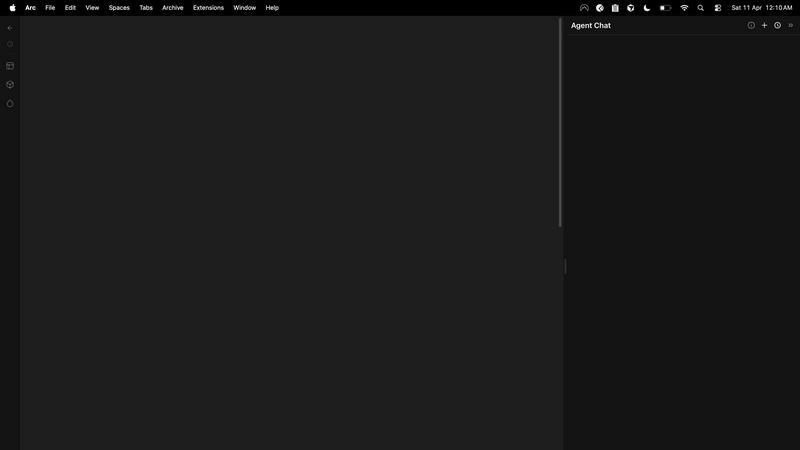
dmaya
Refbox
Feature Comparison
dmaya
AI-Powered Design Generation
With dMaya, you can describe your design needs in plain language! The platform uses AI to generate production-ready UI designs complete with layouts, component systems, and responsive variants in seconds, saving you valuable time and effort.
Multi-Screen Canvas
dMaya offers an infinite canvas, allowing you to work across desktop and mobile frames simultaneously! This feature lets you drag, zoom, and organize screens just like in Figma, but with the added advantage of AI doing the heavy lifting for you.
Built for Teams & Collaboration
Collaboration has never been easier! dMaya enables you to invite team members, share projects with clients, leave comments, and work together in real time. Role-based access ensures that everyone has the right tools for their tasks!
Client Presentation Mode
Impress your clients with polished, interactive previews! Share a single link for clients to review projects without needing to create an account. Collecting feedback and iterating on designs happens seamlessly, all within the dMaya platform.
Refbox
Floating Reference Frames
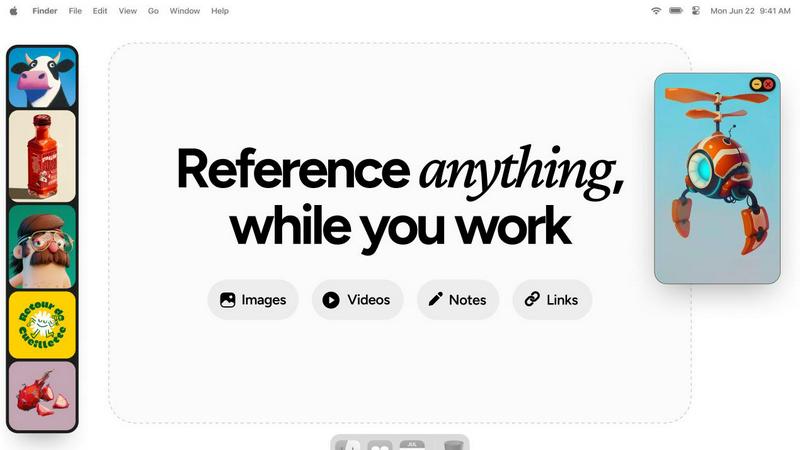
Refbox allows you to pin your references in always-on-top frames that float above any application you are working in, ensuring your inspiration is always within reach!
Masonry Mode & Full-Screen Gallery
View your references in a stunning Masonry Mode or switch to a full-screen Gallery for an immersive experience. This makes it easy to compare visuals and keep your creativity flowing!
Markdown-Enabled Notes
Never lose track of your ideas! Refbox lets you add markdown-enabled notes, complete with styling options and checklists, ensuring your thoughts are organized and readily accessible.
Instant Collection Switching
Manage multiple projects effortlessly! With Refbox, you can create and switch between various collections instantly, allowing you to focus on what matters most without any interruptions.
Use Cases
dmaya
Agencies
Agencies can leverage dMaya to pitch faster and win more clients! Generate design concepts during discovery calls and present multiple directions to stakeholders in hours rather than weeks, significantly enhancing your workflow.
Product Teams
Product teams benefit from moving from ideation to sign-off at lightning speed! Explore various UI directions before committing engineering resources, allowing for effective collaboration across design, product, and engineering teams in one unified workspace.
Freelancers
Freelancers can take on more projects without sacrificing quality or hours! With dMaya, you can deliver high-quality designs efficiently, allowing you to charge more and impress clients with your swift turnaround times.
Startups
Startups can use dMaya to rapidly prototype and validate their product ideas! Create and iterate on designs quickly, ensuring that your vision aligns with user needs before diving into development, thus saving time and resources.
Refbox
Streamlined Design Workflow
Graphic designers can keep all their reference materials—such as color palettes, typography samples, and layout inspirations—visible in one place, enhancing their workflow and creativity!
Enhanced Animation Process
Animators benefit from having reference images and videos floating above their animation software, allowing them to reference movement and styles without breaking their flow or losing focus.
Efficient UI/UX Development
UI and UX designers can quickly access design inspirations, user flow diagrams, and feedback notes while working on their applications, making it easier to iterate and improve their designs.
Comprehensive Moodboarding
Photographers and creatives can effortlessly gather and display a variety of images, GIFs, and notes for moodboarding, leading to a more cohesive vision for their projects without the hassle of constant switching.
Overview
About dmaya
dMaya is the ultimate vibe design platform tailored for agencies, teams, and freelancers who prioritize design before coding! With the ability to generate professional UI designs from simple text descriptions, dMaya streamlines the creative process like never before. Imagine describing a SaaS dashboard, e-commerce flow, or mobile app, and receiving polished screens in mere seconds! The platform empowers users to iterate through conversations, making instant adjustments to colors, layouts, typography, and more. Design tokens ensure consistency across all screens automatically, eliminating the guesswork. When it's time for client review, dMaya provides a hassle-free preview link that requires no account for feedback—transforming days of review cycles into minutes! Once designs are approved, users can export clean HTML, CSS, and JS code for seamless integration with coding agents like Cursor or Claude Code. dMaya embraces the design-first workflow, ensuring that teams can present, approve, and ship their projects with absolute confidence!
About Refbox
Tired of the constant alt-tabbing and window switching that disrupts your creative flow? Meet Refbox, the ultimate floating reference app designed specifically for artists, designers, animators, and creators who need their inspiration right at their fingertips! Refbox keeps your reference materials visible and accessible, allowing you to pin images, GIFs, videos, and notes in resizable frames that float above your primary work applications like Photoshop, Blender, or Figma. With Refbox, you can say goodbye to cluttered folders and lost momentum! It centralizes your inspiration into a sleek, organized sidebar, enabling you to view everything in a beautiful Masonry Mode or a full-screen Gallery for additional monitor space. Plus, you can add markdown-enabled notes for ideas and checklists, save clickable bookmarks to tutorials, and scrub through videos frame-by-frame. With the ability to create multiple collections for various projects, Refbox transforms your chaotic reference process into a streamlined workflow. Designed for professionals who cannot afford distractions, Refbox is your essential upgrade for faster, more accurate, and more inspired creation!
Frequently Asked Questions
dmaya FAQ
What types of designs can I create with dMaya?
You can create a variety of designs, including SaaS dashboards, e-commerce flows, mobile apps, and more! The platform is versatile enough to handle any UI design project.
Is there a limit to how many designs I can generate?
Currently, there are no specified limits on design generation. You can iteratively create and refine as many designs as you need to achieve the perfect outcome!
Do clients need an account to review designs?
No, clients do not need to create an account to review your designs! Simply share a preview link, and they can provide feedback effortlessly.
How does the design-to-code export work?
Once your design is approved, you can export it as clean HTML, CSS, and JS code! You can then hand this off to any coding agent, like Cursor or Claude Code, to build in your preferred framework.
Refbox FAQ
How does Refbox integrate with other applications?
Refbox floats above any application, providing seamless access to your references while you work without interrupting your creative process.
Can I use Refbox on multiple monitors?
Absolutely! Refbox can be utilized on multiple monitors, allowing you to take full advantage of its full-screen Gallery mode for a more immersive experience.
Is there a mobile version of Refbox?
Currently, Refbox is designed for desktop use, ensuring that creatives have the most efficient and distraction-free experience while working on their projects.
What types of media can I store in Refbox?
Refbox supports images, GIFs, videos, notes, and even clickable bookmarks, making it a versatile tool for storing all your references in one convenient location.
Alternatives
dmaya Alternatives
dMaya is an innovative AI vibe design platform tailored for agencies, teams, and freelancers who prioritize the design phase before diving into coding. With its ability to transform text descriptions into striking UI designs in seconds, dMaya empowers users to create everything from SaaS dashboards to mobile apps effortlessly. However, users might seek alternatives for various reasons, such as pricing structures, specific feature sets, or compatibility with their existing workflows. When searching for alternatives, it’s essential to consider factors like ease of use, collaboration capabilities, and the quality of generated designs. Look for platforms that not only streamline the design process but also ensure seamless communication with clients and efficient export options. Prioritizing these elements will help you find a solution that aligns perfectly with your design and development needs.
Refbox Alternatives
Refbox is an innovative floating reference app designed specifically for creative professionals, allowing users to keep their inspirations visible and easily accessible while working. It helps streamline the creative process by eliminating the frustration of constant window switching and cluttered folders. Users often seek alternatives to Refbox for various reasons, such as pricing concerns, the need for specific features, or compatibility with different platforms. When choosing an alternative, it's crucial to consider the functionality, ease of use, and how well it integrates into your existing workflow to ensure that your creative process remains uninterrupted. --- [{"question": "What is Refbox?", "answer": "Refbox is a floating reference app that keeps your inspirations visible and accessible while you work on creative projects."},{"question": "Who is Refbox for?", "answer": "Refbox is designed for artists, designers, animators, and creators who need constant access to their references without distractions."},{"question": "Is Refbox free?", "answer": "Details on pricing for Refbox can vary, so it's best to check the official website for the most current information."},{"question": "What are the main features of Refbox?", "answer": "Refbox features always-on-top floating frames, versatile media organization, markdown-enabled notes, and the ability to create multiple collections for different projects."}]