
Coloring Book Engine vs PNG to Cursor
Side-by-side comparison to help you choose the right tool.

Coloring Book Engine
Turn your ideas into commercial coloring books and videos with one powerful local app.
Last updated: February 28, 2026

PNG to Cursor
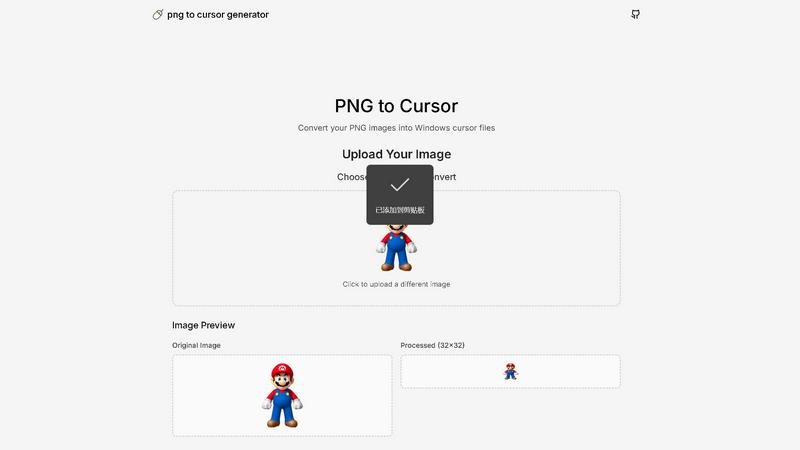
Turn any PNG image into a fully functional, custom cursor for your website instantly!.
Last updated: February 28, 2026
Visual Comparison
Coloring Book Engine

PNG to Cursor
Feature Comparison
Coloring Book Engine
BYOK (Bring Your Own Key) AI Integration
Take full control of your AI usage and costs! Coloring Book Engine lets you integrate your own API keys from any provider you choose. This means no hidden subscription fees for AI features, predictable pay-as-you-go costs, and most importantly, your data and artwork stay private on your own machine. It's freedom and flexibility for the modern creator!
Complete 6-Step Production Workflow
Follow a clear, focused path from idea to finished product! The engine guides you through six streamlined steps: Plan, Sketch, Book, Coloring, Assets, and Video. This structured approach eliminates guesswork and tool-hopping, turning your rough concepts into publish-ready books and marketing materials with incredible speed and organization!
KDP-Ready Export & Batch Processing
Publish with absolute confidence! Coloring Book Engine handles all the tricky technical specifications like trim sizes, bleed, and margins, exporting files perfectly formatted for Amazon KDP. Plus, its highly optimized batch workflow lets you generate and process multiple pages at once, allowing you to scale from a single book to a full series effortlessly!
Social Media Video Creation
Supercharge your marketing with engaging content made directly from your book! Instantly transform your coloring book pages into beautiful, shareable coloring videos and short clips. These assets are perfectly sized for platforms like YouTube Shorts, TikTok, and Instagram, helping you build an audience and drive sales with captivating visuals!
PNG to Cursor
AI-Powered Pixelation Engine
Say goodbye to blurry, low-quality conversions! Our intelligent AI engine expertly transforms your uploaded PNG or JPEG images into crisp, clear pixel art that's perfectly suited for cursor use. You have full control with adjustable pixelation intensity, allowing you to fine-tune the look from subtly stylized to charmingly retro blocky perfection! This ensures your custom cursor remains sharp and recognizable at any size.
Complete Cursor State Generation
We don't just give you one icon; we deliver an entire ecosystem! PNG to Cursor automatically generates a full suite of cursor states for a seamless user experience. This includes the standard arrow, busy/waiting, precision crosshair, text select I-beam, hand pointer, resize arrows, and more! It even creates animated .ANI files for dynamic states like the loading spinner, so every interaction on your desktop is fully themed and visually cohesive.
One-Click Installer Package
Transforming your cursor has never been easier! PNG to Cursor bundles your complete custom cursor set into a ready-to-use ZIP file. Inside, you'll find a simple, automatic installer that handles all the technical setup for you. Just run the installer, and your new cursor pack is applied instantly! This hassle-free process works seamlessly on Windows 7, 10, 11, and beyond, making personalization accessible to everyone.
100% Free & No Sign-Up Required
Unleash your creativity without any barriers! PNG to Cursor is completely free to use with no hidden costs, watermarks, or feature-limited trials. You don't need to create an account or provide any personal information. Simply visit the website, upload your image, generate your cursor pack, and download it immediately! We believe powerful customization tools should be available to all users at zero cost.
Use Cases
Coloring Book Engine
The Solo Artist-Publisher
Individual creators can finally manage their entire publishing pipeline alone! From initial AI-assisted ideation (using your own keys) to final KDP upload and social media promo videos, CBE empowers solo artists to act as a full publishing studio, maximizing profits and creative control without a team!
The Prolific Series Creator
Scale your catalog rapidly! If you dream of building a themed series of coloring books, the batch processing and organized workspace are game-changers. Efficiently produce multiple cohesive books, maintain consistent quality, and deploy them to market faster than ever before!
The Privacy-Conscious Creator
Keep your intellectual property secure! For artists who want to use digital tools but are wary of cloud-based AI sending their work who-knows-where, CBE's local processing and BYOK model are perfect. You can even use the optional AI-free workflow, bringing your own hand-drawn art for complete peace of mind!
The Marketing-Savvy Entrepreneur
Create a buzz and build a brand! Beyond just making books, CBE is a marketing asset factory. Use it to produce a library of short, hypnotic coloring videos for social media to attract followers, demonstrate your book's quality, and create a powerful sales funnel that drives direct traffic to your listings!
PNG to Cursor
For Gamers & Streaming Personalities
Level up your streaming overlay and gaming setup with a cursor that matches your brand! Gamers can create cursors based on their favorite in-game logos, weapons, or symbols, while streamers can design cursors featuring their channel mascot or logo. This adds a incredible layer of professional polish and personal flair that viewers will notice and love, making your digital presence truly unique!
For Content Creators & Digital Artists
Inject your artistic style into every part of your workflow! Digital artists, graphic designers, and video editors can transform their signature or a tiny version of their logo into a custom cursor. It's a fantastic way to brand your creative process and work in a digital environment that feels genuinely yours. Show off your personality with every click and drag across the canvas!
For Brand Managers & Businesses
Promote your brand in a subtle yet impactful way across your entire organization! Businesses can create custom cursor packs featuring their company logo or mascot for a unified look on all employee computers. It's an excellent tool for building brand identity internally during presentations, training, or daily use, fostering a strong sense of team cohesion and professional appearance.
For Personal Desktop Customization Enthusiasts
Break free from the default and express yourself! Anyone who loves personalizing their PC can turn their favorite animal, cartoon character, hobby symbol, or abstract design into a functional cursor. It's a simple, fun, and highly visible way to make your computer feel truly personal and enjoyable to use every single day, bringing a smile to your face with every mouse movement!
Overview
About Coloring Book Engine
Tired of just making a PDF? It's time to run a real coloring book business! Coloring Book Engine (CBE) is your all-in-one, end-to-end production toolkit designed to turn your creative ideas into a thriving commercial venture. This powerful desktop application is built specifically for creators, artists, and entrepreneurs who are serious about publishing. Forget juggling a dozen different tools! CBE streamlines the entire process from your initial sketch all the way to print-ready books and eye-catching promotional videos, all within a single, focused workspace. The best part? You stay in complete control. With its revolutionary BYOK (Bring Your Own Key) AI integration, you choose your own AI providers and models, keeping your costs predictable and your data private on your own machine. Stop dreaming and start publishing! Coloring Book Engine gives you the professional workflow, KDP-ready exports, and marketing assets you need to build and scale your catalog with confidence and efficiency. It's the ultimate engine to fuel your creative business!
About PNG to Cursor
Tired of the same old boring mouse cursor on your Windows PC? It's time for a personal revolution! PNG to Cursor is your ultimate, free online toolkit for transforming any PNG or JPEG image into a fully functional, custom Windows cursor pack! This powerful generator is designed for creators, gamers, streamers, and anyone who wants to inject a massive dose of personality into their digital workspace. Forget complicated software or expensive subscriptions! With just a few clicks, you can upload your favorite logo, character, or design and watch it become the star of your desktop! The magic happens with its intelligent AI pixelation engine, which expertly converts your image into crisp, clear pixel art perfect for cursor use. But it doesn't stop at a single static icon! PNG to Cursor automatically generates a COMPLETE set of cursor states - from the normal arrow and busy spinning wheel to the precise crosshair and text select I-beam - ensuring your custom theme works flawlessly across all applications. It even creates animated .ANI files for dynamic states! The tool outputs a ready-to-install ZIP file, complete with an automatic installer, making setup on Windows incredibly simple. Best of all? It's 100% free, requires no sign-up, and adds no watermarks. Unleash your creativity and redefine your point-and-click experience today!
Frequently Asked Questions
Coloring Book Engine FAQ
Is Coloring Book Engine a subscription?
No, it is not a subscription! Coloring Book Engine is a desktop application you purchase with a one-time, lifetime license. The only ongoing costs are for the AI API credits you choose to use (BYOK), which you pay directly to your chosen provider like OpenAI or Anthropic, giving you full cost control!
Can I use this tool without AI?
Absolutely! Coloring Book Engine offers a fully optional AI-Free Workflow. You can bring your own hand-crafted sketches and line art, and the engine will handle everything else: preparing the book layout, generating previews, creating videos, and exporting print-ready files. AI is a powerful helper, not a requirement!
What exactly does it speed up for coloring book creators?
It accelerates the entire production and marketing process! CBE eliminates the need to switch between 5+ different programs for sketching, line refinement, page layout, color previews, and video editing. It automates technical export settings for KDP and batches tasks, turning weeks of fragmented work into a smooth, days-long workflow!
Do I need a powerful GPU?
A modern GPU is recommended for optimal performance, especially for features like local GPU colorization which runs entirely on your machine. However, for core tasks using your BYOK AI keys (like ideation), the heavy processing happens on your AI provider's servers. A good GPU enhances speed and enables advanced local features!
PNG to Cursor FAQ
Is PNG to Cursor really free to use?
Absolutely, yes! PNG to Cursor is 100% free with no hidden charges, watermarks, or limitations. You can generate and download complete cursor packs without ever needing to sign up for an account or enter payment information. We are committed to providing a powerful customization tool at no cost to our users!
What image formats does the tool support?
Our tool currently supports the most common and versatile image formats: PNG and JPEG (JPG). Simply ensure your image has a transparent or solid background for best results, upload it, and let our AI engine work its magic to convert it into a perfect cursor set!
Which versions of Windows are supported?
The cursor packs generated by PNG to Cursor are fully compatible with a wide range of Windows operating systems! This includes Windows 7, Windows 8, Windows 10, and Windows 11. The included automatic installer makes applying your new cursors a breeze on any of these systems.
Does it create animated cursors?
Yes, it does! For dynamic cursor states like the "Busy" or "Working in Background" state, PNG to Cursor automatically generates animated .ANI cursor files. This means your loading spinner will actually spin, adding a professional and polished touch to your complete custom cursor theme!
Alternatives
Coloring Book Engine Alternatives
Coloring Book Engine is a powerful, all-in-one desktop application designed to turn creative ideas into commercial coloring books and videos. It's a specialized design tool that streamlines the entire publishing process, from initial concept to print-ready files and marketing assets, all within a single local app. Creators often explore alternatives for various reasons! Some might be looking for a different pricing model, a simpler feature set, or a purely web-based platform. Others may need tools that integrate with specific workflows or have different AI capabilities. When evaluating other options, focus on what matters most for your business! Consider the total workflow from design to delivery, the level of control over costs and data privacy, and whether the tool outputs truly print-ready files for platforms like Amazon KDP. The right fit empowers your process without creating new hurdles.
PNG to Cursor Alternatives
PNG to Cursor is a fantastic free online tool in the Design Tools category that lets you transform any image into a custom Windows cursor pack in minutes! It uses smart AI to create pixel-perfect icons and automatically generates a complete set of functional cursor states, making desktop personalization incredibly easy. People often search for alternatives for various reasons. Some might need tools for different operating systems like Mac or Linux, while others may seek advanced editing features, different pricing models, or even simpler, more manual creation methods. The quest for the perfect tool is all about matching specific needs and workflows. When evaluating other options, focus on what matters most to you. Consider the platform compatibility, the range of cursor states generated, the quality of image conversion, and of course, the cost. Whether you prioritize powerful features, absolute simplicity, or cross-platform support, knowing your core requirements will guide you to the best solution for your creative projects!