
CleanPaste.org vs Hush Touch | Voice-to-Text for MacOS
Side-by-side comparison to help you choose the right tool.
CleanPaste.org
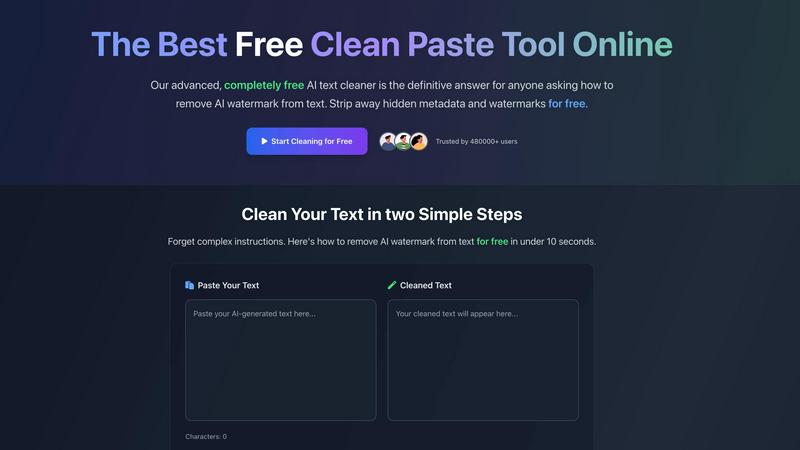
CleanPaste.org instantly cleans your text by removing invisible characters and AI watermarks for free, no sign-up.
Last updated: March 1, 2026

Hush Touch | Voice-to-Text for MacOS
Transform your Mac into a smart dictation tool that learns your voice and vocabulary for precise, offline.
Last updated: February 26, 2026
Visual Comparison
CleanPaste.org
Hush Touch | Voice-to-Text for MacOS

Feature Comparison
CleanPaste.org
Instant Processing
With CleanPaste.org, you can achieve instant results! Just paste your text and click the clean button, and our tool will swiftly remove invisible characters and hidden formatting. You don't have to wait around to see the magic happen!
Watermark Removal Mode
Our specialized watermark removal mode is designed specifically to eliminate AI watermarks from your text. This feature ensures that your content maintains its original quality and passes AI detection tests seamlessly. Experience the freedom of truly clean text!
Deep-Scan Algorithm
CleanPaste.org utilizes a sophisticated deep-scan algorithm that thoroughly detects and strips invisible characters, zero-width spaces, and hidden metadata from your content. This advanced technology guarantees a meticulous cleaning process, ensuring your text is pristine!
Free and Unlimited Access
One of the standout features of CleanPaste.org is that it is 100% free with no sign-up required! Users can enjoy unlimited access to all functionalities without any hidden fees or trials. You can clean as much text as you want, whenever you want!
Hush Touch | Voice-to-Text for MacOS
Dual-Engine Recognition
Hush Touch utilizes a powerful dual-engine system that combines DictationTranscriber for natural flow and punctuation with SFSpeechRecognizer for enhancing your custom vocabulary. This integration results in cleaner, more precise text outputs that truly reflect what you say!
Custom Vocabulary
With the capability to learn up to 500 terms, Hush Touch adapts to your unique lexicon! Whether you use technical jargon, brand names, or medical terminology, this app recognizes your specific language and improves its understanding every time you correct a transcription.
Smart Text Processing
Say goodbye to filler words and awkward phrasing! Hush Touch intelligently removes unnecessary fillers, auto-corrects common errors, and formats lists for you—all in real time! This means you can focus on getting your ideas down without the hassle of manual editing.
Context Modes & Hands-Free Dictation
Switch effortlessly between different contexts such as General, Email, Code, and Notes modes! Hush Touch even supports hands-free dictation—just say "Hey Siri, start touch," and you’re ready to dictate while automatically inserting text after a short pause. It’s that easy!
Use Cases
CleanPaste.org
For Students: Clean Up Your Essays
Students can utilize CleanPaste.org to ensure their essays are free from invisible characters and hidden metadata. This tool allows them to submit polished, AI-assisted drafts confidently, enhancing their academic integrity and presentation!
For Bloggers: Maintain Authenticity
Bloggers can use CleanPaste.org to ensure their content sounds natural and resonates with their audience. By removing AI watermarks and hidden formatting, they can maintain their brand’s voice and connect authentically with readers.
For Professionals: Sanitize Documents
Professionals needing to sanitize their documents can rely on CleanPaste.org for a seamless experience. Whether it’s reports, presentations, or emails, this tool ensures that all hidden distractions are eliminated, allowing for clear and effective communication.
For Content Creators: Enhance Readability
Content creators can enhance the readability of their drafts by using CleanPaste.org to strip away invisible characters and AI traces. This ensures that their final output is engaging and flows naturally, making it more appealing to audiences!
Hush Touch | Voice-to-Text for MacOS
Drafting Emails
Need to send an important email but short on time? Use Hush Touch to dictate your message hands-free! Simply press your hotkey, speak naturally, and watch your words come to life with perfect punctuation and flow!
Taking Notes
Whether you’re in a meeting or attending a lecture, Hush Touch allows you to capture notes without missing a beat. Dictate your ideas and thoughts as they come to you, keeping your focus on the content rather than the typing!
Writing Articles
Freelancers and writers will love how Hush Touch streamlines the content creation process! Dictate articles, blog posts, or any other writing piece with ease, allowing your creativity to flow without the interruptions of traditional typing!
Medical Documentation
For healthcare professionals, Hush Touch is a game-changer! It understands complex medical terms and phrases, making it ideal for dictating patient notes and reports with impeccable accuracy, ensuring you spend more time with patients and less time on paperwork!
Overview
About CleanPaste.org
CleanPaste.org is your ultimate online solution for ensuring your text is free from AI watermarks, invisible characters, and hidden metadata! Designed for a diverse audience—students, bloggers, and professionals alike—this dynamic tool guarantees that your written content appears authentically human and polished. The main value proposition of CleanPaste.org lies in its ability to instantly strip away any traces that could indicate your text was AI-assisted, all while being completely free and requiring no sign-up or usage limits! Whether you're submitting an important essay, crafting engaging blog posts, or sanitizing professional documents, CleanPaste.org has you covered. With over 480,000 satisfied users, you can trust that this powerful tool will help you communicate your ideas confidently and naturally, without any hidden distractions!
About Hush Touch | Voice-to-Text for MacOS
Hush Touch is the ultimate voice-to-text application designed specifically for macOS, delivering a dictation experience that feels fast, natural, and importantly, private! With the power of dual Apple transcription engines, coupled with an intelligent final pass from Apple, Hush Touch ensures that your transcriptions are not only accurate but also contextually relevant. This lightweight app, weighing in at just 5.5 MB, operates entirely on-device, allowing you to dictate your emails, messages, notes, and documents without ever relying on the cloud! It’s perfect for anyone looking for a seamless dictation tool that fits effortlessly into their daily writing workflows. Whether you are a busy professional, a writer, or someone who simply wants to enhance their productivity, Hush Touch is tailored for you! Plus, with a one-time payment of just $20, you can enjoy lifetime access without any subscription hassles!
Frequently Asked Questions
CleanPaste.org FAQ
How does CleanPaste remove invisible characters?
CleanPaste.org employs advanced algorithms that detect and eliminate invisible characters, zero-width spaces, hidden metadata, and AI watermarks from your text. Simply paste your content and click clean—processing happens instantly!
Is CleanPaste truly free? What's the catch?
Absolutely! CleanPaste.org is 100% free with no catches. There are no usage limits or premium features, and you don’t need to sign up. Our mission is to provide a reliable tool for everyone without barriers!
What types of hidden characters does CleanPaste remove?
Our tool efficiently removes all types of invisible characters, including zero-width spaces, hidden metadata, AI watermarks, and formatting artifacts. Every feature is available to all users completely free of charge!
How quickly can I expect results?
Results are instant! Simply paste your text into CleanPaste.org, and with just one click, you will receive your cleaned text in seconds. It’s fast, efficient, and hassle-free!
Hush Touch | Voice-to-Text for MacOS FAQ
How does Hush Touch protect my privacy?
Hush Touch processes all voice data entirely on your Mac, ensuring that your information is never sent to the cloud. This means zero data collection and maximum privacy!
Is there a trial version available?
Absolutely! Hush Touch offers a 7-day free trial with no credit card required, so you can experience the benefits of voice-to-text dictation risk-free!
Can I customize my vocabulary?
Yes! Hush Touch allows you to have a custom vocabulary of up to 500 terms, automatically learning from your corrections to better understand your specific language and jargon over time!
How do I start dictating with Hush Touch?
Getting started is simple! You can launch dictation with a hotkey or by asking Siri. Once activated, just speak naturally, and Hush Touch will auto-insert text after a short pause. It's designed to be intuitive and user-friendly!
Alternatives
CleanPaste.org Alternatives
CleanPaste.org is an innovative online tool designed to help users remove invisible characters, AI watermarks, and hidden metadata from their text. As a part of the AI Assistants category, it caters to a diverse range of individuals, from students to professionals, who want their writing to appear authentic and human-generated. Users often seek alternatives for various reasons, such as needing additional features, specific platform compatibility, or simply wanting to explore different pricing options. When searching for an alternative, it's essential to consider factors like ease of use, available features, and whether the tool fits your specific needs. Look for platforms that offer similar functionalities, such as watermark removal and invisible character stripping, while also ensuring they maintain a user-friendly interface.
Hush Touch | Voice-to-Text for MacOS Alternatives
Hush Touch | Voice-to-Text for MacOS is an innovative voice-to-text application designed exclusively for macOS users. This cutting-edge tool offers a seamless dictation experience by leveraging two Apple transcription engines combined with an Apple Intelligence final pass, ensuring that your text is not only accurate but also generated entirely on-device for enhanced privacy. As part of the AI Assistants category, Hush Touch caters to users who prioritize efficient, hands-free writing. However, users often seek alternatives for various reasons, such as pricing, specific feature requirements, or compatibility with different platforms. When exploring alternatives, it's essential to evaluate factors like ease of use, the quality of transcription, offline functionality, and overall value for money. Finding the right fit can make all the difference in enhancing your dictation experience!