
Beesift vs Zovo
Side-by-side comparison to help you choose the right tool.
BeeSift instantly extracts goal-focused insights from any webpage to save you time!.
Last updated: March 1, 2026

Unlock 20 powerful privacy-first Chrome extensions for developers and writers, all from a solo developer you can trust!.
Last updated: February 26, 2026
Visual Comparison
Beesift
Zovo

Feature Comparison
Beesift
Goal-Aligned Insight Extraction
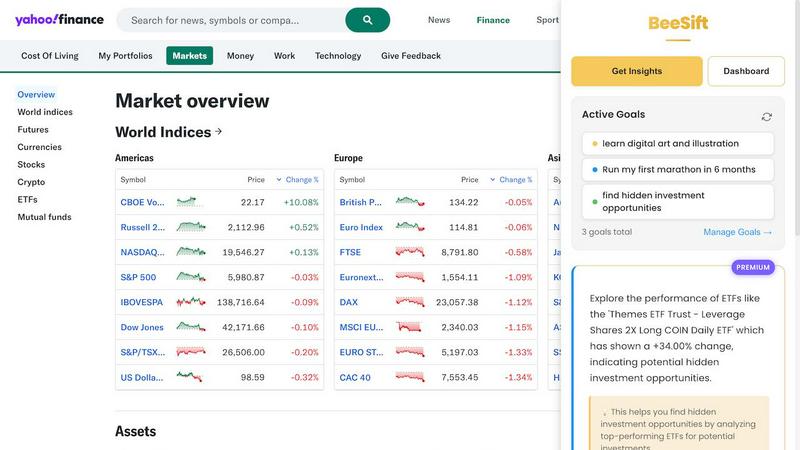
This is the core magic of BeeSift! You start by defining your active goals, like "Learn Python for data science" or "Train for a marathon." When you activate BeeSift on any webpage, its AI doesn't just summarize; it filters the entire content through the lens of your specific goals. It scans 1500+ words and delivers only 3-8 key bullets that are actually relevant to what you're trying to achieve, skipping all irrelevant information and fluff entirely.
One-Shortcut Activation (Ctrl+Shift+K)
Transforming your browsing experience is incredibly simple and fast! There's no complex setup or copying and pasting text. Whenever you land on a potentially useful article, documentation, or report, you simply press Ctrl+Shift+K. Instantly, BeeSift's AI gets to work, and within seconds, a panel appears with your personalized insights. It seamlessly integrates into your existing workflow without any disruption.
Personal Knowledge Dashboard
Every insight BeeSift extracts isn't just for immediate use—it's saved for your future self! All the goal-tailored bullets you save are automatically organized and tagged within your personal dashboard. This creates a powerful, searchable arsenal of knowledge. Need to recall a key point about marathon training or a specific coding framework? Just search your dashboard. It turns scattered browsing into structured, actionable intelligence.
Privacy-First Design
Your data and browsing habits are completely protected! BeeSift is built with a fundamental commitment to privacy. The extension processes page content locally to generate insights, but it does not store your browsing history, track the sites you visit, or sell your data. Your goals and your saved insights remain private on your own device, giving you peace of mind while you learn and work.
Zovo
BeLikeNative
BeLikeNative is your ultimate writing companion! With instant rewrites at the touch of a key, this feature supports 80 languages, enabling users to communicate effectively and naturally, just like a native speaker. This is a game-changer for anyone looking to enhance their writing skills!
Tab Suspender Pro
Tab Suspender Pro is designed to save your computer's memory by automatically suspending inactive tabs. With smart detection capabilities and memory tracking, this feature helps keep your browser running smoothly, allowing you to focus on what matters without the clutter of unused tabs!
Clipboard History Pro
Never lose a copied text again! Clipboard History Pro keeps a record of up to 10,000 clips, allowing you to search instantly and paste text effortlessly. This feature is perfect for anyone who frequently copies and pastes, ensuring you have everything you need right at your fingertips!
Form Filler Pro
Form Filler Pro makes filling out forms a breeze! Save multiple profiles and fill any form with just one click, all while ensuring that your data is stored locally. This feature is designed to save you time and reduce the hassle of repetitive data entry, making online transactions simpler than ever!
Use Cases
Beesift
For Students & Lifelong Learners
Accelerate your research and learning dramatically! Whether you're writing a paper, learning a new skill, or exploring a complex topic, BeeSift helps you extract key concepts, recommended resources, and critical arguments from lengthy educational content. Instead of reading ten articles, you can quickly gather the core ideas from all of them, building a comprehensive understanding in a fraction of the time.
For Developers & Technical Builders
Conquer dense documentation and technical blogs! When you're implementing a new API, learning a framework, or solving a coding problem, BeeSift digs into the documentation to find the exact code examples, best practices, and potential "gotchas" that are relevant to your project. It saves you from manually scouring hundreds of pages to find the one crucial detail you need.
For Professionals & Analysts
Stay ahead of industry trends without the overwhelm! Professionals can use BeeSift to cut through lengthy market reports, news analyses, and competitor updates. It filters out the generic commentary and extracts only the specific data points, trends, and strategic insights that could impact your business decisions and career growth, making you more informed and efficient.
For Content Creators & Curators
Supercharge your content research and idea generation! Writers, marketers, and creators can use BeeSift to quickly analyze multiple sources on a topic. It helps identify common themes, unique angles, key statistics, and compelling quotes that are aligned with your content goals, streamlining the research phase and sparking new, actionable ideas for your own work.
Zovo
Streamlined Writing
Whether you are a student, professional writer, or business person, BeLikeNative can significantly streamline your writing process. With instant rewrites available in 80 languages, you can craft polished emails, reports, and essays in no time!
Efficient Browsing
Using Tab Suspender Pro, busy professionals can maintain a clean and efficient browsing experience. By suspending inactive tabs, the extension enhances performance and helps users focus on their current tasks without distractions from unnecessary tabs!
Enhanced Productivity
With Clipboard History Pro, users can elevate their productivity levels. This tool is perfect for researchers or content creators who need to copy and paste multiple quotes or snippets without losing track of their copied text!
Easy Form Management
Form Filler Pro is a must-have for anyone who frequently fills out online forms, such as job applications or purchase forms. Save your profiles and fill out forms effortlessly, reducing time spent on repetitive tasks and allowing more time for what truly matters!
Overview
About Beesift
Tired of drowning in endless articles, reports, and web pages? BeeSift is your revolutionary solution! It's a powerful Chrome extension that acts as your personal AI research assistant, cutting through the digital noise to deliver only the insights that matter to YOU. Simply set your personal or professional goals, browse the web as normal, and with a single shortcut (Ctrl+Shift+K), BeeSift instantly analyzes any webpage. It extracts 3-8 concise, actionable bullets tailored to your objectives, saving you hours of reading. No more sifting through fluff or getting lost in details! Built for ambitious learners, builders, and professionals, BeeSift helps you build a searchable knowledge base of insights, all while prioritizing your privacy. It's the ultimate tool to maximize productivity, accelerate learning, and ensure every minute online directly progresses your goals. Stop reading everything and start sifting for gold with BeeSift!
About Zovo
Zovo is a powerful suite of 20 Chrome extensions designed and developed by Michael Lip, a solo developer with over 10 years of experience and a remarkable track record of earning $400K+ on Upwork with a 100% success rate! Zovo's flagship extension, BeLikeNative, empowers over 3,300 users to write like native speakers with just one keystroke, supporting an astonishing 80 languages! Each extension in the Zovo suite is crafted with a strong emphasis on user privacy—data never leaves your device, ensuring no data harvesting or third-party interference. Users actively participate in shaping the product roadmap by voting on new features, making Zovo a community-driven platform. With new extensions launched monthly and many tools available for free online at zovo.one, Zovo is your one-stop solution for enhancing productivity and getting the most out of your browser experience!
Frequently Asked Questions
Beesift FAQ
How is BeeSift different from using ChatGPT or other AI chatbots?
While ChatGPT is a fantastic general-purpose tool, BeeSift is laser-focused on your specific goals! ChatGPT doesn't know what you're personally working towards. BeeSift uses your pre-defined goals as a filter, so every piece of information it extracts is judged by one criterion: "Does this help the user progress toward X?" This creates highly personalized, actionable insights rather than generic summaries.
Does BeeSift work on all websites and types of content?
Yes, it works almost everywhere you browse! BeeSift can process content from articles, blog posts, research papers, documentation sites, forums, and even social media platforms. If you can read the text on a webpage in your browser, BeeSift's AI can analyze it and extract tailored insights for you, making it an incredibly versatile tool for all your information needs.
Is my browsing data and history kept private?
Absolutely! Privacy is a core principle of BeeSift. The extension processes the text of the webpage you are currently on to generate insights, but it does not store your browsing history, track which websites you visit, or sell your data. Your goals and your saved insights are stored locally in your browser, keeping your intellectual journey completely confidential.
Can I change or update my goals after I set them?
Of course! Your goals are meant to evolve, and BeeSift evolves with you. You can add, remove, or edit your active goals at any time from the dashboard. The AI will instantly adapt, and future extractions will be aligned with your new objectives. This flexibility ensures BeeSift remains useful through every stage of your projects and learning paths.
Zovo FAQ
How does Zovo ensure user privacy?
Zovo is committed to user privacy! All data processed through its extensions remains on your device. There is no data harvesting or third-party involvement, ensuring your information stays secure and private!
Can I request new features for the extensions?
Absolutely! Users can submit feature requests directly, and the most popular suggestions are prioritized for development. Your input plays a crucial role in shaping the future of Zovo!
Are the extensions free to use?
Many tools in the Zovo suite are available for free online at zovo.one! Additionally, you can enjoy premium features by subscribing to memberships, giving you early access to new extensions!
How can I get support if I encounter issues?
Zovo prides itself on providing exceptional support! Users can contact Michael directly via email or Discord for personalized assistance. There are no bots, no ticket queues—just real human support!
Alternatives
Beesift Alternatives
BeeSift is a powerful Chrome extension in the productivity category that transforms webpages into actionable insights aligned with your goals! It helps you cut through the noise and extract only the most relevant information, saving you time and boosting your learning. Users often explore alternatives for various reasons! You might be looking for different pricing models, need features for a specific platform like mobile, or want a tool that integrates with other apps you use. It's all about finding the perfect fit for your unique workflow and needs. When choosing an alternative, focus on what matters most to you! Consider the core ability to summarize and capture insights, how it protects your privacy, and if it helps organize information for your projects. The right tool should feel like a natural extension of your ambition, accelerating your progress without friction.
Zovo Alternatives
Zovo is an innovative suite of 20 privacy-first Chrome extensions designed for developers and writers, offering tools that enhance productivity and management. With features like JSON Formatter, Tab Suspender, and Clipboard History, Zovo helps users streamline their workflows while ensuring that their data remains secure and private. This unique collection is crafted by a solo developer with over a decade of experience, making it a standout choice in the productivity category! Users often seek alternatives to Zovo for various reasons, such as pricing, feature sets, or specific platform requirements. It’s essential to evaluate what each alternative offers in terms of functionality, user experience, and compatibility with your workflow. Look for options that prioritize privacy, provide a robust selection of tools, and have a user-centric approach to feature development to ensure a seamless experience!