
BarBrain vs DocuExtractor
Side-by-side comparison to help you choose the right tool.

BarBrain
Streamline your inventory process with BarBrain, cutting your counting time in half for accurate and reliable results every time!.
Last updated: April 4, 2026

DocuExtractor
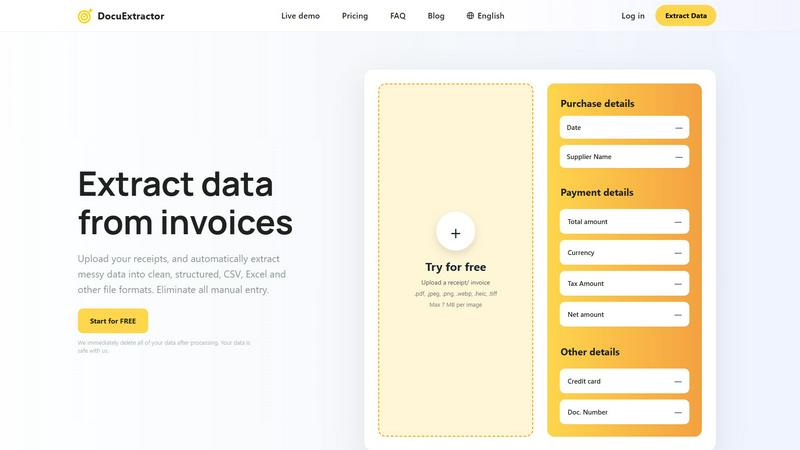
Instantly extract clean data from receipts and invoices to eliminate manual entry forever!.
Last updated: February 28, 2026
Visual Comparison
BarBrain

DocuExtractor
Feature Comparison
BarBrain
Parallel Counting on Multiple Devices
With BarBrain, you can count inventory simultaneously on multiple iOS and Android devices! This feature enables your team to work together efficiently, drastically reducing the time spent on inventory tasks.
Extensive Product Catalog
BarBrain boasts an extensive product catalog with over 30,000 items! From spirits and soft drinks to food items and housekeeping supplies, you can count everything with ease. Our team is here to assist you in setting up your product catalog effortlessly.
Automatic Inventory Reports
Say goodbye to tedious post-counting edits! BarBrain automatically generates a comprehensive inventory report after every count, eliminating the need for manual data entry and ensuring accuracy in your records.
Fill Level Slider for Open Food Items
Capture food and beverage products in just a tap! BarBrain's fill level slider allows you to easily account for both opened and unopened items, streamlining the inventory process and enhancing precision.
DocuExtractor
Triple-Power AI Extraction Engine
DocuExtractor doesn't rely on basic OCR! It combines Optical Character Recognition (OCR), Deep Learning (DL), and Large Language Models (LLMs) to intelligently understand document context and layout. This powerful trio ensures it accurately identifies and extracts complex data fields like supplier names, dates, line items, totals, taxes, and document numbers from even the messiest receipts and invoices, delivering unmatched precision.
One-Click Batch Processing & Export
Say goodbye to processing files one by one! Upload entire batches of documents at once and let our AI work its magic simultaneously. Within seconds, download all your perfectly structured data in your preferred format—CSV or Excel—completely ready for import into QuickBooks, Xero, Sage, or any other accounting software. It's instant workflow integration!
Enterprise-Grade Security & Privacy
Your financial data's safety is our top priority! We employ enterprise-grade security protocols, and most importantly, we immediately and automatically delete all of your uploaded documents and extracted data after processing is complete. Your information is never stored long-term or used for training, giving you complete peace of mind.
Specialized for 45+ Global Languages
Operate globally without a hitch! DocuExtractor automatically detects and processes documents in over 45 languages, from English and Spanish to Japanese and Arabic. Our specialized algorithms are fine-tuned for each document type and region, ensuring the highest accuracy and speed for international invoices and receipts, breaking down language barriers effortlessly.
Use Cases
BarBrain
Single Establishment Management
BarBrain is perfect for individual bar and restaurant owners looking to streamline their inventory process! It simplifies counting, reduces errors, and helps save costs, allowing owners to focus on running their business.
Multi-Location Oversight
For operators running multiple establishments, BarBrain provides a unified inventory management solution. It offers a holistic view of stock usage across all locations, ensuring consistency and control over your operations.
Hospitality Inventory Control
Whether you manage a bustling hotel or a fine dining restaurant, BarBrain empowers you to conduct comprehensive inventory checks. This ensures that all food and beverage products are accounted for, maximizing efficiency and minimizing waste.
Event-Based Inventory Tracking
Planning a special event? Use BarBrain to keep track of inventory levels for specific occasions! It allows you to manage stock effectively, ensuring you have the right amounts of products on hand while minimizing excess.
DocuExtractor
Automating Accounts Payable (AP)
Supercharge your AP department! Staff can instantly upload batches of supplier invoices and receipts. DocuExtractor automatically extracts the vendor name, date, invoice number, total amount, and tax details, outputting a clean CSV file. This data feeds directly into your accounting system, slashing processing time from hours to minutes and virtually eliminating manual entry errors.
Streamlining Expense Reporting & Management
Revolutionize how your team handles expenses! Employees simply snap a photo of their receipt or forward an email invoice. DocuExtractor extracts all purchase details, categorizes them, and provides a structured report. This eliminates the dreaded "shoebox" of receipts, speeds up reimbursements, and gives finance teams audit-ready data in a consistent format instantly.
Accelerating Month-End & Year-End Closing
Tame the chaos of closing periods! Instead of manually sifting through hundreds of bank statements, PDF reports, and transaction records, accountants can upload them all to DocuExtractor. The AI rapidly consolidates key financial data into structured spreadsheets, making reconciliation, reporting, and analysis faster and more accurate than ever before.
Digitizing Historical Document Archives
Unlock the data trapped in your filing cabinets! Easily digitize and extract valuable information from years of archived paper invoices, old PDFs, and scanned documents. DocuExtractor breathes new life into this historical data, converting it into searchable, analyzable digital records for compliance, trend analysis, or financial audits without the monumental manual effort.
Overview
About BarBrain
BarBrain is the ultimate inventory management solution tailored specifically for the hospitality industry! Designed from the ground up, BarBrain addresses the unique challenges faced by bar and restaurant owners. Say goodbye to the tedious hours spent counting bottles, cross-referencing spreadsheets, and dealing with inaccurate data. With BarBrain, you can count stock in minutes, not hours! This powerful tool provides real-time insights into your inventory, enabling you to calculate precise costs for drinks and dishes, flag waste and shrinkage, and manage supplier orders seamlessly. Whether you run a trendy cocktail bar or a bustling multi-location restaurant, BarBrain equips you with the accurate numbers needed to protect your margins and maximize profitability. Join over 1,000 satisfied customers and discover how BarBrain can transform your inventory process, giving you more time for what truly matters!
About DocuExtractor
Tired of drowning in paper and manual data entry? Meet DocuExtractor, your ultimate AI-powered document liberation tool! This revolutionary software is designed specifically for accountants, bookkeepers, finance professionals, and businesses of all sizes who are ready to ditch the drudgery. DocuExtractor instantly transforms messy, unstructured documents like receipts, invoices, bank statements, and PDFs into perfectly clean, structured data. Simply upload your files, and our advanced combination of OCR, Deep Learning, and LLM (AI) technology goes to work, extracting all key details—dates, supplier names, totals, taxes, and more—with incredible 99.6% accuracy. In seconds, you get downloadable, ready-to-use CSV or Excel files, seamlessly formatted for your accounting software. It's fully automated, secure, and built to handle massive scale, processing over 500,000 documents monthly. Reclaim hours every week, eliminate costly errors, and supercharge your workflow with a simple drag-and-drop! Your journey to effortless, error-free data management starts here.
Frequently Asked Questions
BarBrain FAQ
How does BarBrain save time on inventory?
BarBrain reduces inventory counting time by over 75%! This time-saving feature allows you to focus on other important tasks in your establishment, ultimately improving operational efficiency.
Is BarBrain easy to implement?
Absolutely! Getting started with BarBrain is quick and simple. After scheduling a demo, our team will assist you in setting up your account and help you with your first digital inventory process.
Can BarBrain be used on multiple devices?
Yes! BarBrain can be accessed on multiple iOS and Android devices simultaneously. This feature allows your team to collaborate in real-time, significantly speeding up the inventory process.
What types of products can I count with BarBrain?
BarBrain’s extensive product catalog covers a wide range of items! You can count everything from alcoholic beverages and soft drinks to food items and housekeeping supplies, making it a versatile tool for hospitality businesses.
DocuExtractor FAQ
What types of documents can DocuExtractor process?
DocuExtractor is expertly designed to handle all your financial documents! This includes receipts (from retail, restaurants, travel), invoices from suppliers, bank and credit card statements, and various PDF files. We support common file formats like PDF, JPEG, PNG, WebP, HEIC, and TIFF, making it incredibly versatile for all your data extraction needs.
How accurate is the data extraction?
Our accuracy is industry-leading at 99.6%! This exceptional precision is achieved through our unique combination of OCR for text reading, Deep Learning for understanding document layouts, and LLMs (AI) for contextual comprehension. This multi-layered approach ensures that even complex or poorly formatted documents are interpreted correctly, saving you time on corrections.
Is my data secure and private?
Absolutely! Security is foundational to DocuExtractor. We implement enterprise-grade security measures to protect your data during transfer and processing. Crucially, we have a strict data deletion policy: all your uploaded documents and the extracted data are automatically and permanently deleted immediately after processing. Your confidential financial information never lingers on our servers.
Can I process documents in different languages?
Yes, you can! DocuExtractor is a global solution, supporting over 45 languages with automatic language detection. Whether your invoices are in French, German, Mandarin, or Spanish, our specialized algorithms will accurately extract the data. This makes it the perfect tool for multinational businesses and anyone dealing with international suppliers or clients.
Alternatives
BarBrain Alternatives
BarBrain is a revolutionary inventory management solution specifically designed for the hospitality industry. Unlike generic warehouse software, it understands the unique needs of bars and restaurants, streamlining the often tedious process of counting stock and managing supplies. Users often seek alternatives to BarBrain for various reasons, including pricing, specific feature requirements, or compatibility with existing platforms. The right alternative should offer intuitive functionality tailored for hospitality operators, ensuring efficiency in inventory counting, cost management, and supplier orders. When searching for an alternative to BarBrain, consider factors such as ease of use, relevant features that cater to the bar and restaurant environment, and the ability to integrate seamlessly with your existing systems. A user-friendly interface can significantly reduce the time spent on inventory tasks, while robust analytics can help you maintain profitability and minimize waste. Aim for a solution that empowers your operations and supports your business goals!
DocuExtractor Alternatives
DocuExtractor is a powerful AI-driven document data extraction tool designed for finance professionals and businesses drowning in paperwork. It instantly converts receipts, invoices, and statements into clean, structured data, saving countless hours of manual entry. This places it squarely in the productivity and workflow automation category, a space filled with options! Users often explore alternatives for various reasons, whether it's budget constraints, the need for specific integrations, different platform requirements, or simply wanting to compare core features and accuracy rates. It's a smart move to ensure you find the perfect tool for your unique workflow and scale. When evaluating other solutions, focus on a few key areas! Look for proven accuracy rates, supported file formats, batch processing capabilities, and how well the output integrates with your existing accounting software. Security and transparent pricing models are also absolutely critical for protecting your sensitive financial data.